
When you’re shopping for a new mechanical keyboard or trying to understand why your friend’s keyboard looks slightly different from yours, you’ll eventually encounter the ANSI vs ISO keyboard layout debate. These two physical layout standards define how keys are arranged on your keyboard, and the differences go far beyond cosmetic preferences.
I remember the first time I switched from an ANSI keyboard to an ISO layout. I kept hitting the wrong Enter key for nearly a week. That experience taught me that these layouts aren’t just arbitrary designs—they affect your typing flow, muscle memory, and even which keycap sets you can buy.
If you’re looking for keyboards for fast typing, understanding these layout differences becomes even more important. The layout you choose impacts your speed, comfort, and long-term satisfaction with your keyboard investment.
What is ANSI Keyboard Layout?
ANSI stands for the American National Standards Institute. The ANSI keyboard layout is the physical key arrangement standard used primarily in North America and parts of Asia. When you look at most keyboards sold in the United States, you’re looking at an ANSI layout.
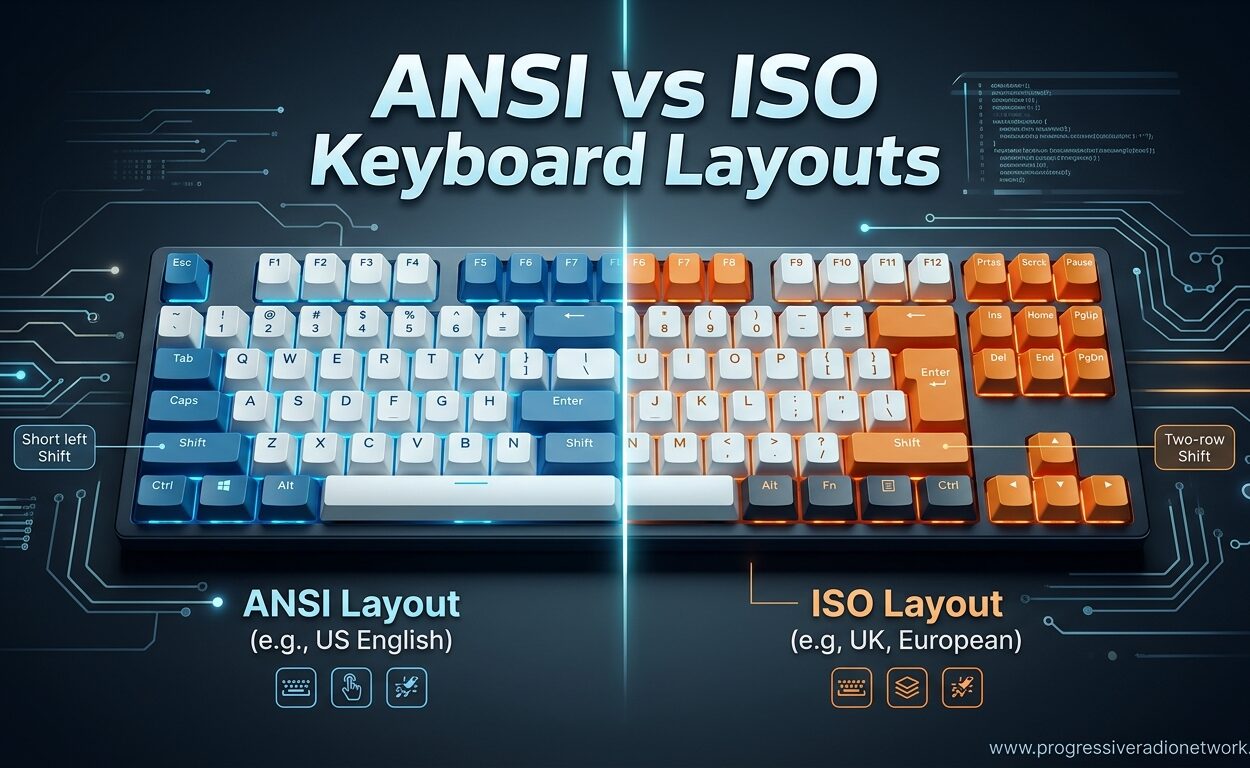
The defining characteristics of an ANSI keyboard include 104 keys on a full-size layout, a wide rectangular Enter key, and a large left Shift key. The backslash key sits above the Enter key, tucked between the equals/plus key and the backspace. This arrangement creates a familiar grid that most American typists learn from their first computer class.
On a full-size ANSI keyboard, you’ll count 104 total keys. The Enter key spans 2.25 units (often written as 2.25u in mechanical keyboard terminology), making it a wide, easily targetable button. The left Shift key is 2.25u as well, providing a generous landing zone for your pinky finger during fast typing sessions.
What is ISO Keyboard Layout?
ISO stands for the International Organization for Standardization. The ISO keyboard layout dominates Europe, the United Kingdom, and many other regions outside North America. If you’ve ever used a computer in the UK, Germany, or France, you’ve likely typed on an ISO layout.
The ISO layout contains 105 keys on a full-size board, with the most immediately noticeable difference being the Enter key. Instead of a wide rectangle, the ISO Enter key forms an upside-down L shape. This design occupies more vertical space and creates a distinct visual profile that separates ISO keyboards from their ANSI counterparts at a glance.
Beyond the Enter key shape, ISO keyboards feature a smaller left Shift key measuring only 1.25u. The extra space created by this reduction accommodates an additional key—the backslash and pipe key moves from above the Enter to the left of it. ISO layouts also include an Alt Graph (AltGr) key that provides access to additional characters essential for European languages.
Key Differences Between ANSI and ISO
Understanding the ANSI vs ISO keyboard layout differences requires looking at specific keys that affect your daily typing experience. Here’s a comprehensive side-by-side comparison:
| Feature | ANSI Layout | ISO Layout |
|---|---|---|
| Total Keys (Full-Size) | 104 keys | 105 keys |
| Enter Key Shape | Wide rectangle (2.25u) | L-shaped (2u vertical + 1u horizontal) |
| Left Shift Key Size | 2.25u (large) | 1.25u (small) |
| Backslash Key Location | Above Enter key | Left of Enter key |
| Alt Graph Key | Not present | Present (replaces right Alt) |
| Primary Regions | United States, Canada, Australia, China | UK, Europe, Latin America, Middle East |
| Keycap Availability | Abundant options | Limited selection, often premium-priced |
The Enter Key Debate
The Enter key represents the most visually striking difference between these layouts. ANSI’s horizontal bar sits comfortably within the home row area, while ISO’s inverted L extends upward into the territory where backspace lives on ANSI boards.
From my experience testing both layouts for extended periods, the ANSI Enter key offers a more predictable target. Your right pinky knows exactly where to go. The ISO Enter key, however, provides a larger vertical strike zone that some typists prefer for reducing accidental mispresses during fast typing sessions.
Left Shift Key Considerations
The reduced size of the ISO left Shift key creates the most significant ergonomic controversy between these layouts. On ANSI keyboards, that 2.25u Shift key provides a forgiving target. On ISO, the 1.25u Shift requires more precision.
Touch typists who use proper form rarely notice the difference. But if you have a habit of pressing the left edge of your Shift key with your left pinky, switching to ISO will cause frustration. You’ll hit that extra backslash key instead until your muscle memory adjusts.
Alt Gr and International Character Support
The Alt Graph key on ISO layouts transforms your keyboard into a multilingual typing tool. Holding AltGr while pressing other keys generates characters with diacritical marks—accents, umlauts, and symbols essential for typing in French, German, Spanish, and dozens of other languages.
ANSI keyboards typically rely on dead keys or software-level input methods for these characters. While perfectly functional, these solutions feel slower than the direct AltGr access ISO provides. European users accustomed to typing é, ñ, or ö find ANSI layouts limiting for their native languages.
Regional Usage Guide
Your geographic location largely determines which keyboard layout you’ll encounter in stores, schools, and offices. Understanding these regional standards helps you make informed decisions when purchasing keyboards online or traveling with your equipment.
Where ANSI is Standard
The United States and Canada exclusively use ANSI layouts for consumer keyboards. You’ll find ANSI standard in Australia, New Zealand, China, Taiwan, and much of Southeast Asia. Large portions of South America, including Brazil, primarily use ANSI despite the Portuguese language requirements that might suggest ISO would work better.
If you live in these regions, buying ANSI keyboards presents no challenges. Every electronics store stocks them. Keycap sets in every color and profile flood the market. You enjoy maximum compatibility with minimal effort.
Where ISO Dominates
The United Kingdom uses ISO exclusively, with the UK-specific ISO variant adding a few additional layout quirks. Most of continental Europe relies on ISO, with country-specific variations adjusting which symbols appear on which keys. Germany, France, Spain, Italy, and Scandinavia all standardize on ISO physical layouts with their own logical arrangements for special characters.
Parts of the Middle East, Eastern Europe, and Russia also follow ISO standards. If you’re shopping for keyboards in these markets, ISO represents the default assumption.
Why Regional Standards Exist
Historical computing development created these regional divisions. American companies like IBM established early keyboard standards based on English typing needs. As computing spread globally, the ISO standard emerged to accommodate languages with diacritical requirements. Network effects and infrastructure investments locked these standards into place.
Today, buying a keyboard outside your region’s standard requires deliberate effort. You must import from international sellers, pay shipping premiums, and accept limited warranty coverage. This reality keeps most users within their regional standard despite personal preferences.
Which Layout Should You Choose?
The ANSI vs ISO decision ultimately depends on your specific use cases, physical location, and typing habits. Neither layout offers objective superiority—each serves different needs better.
For Programmers and Developers
Programmers write code that demands frequent access to symbols located near the Enter and backslash keys. The ANSI layout positions the backslash key directly above Enter, creating a convenient cluster for symbols used constantly in programming languages.
The backslash serves as an escape character in most programming languages. The pipe character (|) enables command piping in terminal environments. Having these symbols readily accessible without stretching your fingers improves coding efficiency.
If you write code professionally, consider exploring our guide to keyboards for programmers after learning about these layout differences. The right combination of layout and keyboard features significantly impacts your coding comfort during long development sessions.
For Gamers
Competitive gamers debate ANSI vs ISO with surprising intensity. The ANSI layout provides a wider left Shift key, which many gamers prefer for sprinting or crouching in first-person shooters. The larger target reduces the chance of missing your modifier key during intense gameplay moments.
However, some gamers appreciate the ISO layout’s extra key—the smaller left Shift creates room for an additional macro key. Games with complex control schemes can assign this extra real estate to useful functions.
Professional players predominantly use whatever layout matches their training environment. Muscle memory matters more than theoretical advantages. If you’re serious about competitive gaming, check our recommendations for CS2 keyboards to see what professional players actually choose.
For Writers and Typists
Writers who type long documents benefit from layouts that minimize finger travel and fatigue. The ISO layout’s larger Enter key provides a more comfortable target for your right pinky during heavy typing sessions. Some writers report reduced strain when reaching for Enter frequently.
The ANSI layout’s larger left Shift key offers similar benefits for capitalizing letters. If you type with proper form and use both Shift keys appropriately, ANSI provides more forgiving targets for your pinky fingers.
Neither layout definitively wins for pure typing speed. Personal comfort and adaptation matter more than layout design. Choose based on which layout feels natural in your hands.
For Multilingual Users
If you regularly type in languages requiring accented characters, ISO offers clear advantages. The AltGr key provides direct access to characters that require software workarounds or dead keys on ANSI layouts. French, German, Spanish, and Nordic language users benefit significantly from ISO’s built-in multilingual support.
ANSI users can still type these characters using software input methods, but the process feels slower and more disruptive to workflow. For daily multilingual typing, ISO represents the practical choice despite any other considerations.
Muscle Memory and Switching Considerations
Switching between ANSI and ISO layouts creates genuine challenges that forum discussions consistently highlight. Reddit users and mechanical keyboard community members report adjustment periods lasting one to two weeks when moving between these standards.
The most common switching frustration involves the Enter key. ANSI users switching to ISO frequently hit the extra backslash key when reaching for Enter. The L-shaped ISO Enter sits partially where backslash lives on ANSI. Conversely, ISO users switching to ANSI sometimes miss the wider Enter key entirely, striking empty space where the vertical portion existed before.
The left Shift key creates similar problems. Touch typists who anchor their left pinky on the edge of Shift find themselves hitting backslash on ISO layouts until muscle memory retrains. This specific transition causes the most reported frustration during layout switches.
To minimize adjustment pain, consider these strategies:
Practice deliberately during the first week. Type slowly and focus on accuracy over speed. Your muscle memory will adapt faster if you reinforce correct finger placement rather than rushing and reinforcing errors.
Use keyboard software to remap keys temporarily if specific keys cause persistent problems. Some users remap the ISO backslash key to function as a second Enter key during their transition period.
Stick with one layout for at least a month before evaluating whether it works for you. Switching back and forth between layouts prevents proper muscle memory formation and extends the adjustment period indefinitely.
Keycap Compatibility Explained
The mechanical keyboard community cares deeply about keycap compatibility between ANSI and ISO layouts. This concern matters because keycap sets represent a significant investment, and availability varies dramatically between standards.
ISO keycaps require different sizing for several critical keys. The Enter key uses a unique 2u vertical and 1u horizontal shape that no ANSI keycap matches. The left Shift key measures 1.25u on ISO versus 2.25u on ANSI. The backslash key moves to a different position with different sizing.
These physical differences mean you cannot use ISO keycaps on an ANSI keyboard or vice versa without missing several essential keys. The layouts require entirely different keycap sets, or at minimum, separate “compatibility kits” that add ISO-specific keys to ANSI base sets.
The mechanical keyboard market heavily favors ANSI. Group buys and aftermarket keycap releases typically assume ANSI as the default, offering ISO compatibility as an expensive add-on or ignoring it entirely. ISO users pay premiums of 30-50% for keycap sets that include their required keys.
If you plan to customize your keyboard with aftermarket keycaps, ANSI offers far more options at better prices. ISO customization remains possible but requires more research, patience, and budget.
FAQ
Which is better ISO or ANSI keyboard?
Neither layout is objectively better. ANSI works best for North American users, programmers who need easy backslash access, and those wanting maximum keycap availability. ISO suits European users, multilingual typists who need AltGr functionality, and those who prefer the larger Enter key. Your regional standard, typing habits, and language requirements should guide your choice.
Is QWERTY the same as ANSI?
No. QWERTY refers to the logical arrangement of letter keys on a keyboard. ANSI and ISO refer to the physical layout—the size, shape, and position of keys. You can have a QWERTY keyboard in either ANSI or ISO physical layout. Similarly, you can have AZERTY or QWERTZ logical layouts on either ANSI or ISO physical standards.
Is ANSI or ISO better for gaming?
Most gamers prefer ANSI for its larger left Shift key, which provides a bigger target for sprinting and crouching in games. However, some competitive players use ISO successfully, and the extra ISO key can serve as a dedicated macro button. The best gaming layout depends on your specific games and muscle memory.
Which keyboard layout is better?
The best keyboard layout depends entirely on your location and needs. Use whatever layout your region standardizes on for easiest purchasing and compatibility. North Americans should choose ANSI. Europeans and UK users should choose ISO. Programmers often prefer ANSI while multilingual users benefit from ISO’s AltGr key.
Is ANSI or ISO better for typing?
Both layouts work equally well for typing once you adapt. ANSI offers a larger left Shift key that some find more comfortable. ISO provides a larger Enter key that reduces mispresses for some typists. Your personal typing style and which layout you learned first matter more than any objective typing advantage.
Does the US use ANSI or ISO?
The United States exclusively uses the ANSI keyboard layout standard. You’ll find ANSI keyboards in every American electronics store, school, and office. ISO keyboards are specialty imports in the US market and typically cost more due to shipping and limited availability.
Which countries use ISO keyboard?
ISO is standard throughout Europe including the United Kingdom, Germany, France, Italy, Spain, and Scandinavia. It’s also used in parts of the Middle East, Eastern Europe, Russia, and Latin America. The UK has its own ISO variant with slight modifications from the continental European ISO standard.
Can I switch from ISO to ANSI or vice versa?
Yes, you can switch between layouts, but expect a 1-2 week adjustment period for your muscle memory to adapt. The Enter key and left Shift key differences cause the most initial frustration. Stick with one layout consistently rather than switching back and forth to allow proper adaptation.
Conclusion
The ANSI vs ISO keyboard layout difference ultimately comes down to regional standards and personal adaptation. ANSI dominates North America with its 104-key layout, wide rectangular Enter key, and abundant customization options. ISO serves Europe and multilingual users with its 105-key arrangement, L-shaped Enter key, and essential AltGr functionality.
Choose ANSI if you live in North America, write code frequently, want the widest keycap selection, or prefer that generous left Shift key. Choose ISO if you live in Europe, type in multiple languages, value the larger Enter key, or need the AltGr key for special characters.
Whichever layout you select, commit to it for at least a month to build proper muscle memory. Your typing comfort matters more than any theoretical layout superiority. Now that you understand the differences, you can make an informed decision for your next keyboard purchase.
Ready to find your perfect keyboard? Browse our current mechanical keyboard deals to discover options available in both ANSI and ISO layouts for 2026.




Leave a Comment