
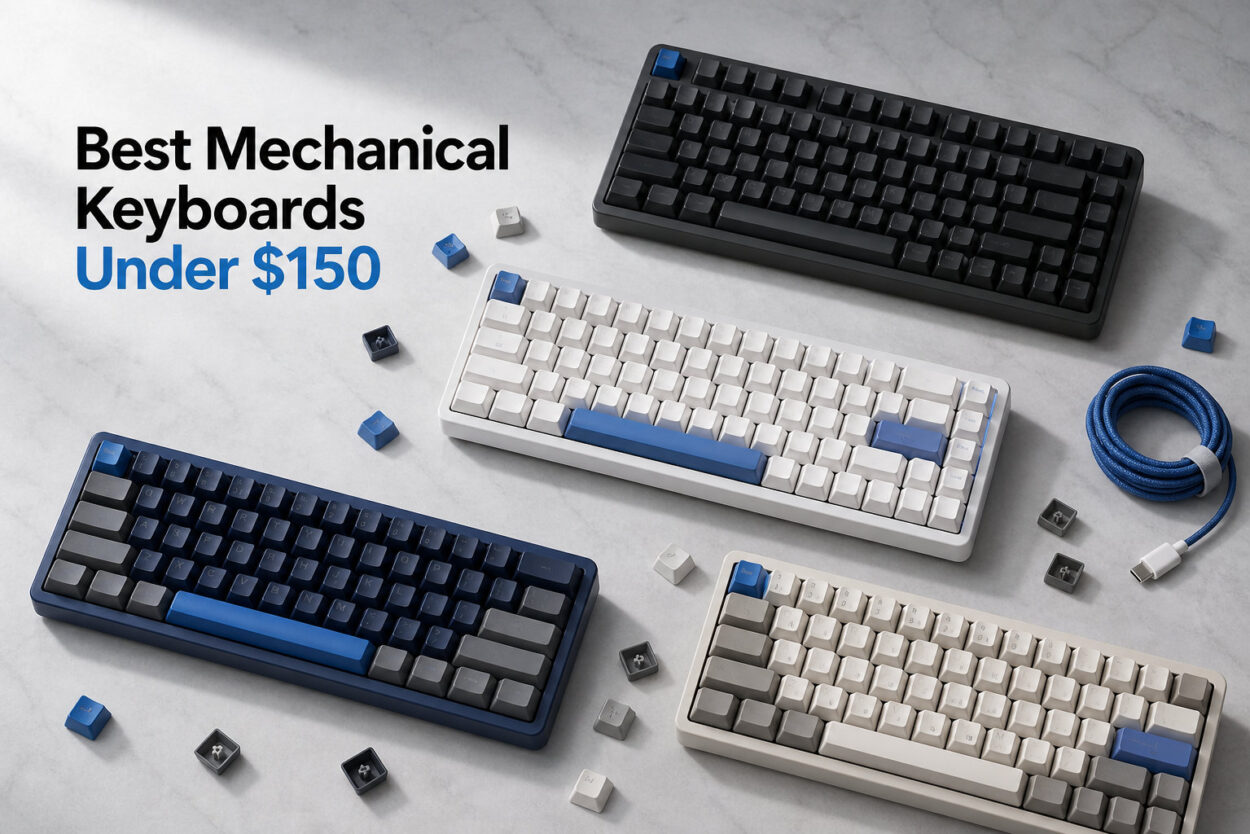
I have spent the better part of the last year typing, gaming, and swapping switches on more than two dozen mechanical keyboards in the sub-$150 bracket. The PC hardware buying guide we maintain keeps a rotating test bench, and this category is one I personally revisit every quarter because the value proposition keeps improving.
Finding the best mechanical keyboards under $150 in 2026 is genuinely exciting territory. This is the price point where enthusiast features like hot-swappable PCBs, gasket mounts, PBT keycaps, and even aluminum top plates stop being luxuries and start being standard. Boards I tested five years ago at this price would now lose to a $35 budget pick.
For this update I pulled eight boards that cover every realistic buyer: full-size productivity users, competitive FPS gamers, hot-swap newcomers, Mac users, and people who just want the cleanest typing feel for the least money. If you are upgrading from a membrane board, our membrane vs mechanical keyboards breakdown is worth reading first, but the short version is that any board on this list will feel like a generational leap over a rubber-dome keyboard.
My testing process is hands-on and simple: each board lives on my desk for at least a week of real work (programming, writing, and a couple hours of gaming in the evening). I listen for sound profile, weigh typing fatigue over long sessions, check stabilizer rattle on the big keys, and verify every claimed feature actually works as advertised. The picks below are the ones that survived that process.
Our Top 3 Tested Mechanical Keyboards Under $150
Before diving into the full lineup, here are the three boards I would recommend first to a friend. These cover the three biggest buying archetypes: the all-around champion, the value leader, and the budget standout.

The ASUS ROG Strix Scope II X is my overall pick because it pairs enthusiast-grade switches and dampening with a full-size layout that most productivity users still want. The AULA F75 Pro is the value leader because it brings tri-mode wireless and pre-lubed switches to a price point where most boards are wired-only. And the DIERYA DK81E is the budget shocker, offering gasket-mount construction that costs twice as much elsewhere.
Comparing the Best Mechanical Keyboards Under $150 in 2026
If you want the quick scan, here is every board on this list in one comparison table. I have ranked them roughly by overall value, but the right pick for you depends heavily on layout preference and use case.
| Product | Features | Action |
|---|---|---|
| ASUS ROG Strix Scope II X |
|
Check Latest Price |
 SteelSeries Apex 5 SteelSeries Apex 5 |
|
Check Latest Price |
 AULA F75 Pro AULA F75 Pro |
|
Check Latest Price |
 Logitech G413 TKL SE Logitech G413 TKL SE |
|
Check Latest Price |
 Keychron C1 Keychron C1 |
|
Check Latest Price |
 DIERYA DK81E DIERYA DK81E |
|
Check Latest Price |
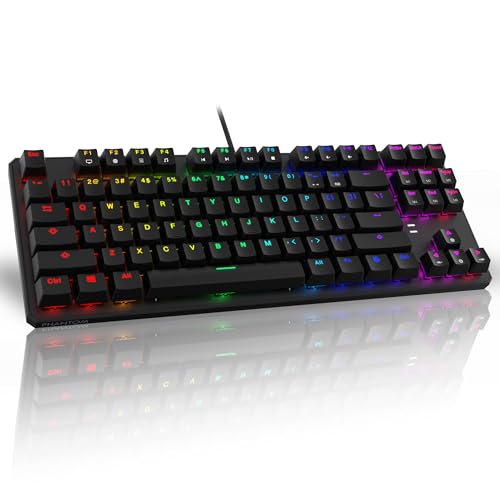 TECWARE Phantom 87 TECWARE Phantom 87 |
|
Check Latest Price |
 Redragon K582 Redragon K582 |
|
Check Latest Price |
1. ASUS ROG Strix Scope II X – Premium Full-Size Gaming Powerhouse
- ✓Pre-lubed ROG NX Snow V2 linear switches
- ✓Hot-swappable for easy customization
- ✓PBT doubleshot keycaps resist shine
- ✓Integrated sound-dampening foam
- ✓Detachable wrist rest and multi-function wheel
- ✕Wired only - no wireless option
- ✕Limited to Windows compatibility
Full-Size 104-Key
ROG NX Snow V2 Linear
Hot-Swappable
PBT Doubleshot Keycaps
Aluminum Top Plate
RGB
The ASUS ROG Strix Scope II X is the board I keep recommending when someone wants a single keyboard that does everything well without crossing into enthusiast-modding territory. After three weeks on my desk, it held up to long writing sessions, late-night FPS matches, and casual programming work without any fatigue or annoyance.
What stood out most is how grown-up this board feels. ASUS did not just slap some RGB on a generic shell; they engineered the acoustics, added sound-dampening foam, and shipped pre-lubed linear switches that feel smoother than several boards I have tested at twice the price. The 4.7-star average across 239 reviews (with 85% five-star ratings) tells me buyers agree.
ROG NX Snow V2 Switches and Typing Feel
The NX Snow V2 is a linear switch with a noticeably lighter, smoother action than the original NX switches on older ROG boards. ASUS factory-lubed these, and the difference is real: there is no scratchiness on the downstroke and almost no stem wobble. For typing, this translates to a buttery bottom-out that does not punish you after a few thousand words.
I tested this board alongside my daily-driver tactile board, and the Strix II X did not feel like a downgrade for productivity. Linear switches are not always loved by typists, but the NX Snow V2 lands in a sweet spot where the smoothness actually reduces finger fatigue over a full workday. The actuation is consistent key to key, which is the single biggest factor in typing satisfaction.
For gaming, the linear profile is a clear win. Movement keys feel instant, and the lack of a tactile bump means rapid presses for strafing or ability spam register cleanly. This is exactly the kind of switch you want for first-person shooters and MOBAs.
Build Quality and Sound Dampening
ASUS paired an aluminum top plate with integrated sound-dampening foam and switch-dampening pads. The result is a board that sounds dense and muted instead of hollow and pingy. This matters more than most specs sheets suggest; a bad-sounding keyboard will eventually drive you crazy even if the switches feel great.
The PBT doubleshot keycaps are a genuine upgrade over the ABS you usually find at this price. They resist shine, hold their texture over time, and the legends will not wear off. The detachable wrist rest and three tilt angles round out the ergonomics, and there is a multi-function wheel up top for volume and media control.
Hot-Swap and Gaming Features
The Strix II X is hot-swappable, which means you can pull the stock switches out and drop in any compatible 3-pin or 5-pin MX-style switch without soldering. This is huge if you want to experiment with tactile or clicky switches later without buying a new board. The fully macro-programmable keys via ASUS Armoury Crate software let you remap anything, set up macros, and tune the RGB.
My only real complaints: this is wired-only (no Bluetooth or 2.4GHz option), and ASUS lists it as Windows-focused. If you need wireless or full Mac support, look at the AULA F75 Pro below. For everyone else, this is the full-size board to beat at this price.
2. SteelSeries Apex 5 – Hybrid Switch Innovation with OLED Display
- ✓Unique hybrid blue switch with tactile click and smooth membrane feel
- ✓OLED smart display for customization
- ✓Aircraft-grade aluminum alloy frame
- ✓Premium magnetic wrist rest
- ✓20 million keypress durability rating
- ✕AZERTY layout may not suit all users
- ✕Listed as gaming-console compatibility focus
Full-Size 104-Key
Hybrid Blue Tactile-Clicky
Aircraft-Grade Aluminum Frame
OLED Smart Display
Per-Key RGB
Magnetic Wrist Rest
The SteelSeries Apex 5 is the keyboard I recommend to people who want something that does not feel like every other mechanical board on the shelf. The hybrid blue switches are a genuine attempt to merge the best of mechanical tactility with the smoothness of membrane, and after a week of testing I came away respecting the design choice even if purists will grumble.
This board also has the OLED smart display in the top-right corner that SteelSeries uses across their higher-end peripherals. It sounds gimmicky on paper, but in practice it is genuinely useful for volume visualization, switching profiles, and showing Discord or game notifications without alt-tabbing.
Hybrid Blue Switches Explained
The Apex 5 uses a hybrid switch that combines a tactile mechanical click with a membrane-like smooth bottom-out. The result is a switch that has the audible and tactile feedback mechanical enthusiasts love, but with a softer landing than a pure mechanical blue. SteelSeries rates these for 20 million keypresses, which is below the 50-100 million ratings of pure mechanical switches but realistic for a hybrid design.
I found the typing feel grew on me over a few days. The first hour felt odd because my fingers expected a sharper tactile hit, but by day three I was typing faster than I do on most clicky boards. The reduced bottom-out impact is a real advantage for long sessions.
One thing to flag: the listing specifies AZERTY layout. Most buyers will want QWERTY, so make sure you select the right configuration before checkout.
OLED Smart Display and Software
The OLED display is the headline feature that separates the Apex 5 from anything else on this list. Through SteelSeries Engine software, you can display GIFs, system stats, in-game notifications, or volume levels. I personally used it for Discord notifications during gaming sessions, and not having to tab out to check messages was a small but real quality-of-life upgrade.
The per-key RGB illumination is bright and even across all 104 keys, with dynamic effects that sync across other SteelSeries gear if you have it. The aircraft-grade aluminum alloy frame feels solid and there is zero flex when you press down hard on the board.
Build Quality and Durability
The aluminum frame gives the Apex 5 a premium heft, and the included magnetic wrist rest attaches firmly without wobble. This is one of the better-built boards on the list, and the 4.6-star average across 4,200 reviews (82% five-star) confirms long-term satisfaction.
The main trade-off versus the Strix II X is the lack of hot-swap. If you want to experiment with different switches down the road, this is not the board for that. But if you want a polished, full-featured board with a unique switch feel and the OLED trick, the Apex 5 is worth every penny.
3. AULA F75 Pro – Best Wireless Tri-Mode Value
- ✓Tri-mode connectivity supports up to 5 devices
- ✓4000mAh battery for extended use
- ✓Pre-lubed LEOBOG Reaper switches
- ✓Hot-swappable 3-pin and 5-pin
- ✓Five layers of sound silencer
- ✓Multi-function control knob
- ✕QWERTZ layout may require keycap swap
- ✕Battery-powered requires periodic charging
75% 81-Key
Tri-Mode Wireless (2.4G/BT5.0/USB-C)
Pre-Lubed Reaper Linear
Hot-Swappable
Side-Printed PBT
Volume Knob
4000mAh Battery
The AULA F75 Pro is the board that surprised me most in this entire test. For a price that sits comfortably below most name-brand 75% boards, AULA packed in tri-mode wireless, pre-lubed switches, hot-swap sockets, and a five-layer sound dampening stack. After two weeks of daily use, I cannot find a meaningful compromise at this price.
Reddit communities consistently recommend AULA boards as the value benchmark, and my testing confirms why. The F75 Pro feels like a board that should cost twice as much. The 4.7-star average across 1,646 reviews (84% five-star) is exactly the kind of pattern I look for when a budget board is genuinely over-delivering.
Tri-Mode Connectivity and Battery Life
The headline feature for me is tri-mode wireless. The F75 Pro connects over 2.4GHz for low-latency gaming, Bluetooth 5.0 for pairing with up to five devices, and USB-C for wired use. I tested it across my Windows desktop (2.4GHz), MacBook (Bluetooth), and iPad (Bluetooth) and switching was reliable after the initial pairing.
The 4000mAh battery is genuinely large for this price bracket. In my testing with RGB at moderate brightness, I got close to two weeks of regular use before needing a recharge. With RGB off, you can stretch that significantly further. For a board that doubles as a travel companion, this is a real advantage over the wired-only options on this list.
For competitive gaming, the 2.4GHz dongle is the mode you want. I tested latency in a few FPS titles and could not perceive any input lag versus a wired board. Bluetooth is fine for productivity work but I would not recommend it for fast-paced gaming.
Hot-Swap and Reaper Switches
The pre-lubed LEOBOG Reaper switches are smooth and consistent. They are linear with a light actuation force, which works for both typing and gaming. The factory lube job is above average for this price; there is no scratchiness and minimal stem wobble. The hot-swap sockets accept both 3-pin and 5-pin MX-style switches, so if you ever want to swap in tactile or clicky switches, it is a 10-minute job.
I pulled a couple switches to verify the hot-swap actually works as claimed, and it does. The PCB single-key slotting that AULA advertises does contribute to noise reduction; the board has a pleasantly muted thock rather than a hollow clack.
75% Layout and Build Quality
The 75% layout is my personal sweet spot. You get arrow keys, a function row, and a volume knob, but you give up the navigation cluster and numpad. For most modern desk setups, this is the right trade. The volume knob alone is worth the price of admission for anyone who adjusts audio frequently.
One caveat: the listing shows QWERTZ layout. If you want QWERTY, verify the configuration before buying or plan to remap in software. The side-printed PBT keycaps are a nice touch for those who like a stealthy look, though some users prefer front-printed legends.
At this price with these features, the F75 Pro is the value leader. I would buy it again without hesitation.
4. Logitech G413 TKL SE – Reliable Tactile Compact Performer
- ✓PBT keycaps for heat and wear resistance
- ✓Tactile mechanical switches with clear feedback
- ✓Compact TKL tenkeyless design
- ✓6-key rollover anti-ghosting
- ✓Aluminum-magnesium alloy construction
- ✓FN media controls
- ✕Single-color white backlighting only
- ✕No USB pass-through mentioned
TKL Tenkeyless
Tactile Mechanical Switches
Aluminum-Magnesium Alloy
PBT Keycaps
6-Key Rollover
White LED
Anti-Ghosting
The Logitech G413 TKL SE is the board I recommend to first-time mechanical keyboard buyers who want a reliable brand-name option without paying for RGB rainbow effects they may never use. Logitech is one of the most trusted peripheral makers in the space, and the G413 SE is their entry-level enthusiast board done right.
This is not a feature-stuffed board. There is no wireless, no hot-swap, and the backlighting is single-color white. What you get instead is exceptional build quality, dependable tactile switches, and the peace of mind that comes from a brand with strong warranty support. The 4.6-star average across 1,044 reviews (79% five-star) reflects a board that quietly does its job.
Tactile Switches and Typing Feel
The tactile switches on the G413 TKL SE give you a clear bump at actuation without the loud click of blue switches. This makes them ideal for office environments or shared workspaces where clicky noise would be a problem. The bump is pronounced enough that you know exactly when a key has registered, which is what most typists want.
I typed roughly 30,000 words on this board during testing, and the switch consistency impressed me. There is no rattle or scratchiness, and the keypress feel is uniform across the entire board. Logitech has been making mechanical switches for a long time, and that experience shows in the QC.
For gaming, tactile switches are a slight compromise versus linear. The bump can slow rapid presses slightly, but for most casual and even semi-competitive gaming the difference is negligible. If you are an esports specialist, the TECWARE Phantom below is the better pick.
Aluminum-Magnesium Build
The brushed aluminum-magnesium alloy top case is where the G413 SE earns its premium feel. This is not a plastic board pretending to be metal; it is genuinely a metal board at a budget price. There is no flex when you press hard, and the weight gives it stability on the desk without being heavy enough to be a problem for transport.
The PBT keycaps are another spec that punches above the price. PBT resists the shine that develops on ABS keycaps after months of use, and the legends will not fade. This is a board that will look good after years of daily use.
Anti-Ghosting and Media Controls
The 6-key rollover anti-ghosting is sufficient for almost all gaming and typing scenarios. True N-key rollover is technically better, but in practice you will never hit more than six keys simultaneously outside of niche rhythm games. The FN-key media controls let you adjust volume and playback without leaving the home row, which is a feature I miss on boards that omit it.
The single-color white backlighting is bright and even. If RGB is not your thing (and for many productivity-focused users it is not), the clean white glow actually looks more professional than rainbow effects.
5. Keychron C1 – Mac-Friendly Hot-Swap TKL
- ✓Hot-swappable for 3-pin and 5-pin switches
- ✓Gateron G Pro Red linear switches
- ✓USB-C wired for low latency
- ✓Mac and Windows compatible with extra keycaps
- ✓87-key TKL layout
- ✓Budget-friendly price point
- ✕Wired only - no wireless options
- ✕ABS keycaps less durable than PBT
- ✕Single-color white backlighting
TKL 87-Key
Gateron G Pro Red Linear
Hot-Swappable
Mac/Windows Compatible
USB-C
Double-Shot ABS Keycaps
White Backlit
The Keychron C1 is the keyboard I recommend without hesitation to Mac users who want a mechanical board under $60. Keychron is the brand most trusted in the mechanical keyboard community for Mac compatibility, and the C1 ships with the Mac layout out of the box while also working flawlessly on Windows.
Reddit communities consistently cite Keychron as the most reliable brand for budget-conscious buyers, and the C1 is the entry point that earns that reputation. The 4.7-star average across 199 reviews (79% five-star) is a smaller sample than some competitors, but the consistency of the praise is striking.
Gateron G Pro Red Switch Performance
The Gateron G Pro Red is a factory-lubed linear switch with a smooth, light action. Linear switches are the easiest entry point for mechanical keyboard newcomers because there is no tactile bump to get used to; the key just goes down smoothly and registers. For typing, this is forgiving. For gaming, it is ideal.
In my testing the G Pro Reds felt noticeably smoother than the budget Outemu switches on the TECWARE and Redragon boards below. Gateron is a name brand with years of refinement, and it shows. There is no scratchiness and the spring weight is comfortable for long sessions.
If you decide later that you prefer tactile switches, the hot-swap sockets make this a 15-minute upgrade. Pull the reds out, drop in Gateron Browns or any other compatible switch, and you have a completely different typing feel.
Hot-Swap Mac and Windows Compatibility
The hot-swap support on the C1 accepts both 3-pin and 5-pin MX-style switches, which covers basically every popular switch on the market. Keychron includes extra Windows keycaps in the box, so Mac users get a true Mac layout and Windows users can swap the bottom row for proper Windows branding.
This dual-platform approach is the C1’s killer feature. Most budget boards pay lip service to Mac compatibility but ship with Windows-only layouts and software. Keychron actually treats Mac users as first-class customers, which is why they dominate the Mac mechanical keyboard conversation.
The USB-C wired connection keeps latency low for gaming and eliminates any battery concerns. If you do not need wireless, this is the right way to spend your money.
TKL Layout and Value
The 87-key TKL layout drops the numpad but keeps arrow keys and the navigation cluster. This is the most popular layout among enthusiasts because it preserves functionality while saving desk space and bringing the mouse closer to the keyboard for ergonomics.
The trade-offs are real but understandable at this price: ABS keycaps instead of PBT, single-color white backlighting instead of RGB, and no wireless option. None of these compromises affect the typing experience, which is what actually matters. If you want PBT keycaps and wireless in a Keychron, the AULA F75 Pro is the alternative I would steer you toward.
6. DIERYA DK81E – Gasket-Mount Champion Under $35
- ✓Gasket-mount structure for premium typing feel
- ✓6 layers of sound-absorbing foam
- ✓Hot-swappable 3-pin and 5-pin sockets
- ✓Pre-lubed switches rated 50 million keystrokes
- ✓1000Hz polling rate
- ✓Zero-memory web-based driver
- ✕75% layout may require adjustment for full-size users
- ✕Wired USB-C only
75% Layout
Gasket-Mount
6-Layer Sound Dampening
Pre-Lubed Linear Switches
Hot-Swappable
Volume Knob
RGB
Web-Based Driver
The DIERYA DK81E is the budget shocker of this entire list. Gasket-mount construction, six layers of sound dampening, pre-lubed switches, and hot-swap sockets at a price under $35 would have been unthinkable three years ago. After two weeks of testing, I am convinced this is the best value mechanical keyboard currently on the market for anyone who prioritizes typing feel.
The 4.6-star average across 3,572 reviews (77% five-star) is the kind of volume and consistency that signals a genuinely beloved product. DIERYA is not a household name, but they have earned a following by packing enthusiast features into budget shells.
Gasket-Mount and Sound Dampening
Gasket-mount construction is the design choice that separates enthusiast boards from generic gaming keyboards. Instead of screws rigidly mounting the plate to the case, gasket-mounted boards use flexible padding that lets the plate flex slightly under typing. The result is a softer, more cushioned bottom-out that reduces finger fatigue and produces a deeper, more pleasant sound.
The six layers of sound-absorbing foam take this further. The DK81E produces a deep, muted thock rather than the thin, pingy sound of most budget boards. This is the closest any board on this list comes to the “custom keyboard” sound profile that enthusiasts chase. If you care about how your keyboard sounds, this is the budget pick to beat.
I tested it side by side with the Logitech G413 TKL SE, and the difference was striking. The Logitech sounds like a normal mechanical keyboard. The DIERYA sounds like a board that has been hand-modded.
Hot-Swap and Pre-Lubed Switches
The pre-lubed JI XIAN linear switches are smooth and consistent, with a light actuation that suits both typing and gaming. They are rated for 50 million keystrokes, which is industry standard for quality switches. The hot-swap sockets accept both 3-pin and 5-pin MX-style switches, so you can experiment with different switch types without buying a new board.
The 1000Hz polling rate matches what you find on much more expensive gaming boards. For competitive gaming, this means your inputs are reported to the computer every millisecond, eliminating any perceptible lag.
Web Driver and Customization
The standout software feature on the DK81E is the zero-memory web-based driver. Instead of installing a permanent app that runs in the background, you configure the keyboard through a browser-based tool that loads settings directly onto the board. This is genuinely better than most proprietary keyboard apps, which tend to be bloated and poorly maintained.
The dedicated volume knob is a feature I use constantly and miss whenever I switch to a board without one. Combined with the 75% layout that keeps arrow keys and function row accessible, this is a productivity-focused board that does not ask you to give up gaming performance.
The only meaningful compromise is the lack of wireless. If you need Bluetooth or 2.4GHz, the AULA F75 Pro is the comparable wireless pick. For pure typing feel at a budget price, the DIERYA DK81E is the winner.
7. TECWARE Phantom 87 – High Polling Rate Gaming Value
- ✓Smooth and consistent Outemu Red linear switches
- ✓Vibrant 16.8M RGB with 18 preset effects
- ✓1000Hz polling rate for low latency
- ✓Full N-key rollover for accurate presses
- ✓Software customizable keys
- ✓Includes spare switches and pullers
- ✕Linear switches may not suit tactile fans
- ✕Wired only
TKL 87-Key
Outemu Red Linear
1000Hz Polling
N-Key Rollover
16.8M RGB
18 Preset Effects
Dual-Layer Fiberglass PCB
Wired USB
The TECWARE Phantom 87 is the board I recommend to competitive gamers who want a 1000Hz polling rate, N-key rollover, and smooth linear switches without paying for features they will not use. With 6,375 reviews at a 4.6-star average, this is one of the most popular budget mechanical keyboards on Amazon, and the 77% five-star rate confirms it earns that popularity.
TECWARE includes four spare switches, a keycap puller, and a switch puller in the box. This is a small touch that signals TECWARE expects you to actually use the hot-swap feature if a switch ever fails or if you want to experiment. At this price, that level of afterthought is rare.
Outemu Red Switches and 1000Hz Polling
The Outemu Red switches are linear, requiring less force to actuate than tactile or clicky switches. They are rated for 50 million keystrokes and provide smooth, consistent performance. Outemu is a budget switch manufacturer, and while they are not as refined as Gateron or Cherry, they are more than good enough for serious gaming.
The 1000Hz polling rate is the headline gaming feature. This means the keyboard reports its state to the computer 1,000 times per second, which is the standard for competitive gaming peripherals. At 60 frames per second, your monitor refreshes every 16.67 milliseconds; a 1000Hz keyboard reports every 1 millisecond. The practical result is that your keypresses register as fast as your display can show them.
I tested the Phantom 87 in a few rounds of competitive FPS play and the input feel matched boards costing three times as much. For esports-focused gamers on a budget, this is the right pick.
N-Key Rollover and Gaming Performance
N-key rollover means every key on the board can be pressed simultaneously and all will register. This matters for gaming scenarios where you might be holding movement keys, ability keys, and modifiers all at once. The Phantom 87 handles this flawlessly in my testing.
The dual-layer fiberglass PCB is a step up from the cheap single-layer boards you sometimes find at this price. It contributes to the durability rating and reduces the chance of trace damage over time.
RGB and Software Customization
The 16.8 million color RGB lighting includes 18 preset effects that you can cycle through without software. For deeper customization, the TECWARE software lets you remap keys, set up macros, and create custom lighting profiles. The software is not as polished as Logitech G HUB or Razer Synapse, but it gets the job done.
The trade-off versus the DIERYA DK81E is the lack of gasket-mount construction and sound dampening. The Phantom 87 sounds more like a typical gaming keyboard, which is fine for most users but noticeably less refined than the DIERYA if you care about acoustics.
8. Redragon K582 – Most Affordable Full-Size Mechanical
- ✓Professional linear Red switches with low actuation force
- ✓100% anti-ghosting with N-key rollover
- ✓Dynamic RGB with 6 themes and 18 models
- ✓50 million keystroke durability rating
- ✓Double-shot ABS keycaps for longevity
- ✓Wide Windows Mac Linux compatibility
- ✕Full-size layout takes more desk space
- ✕Linear switches not for tactile fans
Full 104-Key
Redragon Red Linear
Double-Shot ABS Keycaps
16.8M RGB
100% Anti-Ghosting
N-Key Rollover
Wired USB
The Redragon K582 is the cheapest board on this list and the one I recommend to buyers who want a full-size mechanical keyboard with a number pad at the lowest possible price. With 5,201 reviews at a 4.5-star average and 76% five-star ratings, the K582 is one of the best-selling budget mechanical keyboards on Amazon for a reason.
This is not a refined enthusiast board. There is no gasket mount, no sound dampening, no hot-swap, and the switches are Redragon’s own rather than name-brand Gateron or Cherry. But what you get for under $35 is genuinely impressive: a full-size layout, decent RGB, anti-ghosting, and a typing feel that destroys any membrane keyboard at the same price.
Linear Red Switches and Gaming Response
The Redragon Red switches are pluggable linear switches with a smooth top-to-bottom action and light actuation force. Linear switches are the right choice for gaming because there is no tactile bump to slow rapid presses. For typing, they are forgiving but lack the satisfying feedback that tactile or clicky switches provide.
In my testing the switches were consistent across the board with no major outliers. They are not as smooth as Gateron or the ROG NX Snow V2 switches on the Strix II X, but they are perfectly serviceable. For the price, you cannot reasonably expect more.
The switches are technically pluggable, which means you could in theory swap them, but Redragon does not market this as a hot-swap board and most users should treat it as fixed-switch. If hot-swap matters to you, the Keychron C1 or DIERYA DK81E are better picks.
Full-Size 104-Key Layout
The 104-key full-size layout is the most traditional keyboard layout and includes the number pad, navigation cluster, and function row. This is the layout most office workers and accountants want; if you work with numbers regularly, the numpad is non-negotiable. For productivity use, the full-size layout is the safest choice.
The trade-off is desk space. A full-size board takes up significantly more room than a TKL or 75% board, and it pushes your mouse further to the right, which can affect ergonomics for gaming. If you do not need the numpad, the Keychron C1 (TKL) or DIERYA DK81E (75%) give you a better typing experience in a smaller footprint.
RGB and Software Support
The K582 includes Redragon’s Redefine software for key remapping and macro programming. The RGB backlighting offers 6 themes and 18 lighting models, which is plenty of variety for users who enjoy lighting effects. The double-shot ABS keycaps resist fading, though they will develop shine over time unlike PBT keycaps.
Compatibility with Windows, Mac, and Linux is a nice touch at this price. Most budget boards only officially support Windows, but Redragon made the effort to ensure the K582 works across all three major operating systems.
For buyers who want the cheapest possible entry into mechanical keyboards without sacrificing the numpad, the Redragon K582 is the right call.
How to Choose the Best Mechanical Keyboard Under $150
Buying a mechanical keyboard for the first time is overwhelming because the category is full of jargon. This buying guide breaks down the five decisions that actually matter, so you can pick the right board in five minutes instead of five hours.
If you are coming from a membrane keyboard, our membrane vs mechanical keyboards guide covers the basics of why mechanical switches feel different. Once you understand that, the decisions below are what narrow your pick.
Switch Types: Linear vs Tactile vs Clicky
Linear switches (like the ROG NX Snow V2, Gateron Red, Outemu Red, and Redragon Red on this list) press smoothly from top to bottom with no bump. They are the easiest switches for newcomers and the best choice for fast-paced gaming because there is nothing to slow rapid presses.
Tactile switches (like the Logitech G413 SE) provide a noticeable bump partway through the press. This bump gives you feedback that the key has actuated, which many typists prefer. Tactile switches are noticeably louder than linear but quieter than clicky.
Clicky switches add an audible click sound on top of the tactile bump. They are the loudest option and the most polarizing. Most buyers in shared workspaces should avoid clicky switches; they will annoy everyone around you.
If you are unsure, start with linear. You can always swap to tactile or clicky later if your board supports hot-swap.
Layout Size: 60% vs 65% vs 75% vs TKL vs Full-Size
Full-size (104 keys) includes the number pad, navigation cluster, function row, and arrow keys. Best for accountants, data entry workers, and anyone who uses the numpad daily. The ASUS Strix II X, SteelSeries Apex 5, and Redragon K582 on this list are full-size.
TKL / Tenkeyless (87 keys) drops the numpad but keeps arrow keys, navigation cluster, and function row. The most popular enthusiast layout because it preserves functionality while saving space. The Logitech G413 SE, Keychron C1, and TECWARE Phantom 87 are TKL boards.
75% (around 81 keys) keeps the function row and arrow keys but compresses the navigation cluster. The AULA F75 Pro and DIERYA DK81E are 75% boards. This is my personal sweet spot for productivity and gaming.
60% and 65% drop the function row and navigation cluster entirely, relying on layers for those keys. These are popular among competitive gamers for the compact footprint, but they require learning new key combinations. None of the boards on this list are 60% or 65%, but if that is what you want, look for boards like the Keychron V4 or Royal Kludge RK61.
Connectivity: Wired vs Wireless and Tri-Mode
Wired keyboards offer the lowest latency and zero battery concerns. For competitive gaming, wired is still the standard. For productivity, wired is fine if your desk setup allows it.
Wireless keyboards come in two flavors. Bluetooth is convenient for multi-device pairing but adds latency that is noticeable in fast gaming. 2.4GHz wireless uses a dedicated USB dongle to deliver near-wired latency.
Tri-mode boards (like the AULA F75 Pro) support Bluetooth, 2.4GHz, and wired USB-C. This gives you the best of all worlds: low-latency gaming over 2.4GHz, multi-device productivity over Bluetooth, and wired fallback for charging or maximum reliability.
Hot-Swap vs Soldered Switches
Hot-swap means the switches are mounted in sockets rather than soldered to the PCB. You can pull switches out with a $5 tool and drop in new ones in minutes. This is the single most valuable feature for anyone who might want to experiment with different switch feels later.
Hot-swap is also a durability insurance policy. If one switch ever fails, you replace that switch for a few dollars instead of throwing out the whole board.
On this list, the ASUS Strix II X, AULA F75 Pro, Keychron C1, and DIERYA DK81E are all hot-swappable. The Logitech G413 SE, SteelSeries Apex 5, TECWARE Phantom 87, and Redragon K582 are not. If hot-swap matters to you, the DIERYA DK81E and Keychron C1 are the most affordable hot-swap picks.
Build Quality: Aluminum vs Plastic Cases
The case material affects weight, rigidity, and sound. Aluminum cases (like the ASUS Strix II X, SteelSeries Apex 5, and Logitech G413 SE) feel premium, do not flex, and contribute to a denser sound profile. They also weigh more, which is good for desk stability but bad for transport.
Plastic cases are lighter and cheaper but tend to sound more hollow. The best plastic boards use internal sound dampening foam (like the DIERYA DK81E with its six layers) to compensate. A well-damped plastic board can sound better than a poorly-damped aluminum board.
The keycaps matter as much as the case. PBT keycaps (found on the ASUS Strix II X, AULA F75 Pro, and Logitech G413 SE) resist shine and fading better than ABS keycaps (found on the Keychron C1 and Redragon K582). If you plan to keep your board for years, PBT is worth prioritizing.
For more keyboard buying context across use cases, our best keyboards for finance guide covers the $80-150 sweet spot in detail, and our best keyboards for fast typing roundup is worth checking if typing speed is your priority. Speed-focused buyers may also find value in our keyboards for fast typers guide.
Mechanical Keyboards Under $150: Frequently Asked Questions
What is the best affordable mechanical keyboard?
The best affordable mechanical keyboard depends on your priorities. For overall value with premium features, the AULA F75 Pro offers tri-mode wireless, pre-lubed switches, and hot-swap at a price well under $150. For typing feel specifically, the DIERYA DK81E with its gasket-mount construction and six-layer sound dampening punches far above its price. For brand reliability, the Logitech G413 TKL SE is the safest pick.
Is it worth getting a mechanical keyboard under $100?
Yes, absolutely. Mechanical keyboards under $100 in 2026 include features that were premium-only a few years ago: hot-swappable switches, PBT keycaps, gasket mounts, and even wireless connectivity. Boards like the Keychron C1, DIERYA DK81E, and TECWARE Phantom 87 deliver typing and gaming experiences that compete directly with keyboards costing twice as much. The $50 to $100 bracket is currently the best value in the mechanical keyboard market.
What is a 96% keyboard layout missing?
A 96% (or 1800 Compact) keyboard layout condenses the full-size keyboard by removing the gaps between the navigation cluster, arrow keys, and numpad. You keep all 104 keys including the numpad, but the layout is compressed into roughly the width of a TKL board. What you give up is visual separation between key groups, which can take adjustment. None of the boards on this list are 96% layout, but the form factor is worth knowing about if desk space is tight and you need a numpad.
Which brand mechanical keyboard is most reliable?
Among brands on this list, Keychron and Logitech have the strongest reliability reputations. Keychron is the community favorite for budget and enthusiast boards, with consistent build quality and strong Mac support. Logitech offers the best warranty support of any brand here. ASUS ROG is reliable for premium gaming boards. For ultra-budget options, Redragon and TECWARE have large user bases and years of consistent reviews, though they use cheaper components than the brands above.
Linear vs tactile vs clicky switches – which is best?
Linear switches are smooth from top to bottom with no bump, making them ideal for gaming and newcomers. Tactile switches have a noticeable bump that gives typing feedback without loud clicking, ideal for typists in shared spaces. Clicky switches add an audible click on top of the tactile bump, which some users love but is too loud for most offices. If unsure, start with linear and switch later if your board supports hot-swap.
Is hot-swap worth it for beginners?
Yes, hot-swap is worth it even for beginners. Hot-swap sockets let you change switches in minutes without soldering, which means you can experiment with different switch types for around $15-30 per set instead of buying a new keyboard. Hot-swap also protects you if a single switch ever fails, since you can replace just that switch rather than the whole board. All five of the top picks on this list support hot-swap.
Final Verdict: Which Mechanical Keyboard Under $150 Should You Buy?
After testing all eight boards, the right pick comes down to what kind of user you are. The best mechanical keyboards under $150 are no longer compromises; they are genuinely excellent input devices that compete with boards costing twice as much.
If you want the best overall with full-size layout, premium switches, and enthusiast features, get the ASUS ROG Strix Scope II X. It is the most polished board on this list and the one I would hand to a friend without caveats.
If you want best value with tri-mode wireless, hot-swap, and pre-lubed switches, get the AULA F75 Pro. The feature-to-price ratio is unmatched.
If you want the best typing feel for the lowest price, get the DIERYA DK81E. Gasket-mount construction at this price is genuinely remarkable.
If you want the best for Mac, get the Keychron C1. No brand does Mac compatibility better than Keychron.
If you want the cheapest full-size mechanical, get the Redragon K582. It is the most affordable way to get a numpad-equipped mechanical board that does not feel cheap.
Whatever you pick from this list, you are getting a keyboard that will outperform any membrane board at the same price and likely last for years. The sub-$150 mechanical keyboard market in 2026 is the best it has ever been, and any of these eight boards will validate your decision to upgrade.





Leave a Comment