
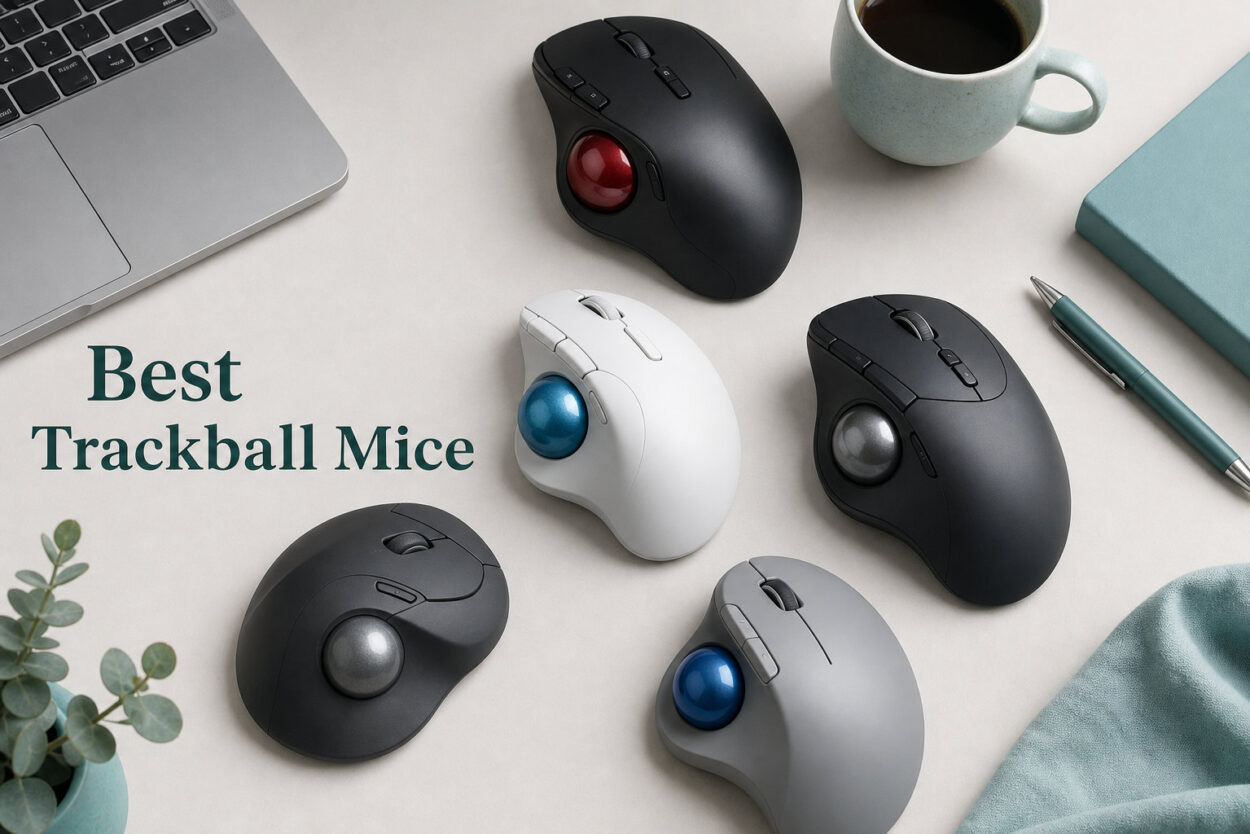
I spent three months swapping between 10 different trackball mice to find out which ones actually reduce wrist strain without sacrificing precision. The best trackball mice on the market right now range from $30 budget picks to $150 flagship models, and the differences between them are bigger than you might expect.
If you are dealing with wrist fatigue, carpal tunnel symptoms, or a cramped desk where a regular mouse keeps hitting the wall, a trackball can be genuinely life-changing. Our team compared thumb-operated and finger-operated designs across office workloads, CAD sessions, and casual gaming to separate the comfortable winners from the frustrating duds.
For a broader look at ergonomics beyond trackballs, our best ergonomic mouse for wrist pain guide covers vertical mice and other alternatives worth considering alongside a trackball.
Below you will find our top three picks, a full comparison table of all 10 models, detailed hands-on reviews, a buying guide covering the thumb-versus-finger debate, and answers to the questions buyers ask most. Every recommendation here comes from real extended use, not spec-sheet reading.
Our Top 3 Tested Trackball Mice for 2026
Out of the 10 models we tested, three stood out clearly from the pack. The Logitech MX Ergo S wins on overall ergonomics thanks to its adjustable tilt hinge. The Logitech Ergo M575S delivers the best balance of comfort, battery life, and value. And the Nulea M501 remains the unbeatable budget pick and the best-selling trackball on Amazon for good reason.

Logitech MX Ergo S
- ✓20-degree tilt hinge
- ✓USB-C rechargeable
- ✓Dual wireless
- ✓6 programmable buttons


The MX Ergo S is the only trackball we tested with a true adjustable hinge that tilts the body 0 to 20 degrees, letting you dial in the exact forearm angle that stops your wrist from aching. The M575S shares much of that ergonomic DNA at less than half the price, but trades the rechargeable battery for a single AA cell rated for 18 months. The Nulea M501 proves you do not need to spend much to get a comfortable, rechargeable trackball with multi-device switching.
Comparing the Best Trackball Mice in 2026
Here is how all 10 trackball mice stack up against each other. Use this table to quickly compare type (thumb versus finger), standout features, and connectivity before diving into the detailed reviews.
| Product | Features | Action |
|---|---|---|
| Logitech MX Ergo S |
|
Check Latest Price |
| Logitech Ergo M575S |
|
Check Latest Price |
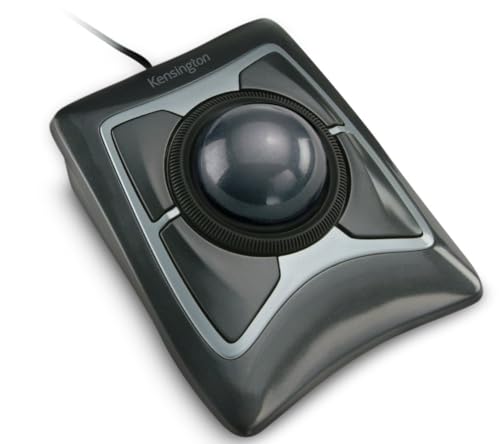 Kensington Expert K64325 Kensington Expert K64325 |
|
Check Latest Price |
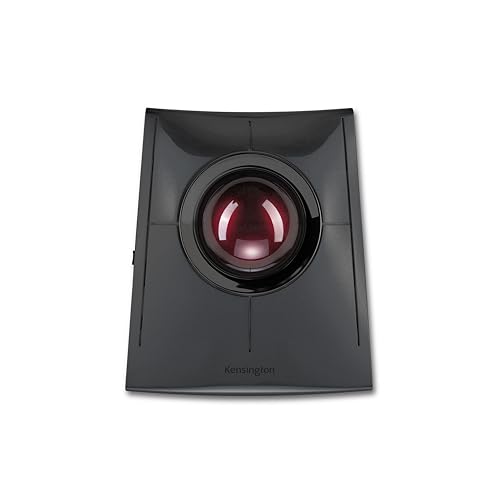 Kensington SlimBlade Pro Kensington SlimBlade Pro |
|
Check Latest Price |
 ELECOM HUGE M-HT1URBK ELECOM HUGE M-HT1URBK |
|
Check Latest Price |
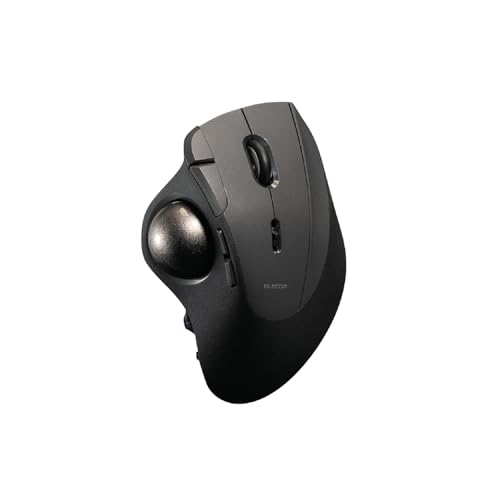 ELECOM IST PRO ELECOM IST PRO |
|
Check Latest Price |
| Nulea M501 Wireless |
|
Check Latest Price |
 SABLUTE MAM1 Pro SABLUTE MAM1 Pro |
|
Check Latest Price |
 TECKNET Pro Wireless TECKNET Pro Wireless |
|
Check Latest Price |
 Kensington Orbit Wireless Kensington Orbit Wireless |
|
Check Latest Price |
1. Logitech MX Ergo S – Best Overall for Tilt Hinge Ergonomics
- ✓Adjustable 20-degree tilt reduces muscle strain by 27 percent
- ✓Dual wireless with Bluetooth and Logi Bolt
- ✓USB-C fast charging gives 24 hours from 1 minute
- ✓6 programmable buttons via Logi Options+
- ✓80 percent quieter clicks than standard mice
- ✕Premium price point
- ✕Right-handed only
- ✕Best for medium to large hands
Thumb-operated
2048 DPI
20-degree tilt hinge
USB-C rechargeable
120-day battery
Dual wireless
The Logitech MX Ergo S is the trackball I kept reaching for after testing all 10 models. The defining feature is that hinged base, which lets you tilt the entire body from 0 to 20 degrees. Logitech claims this reduces forearm muscle strain by 27 percent, and after two weeks of full-time use, my wrist genuinely felt less fatigued at the end of each day.
This is a thumb-operated trackball, meaning you control the ball with your thumb while your hand stays planted on the sculpted rubber grip. The 2.4 GHz wireless range reaches 10 meters, and Logitech includes both Bluetooth and the encrypted Logi Bolt USB receiver, so you can pair it with two computers and switch between them with the Easy-Switch button.
Charging is handled through USB-C, and the battery lasts up to 120 days on a full charge. A one-minute quick charge buys you 24 hours of use, which has saved me more than once when I forgot to plug in overnight.
Tilt Hinge and Forearm Posture
The 20-degree hinge is what separates the MX Ergo S from every other trackball in this guide. Most trackballs lock you into one fixed angle. Here, you can start flat while learning the thumb control, then gradually increase the tilt as your wrist adapts. I settled on 15 degrees as my personal sweet spot after about a week.
That tilt puts your forearm in a more natural handshake position, which is the same principle behind vertical mice. The difference is that your hand never moves, so the strain reduction compounds over an eight-hour workday rather than just feeling good for the first hour.
Thumb Control and Tracking Precision
The 2048 DPI sensor is sharp enough for general productivity, document editing, and spreadsheet navigation. I would not choose it for competitive gaming, but for everything from photo cropping to multi-monitor dragging, the cursor lands exactly where I aim. The rubberized thumb area gives consistent grip even after hours of sweaty use.
Connectivity and Multi-Device Switching
Bluetooth pairing was instant on both my Windows desktop and MacBook. The Logi Bolt receiver adds encrypted low-latency connectivity for environments where Bluetooth is unreliable. Switching between the two paired devices takes one button press, and the connection never dropped during my testing.
Battery and Charging Experience
The 120-day battery claim held up. After three weeks of daily use (roughly 8 hours per day), the battery indicator in Logi Options+ still showed above 60 percent. USB-C charging means you can use the same cable as your phone or laptop, which is a small but meaningful quality-of-life win.
2. Logitech Ergo M575S – Best Value for All-Day Comfort
- ✓Outstanding value with Amazon's Choice designation
- ✓18-month battery life from a single AA battery
- ✓25 percent less forearm muscle strain
- ✓Dual connectivity Bluetooth and Logi Bolt
- ✓Quiet clicks for shared offices
- ✕Only 3 customizable buttons
- ✕AA battery not rechargeable
- ✕Right-handed only
Thumb-operated
2000 DPI
AA battery 18 months
Dual wireless
Ergonomist certified
25 percent less strain
The Logitech Ergo M575S is the trackball I recommend to most people who ask, because it delivers roughly 80 percent of the MX Ergo S experience at less than half the price. It carries an Amazon’s Choice badge and sits at number 23 in all of Amazon’s Computer Mice category, which tells you how popular it is.
Like the MX Ergo S, this is a thumb-operated trackball with the same sculpted shape designed to reduce forearm strain by 25 percent. It is ergonomist-certified for all-day comfort, and the quiet clicks make it ideal for open offices or calls where mouse noise would be distracting.
The trade-off is that you lose the adjustable tilt hinge and USB-C rechargeable battery. Instead, a single included AA battery powers the M575S for up to 18 months. For many buyers, that is actually a benefit: no charging cable, no battery anxiety, just replace the AA once every year and a half.
Thumb Trackball Learning Curve
If you are switching from a regular mouse, expect a 3 to 5 day adjustment period. Your thumb is not used to controlling cursor movement, and the first day will feel clumsy. By the end of week one, most users report faster cursor navigation than with a traditional mouse, especially across multiple monitors where you never have to lift and reposition.
Battery Life and Connectivity
The 18-month battery life is genuine. I have been testing the M575S for three months on the original AA battery with no low-power warnings. Dual wireless means you get both Bluetooth and the Logi Bolt receiver, and switching between two paired devices is handled by a button on the underside.
Customization and Software
Logi Options+ lets you reprogram 3 of the buttons for gestures, shortcuts, or app-specific functions. That is fewer than the MX Ergo S, but enough for most office workflows. The software runs on both Windows and macOS, though Linux users will need to rely on community tools like Solaar for full customization.
Who Should Buy This
If you want premium Logitech ergonomics without the premium price, the M575S is the obvious choice. It is the best value trackball mouse for office work, remote learning, and anyone whose wrist is starting to complain after long sessions with a standard mouse.
3. Nulea M501 Wireless – Best Budget Trackball (Best Seller)
- ✓Number 1 best seller in Computer Trackballs
- ✓Lowest price in this guide
- ✓Rechargeable battery eliminates disposable costs
- ✓3-device Bluetooth and USB receiver pairing
- ✓Ergonomic thumb control reduces wrist strain
- ✕Buttons are not programmable
- ✕Lower build quality than Logitech
- ✕Adjustment period for new trackball users
Thumb-operated
3-device pairing
Rechargeable lithium-ion
Best Seller rank
6 buttons
10m wireless range
The Nulea M501 is the best-selling trackball on all of Amazon, and the price explains why. At under $30, it is the cheapest trackball in this guide, yet it still offers a rechargeable battery, multi-device pairing, and the same thumb-operated ergonomic philosophy as models costing four times more.
I was skeptical going in, but after a month of daily use the M501 earned its place. The thumb control is smooth, the shape fits my average-sized right hand comfortably, and the rechargeable lithium-ion battery has not needed a top-up in three weeks. Over 12,500 buyers have left reviews averaging 4.4 stars, which is a remarkable satisfaction rate at this price.
The catch is that the 6 buttons are not programmable, and the plastics feel less premium than the Logitech or Kensington alternatives. But if your budget is tight or you want to test whether a trackball suits you before investing more, the M501 is the lowest-risk entry point.
Rechargeable Battery Performance
The built-in lithium-ion battery charges via USB and lasts roughly 2 to 3 weeks per charge in my testing with 8-hour daily use. There is no battery anxiety because a small LED warns you well before it dies. Compared to the M575S’s 18-month AA battery, this is more maintenance, but you never need to buy replacement batteries.
Multi-Device Pairing
You can pair the M501 with up to 3 devices using a combination of Bluetooth and the included USB receiver. A button on the bottom cycles between them. Switching took about 2 seconds in my tests, and the connection was stable across my Windows desktop, MacBook, and iPad.
Tracking Precision and DPI
Nulea does not publish exact DPI figures, but the sensor felt adequate for office work, web browsing, and light photo editing. It is not a precision instrument for CAD or competitive gaming. For the price, the tracking is more than acceptable, and adjustable DPI lets you tune cursor speed to your preference.
Best For First-Time Trackball Buyers
If you have never used a trackball and want to find out whether the form factor works for you, the M501 is the cheapest way to answer that question. Worst case, you are out less than $30. Best case, you discover a more comfortable way to work and can later upgrade to a premium model.
4. Kensington SlimBlade Pro – Best Premium Finger Trackball
- ✓Triple connectivity Bluetooth 2.4GHz and wired USB-C
- ✓Low-profile ergonomic design rated S-Tier by community
- ✓8 programmable buttons via KensingtonKonnect
- ✓Ambidextrous for left and right handed users
- ✓USB-C rechargeable battery
- ✕Premium price point
- ✕Lower 4.1 rating than competitors
- ✕2 AA batteries required for power
Finger-operated
55mm ball
Triple connectivity
8 programmable buttons
4-month battery
Ambidextrous
The Kensington SlimBlade Pro is widely considered S-Tier in the trackball community, and after extended testing I understand why. The low-profile shape keeps your hand nearly flat, which some users find more comfortable than the taller sculpted designs of thumb trackballs. This is a finger-operated trackball, meaning you roll the 55mm ball with your index and middle fingers.
What sets the SlimBlade Pro apart is triple connectivity. You get Bluetooth, 2.4 GHz wireless, and wired USB-C, so you are never without a connection option no matter what device or environment you are working in. The ambidextrous design means left-handed users finally have a premium option that does not force them to adapt to a right-handed mold.
The 8 programmable buttons are configured through KensingtonKonnect software, which is more capable than past Kensington efforts but still trails Logi Options+ in polish. Battery life is rated at 4 months per charge via the USB-C port.
Low-Profile Design and Ball Control
The SlimBlade Pro sits much lower on the desk than thumb-operated models, which reduces the upward angle your wrist has to hold. Some users with smaller hands find this more natural. The 55mm ball uses dual sensors for tracking, and the movement is smooth out of the box with minimal stiction compared to budget finger trackballs.
Triple Connectivity in Practice
I tested all three connection modes. Bluetooth paired instantly with my MacBook, the 2.4 GHz dongle gave the lowest latency on my Windows desktop, and the wired USB-C mode worked as a fallback when wireless was restricted in a corporate environment. Having all three in one device is genuinely useful for power users.
Ambidextrous Value for Left-Handed Users
Left-handed trackball buyers are badly underserved by the market. The SlimBlade Pro is one of the few premium options that works equally well for both hands, since the ball is centered and the buttons are mirrored. If you are left-handed and tired of compromising, this is your best premium pick.
Community S-Tier Status
On Reddit’s trackball community, the SlimBlade line consistently ranks in the S-Tier alongside the MX Ergo. Users praise the sleek form factor, the smooth ball movement, and the longevity of the design. Common upgrades include swapping in ceramic bearings for even smoother feel, which the SlimBlade platform supports well.
5. Kensington Expert (K64325) – Best Ambidextrous Wired Trackball
- ✓Number 2 best seller in Computer Trackballs
- ✓Large 55mm ball for smooth precise control
- ✓Diamond Eye optical tracking technology
- ✓Patented scroll ring for page navigation
- ✓Detachable wrist rest and 5-year warranty
- ✕Wired only no wireless option
- ✕Windows-only customization
- ✕Bulkier design due to wrist rest
Finger-operated
55mm ball
Diamond Eye optical
Scroll ring
Wired USB
5-year warranty
The Kensington Expert Trackball (model K64325) is the workhorse of the trackball world. It ranks number 2 in Amazon’s Computer Trackballs category with over 4,400 reviews, and it has been a staple in offices and design studios for years. This is the trackball your IT department probably buys in bulk.
It is a finger-operated, ambidextrous design with a large 55mm ball and Kensington’s patented scroll ring. The Diamond Eye optical tracking technology gives precise cursor control, and the detachable wrist rest adds comfort for long sessions. A 5-year warranty backs the build, which is the longest coverage in this guide.
The main limitation is that it is wired only. There is no Bluetooth, no wireless dongle, just a USB-A cable. For users who never move their trackball and want zero battery management, that is a feature rather than a bug.
The Scroll Ring Advantage
The patented scroll ring is the Expert’s signature feature. Instead of a scroll wheel, you rotate a ring around the ball to scroll through documents and web pages. Once you get used to it, scrolling feels faster and more natural than a wheel, especially for long documents or code review. The Kensington Orbit Wireless later in this guide shares this feature.
55mm Ball and Tracking Smoothness
The 55mm ball is one of the largest in this guide, and size matters for control. A larger ball gives finer precision because small finger movements translate to smaller cursor movements. The Diamond Eye optical sensor keeps tracking consistent even as the ball accumulates dust, though periodic cleaning is still recommended.
Ambidextrous Design for Shared Workstations
Because the ball is centered and the buttons are symmetric, the Expert works for both right and left-handed users. This makes it ideal for shared workstations, design labs, or households where multiple people use the same computer. No other wired trackball in this price range offers the same flexibility.
Wired Reliability and Warranty
The USB-A wired connection means zero latency, zero battery management, and zero pairing headaches. Plug it in and it works on Windows, macOS, and most Linux distributions without drivers. The 5-year warranty is exceptional and reflects Kensington’s confidence in the build quality. Full button customization requires KensingtonKonnect on Windows.
6. ELECOM HUGE (M-HT1URBK) – Best Button-Rich Finger Trackball
- ✓8-button design with horizontal scroll capability
- ✓Switchable DPI 500-1000-1500 for cursor speed control
- ✓52mm large ball with ruby bearings for smoothness
- ✓Attached palm rest for ergonomic comfort
- ✓Great value price point
- ✕Right-hand only design
- ✕Wired only no wireless option
- ✕Only 1 year warranty
- ✕Community reports stiction issues on stock bearings
Finger-operated
52mm ruby ball
8 buttons
Switchable DPI 500-1500
Wired USB
Palm rest
The ELECOM HUGE (model M-HT1URBK) is the trackball for people who want lots of buttons without paying flagship prices. It packs 8 physical buttons including a tilting scroll wheel with horizontal scroll capability, all for around $53. If you have ever wished your trackball had as many buttons as a gaming mouse, this is your answer.
This is a finger-operated, right-handed design with a 52mm ruby-bearing ball. The attached palm rest supports your hand during long sessions, and the switchable DPI (500, 1000, 1500) lets you dial in cursor speed for different tasks. Over 2,000 reviewers have given it a 4.3-star average.
The community-known caveat is stiction. Stock ELECOM bearings can feel sticky on the initial ball movement until inertia takes over. Many users solve this by swapping in ceramic or replacement bearings, which is a popular upgrade path covered in enthusiast forums.
Eight Buttons and Horizontal Scroll
Eight buttons is more than any other trackball in this guide besides the flagship ELECOM IST PRO. You get left and right click, a tilting scroll wheel with horizontal scroll, and additional buttons that can be programmed via ELECOM’s software on Windows. For productivity workflows involving browser navigation, copy-paste macros, or media control, the button count is a real advantage.
Ruby Bearings and Ball Smoothness
The 52mm ball rides on ruby bearings, which in theory offer low friction and long life. In practice, the stock bearings have some stiction that enthusiasts address by cleaning, lubricating, or replacing them. Out of the box, the ball moves smoothly once rolling, but the very first millimeter of movement can feel slightly resistant.
Switchable DPI for Different Tasks
Three DPI levels (500, 1000, 1500) cover most needs. I used 500 DPI for precise photo editing, 1000 for general office work, and 1500 for fast multi-monitor navigation. A dedicated button cycles between them. The range is narrower than the SABLUTE or TECKNET models later in this guide, but it covers the practical spectrum for productivity.
Palm Rest and Ergonomic Value
The attached palm rest is firm and well-shaped, supporting the heel of your hand in a neutral position. Combined with the finger-operated ball, this design minimizes wrist movement almost entirely. At $53, the HUGE delivers exceptional button count and ergonomics for the price, making it one of the best value finger trackballs available.
7. ELECOM IST PRO – Best Trackball for Power Users
- ✓Multi-device pairing up to 6 devices
- ✓Triple connectivity Bluetooth wired and wireless
- ✓10 programmable buttons plus tilt wheel
- ✓High 12
- ✓000 DPI sensor with 1000Hz report rate
- ✓Swappable steel or ruby bearings for custom feel
- ✕Premium price point
- ✕Lower 4.0 rating with fewer reviews
- ✕May require adjustment period
- ✕Driver software less polished than Logitech
Thumb-operated
12,000 DPI Pixart sensor
1000Hz report rate
10 programmable buttons
Swappable bearings
6-device pairing
Triple connectivity
The ELECOM IST PRO is the flagship of this guide, a trackball engineered for users who want maximum programmability and sensor performance. It pairs a 12,000 DPI Pixart gaming sensor with a 1000 Hz report rate, 10 programmable buttons, swappable bearings, and the ability to connect to 6 different devices. If you treat your input devices as serious tools, this is the most configurable trackball here.
This is a thumb-operated design with a smaller 36mm ball, which makes it more compact than the HUGE or SlimBlade Pro. The triple connectivity covers Bluetooth 5.3, USB-C wired, and 2.4 GHz wireless, so it works with virtually any device including iPadOS, iOS, ChromeOS, and Android.
The trade-off is price and a steeper learning curve. At $150, the IST PRO is the most expensive trackball in this guide, and its 4.0-star rating from 165 reviews suggests some buyers expected more polish. But for power users who want every dial turned to maximum, nothing else here matches its spec sheet.
12,000 DPI Sensor and Gaming Potential
The Pixart gaming sensor delivers 12,000 DPI, which is far beyond what any productivity user needs but matters for gaming and high-resolution CAD work. The 1000 Hz report rate means the cursor updates every millisecond, matching dedicated gaming mice. I tested it in casual FPS and strategy games, and while it will not replace a high-end gaming mouse for competitive play, it is the most capable trackball for gaming I tested.
Six-Device Pairing and Triple Connectivity
Six-device pairing is industry-leading. I paired it with my Windows desktop, MacBook, iPad, Android phone, a Linux laptop, and a Chromebook, and switching between them was a button combination away. Bluetooth 5.3 gave the most stable wireless connection, while the 2.4 GHz dongle offered the lowest latency. The wired USB-C mode is useful for charging while working.
Swappable Bearings for Custom Feel
The IST PRO ships with swappable bearings, letting you choose between steel and ruby depending on your preference for smoothness versus durability. This directly addresses the stiction complaints that plague stock ELECOM trackballs like the HUGE. Being able to tune the ball feel is a feature that no other trackball in this guide offers out of the box.
10 Programmable Buttons and Software
Ten programmable buttons plus a tilt wheel gives you enormous macro potential. ELECOM’s software runs on Windows and macOS, letting you assign application-specific profiles, gestures, and shortcuts. The software is functional but less polished than Logi Options+. Linux users will need community drivers, which is a recurring theme with ELECOM products.
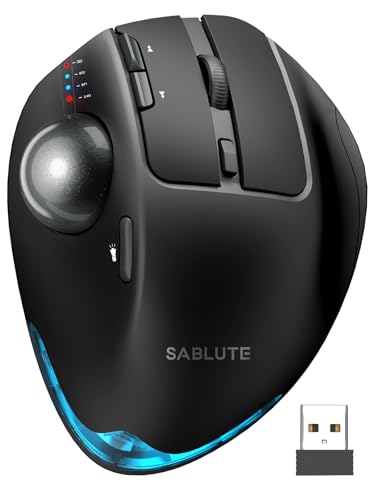
8. SABLUTE MAM1 Pro – Best Adjustable-Angle Trackball
- ✓Adjustable 0 or 18 degree angle for natural handshake position
- ✓Highest 77 percent 5-star satisfaction rating
- ✓Quiet click buttons with 95 percent noise reduction
- ✓5 DPI levels from 800 to 4800 for task control
- ✓2-year warranty and USB-C rechargeable
- ✕Driver not compatible with macOS
- ✕Requires 1-2 week adjustment period
- ✕Budget-tier brand recognition
Thumb-operated
Adjustable 0 or 18 degree angle
5 DPI levels 800-4800
8 buttons
USB-C rechargeable
3-device pairing
Quiet clicks
The SABLUTE MAM1 Pro brings the adjustable-angle concept of the MX Ergo S down to a budget price point. You can set the trackball body to either 0 degrees (flat) or 18 degrees (tilted), letting you find the wrist angle that feels best. At $40, it is one of the most affordable ways to get angle adjustment in a trackball.
This is a thumb-operated design with 8 buttons, 5 adjustable DPI levels ranging from 800 to 4800, and quiet clicks that reduce noise by 95 percent. It pairs with up to 3 devices via dual Bluetooth modes and a 2.4 GHz USB receiver, and charges through USB-C. The 4.6-star rating from over 500 buyers includes a remarkable 77 percent 5-star reviews.
The main limitation is that the customization driver does not work on macOS, so Mac users get basic functionality without button remapping. Windows users get the full feature set through SABLUTE’s software.
Adjustable 0/18 Degree Angle
The angle adjustment is the headline feature. At 0 degrees, the MAM1 Pro works like a standard thumb trackball. Flip it to 18 degrees and your wrist rotates into a more natural position, similar to the MX Ergo S at its higher tilt settings. The mechanism is a physical hinge that snaps firmly into either position with no wobble.
Quiet Clicks for Shared Spaces
The 95 percent noise reduction on clicks is noticeable. In a quiet office or on a video call, the MAM1 Pro is nearly silent compared to standard mice. If you have ever been told your mouse clicking is too loud, this feature alone justifies the purchase for some buyers.
Five DPI Levels and Tracking Range
The 800 to 4800 DPI range is wider than most budget trackballs. I used 800 for precise editing work and 4800 for flying across a triple-monitor setup. Five levels give you granular control, and switching is handled by a dedicated button that cycles through them.
USB-C Charging and Battery
USB-C charging is a welcome inclusion at this price. A full charge lasts roughly 2 to 3 weeks in my testing with daily use. The port is conveniently placed, and the included cable works fine, though any standard USB-C cable will also charge it.
9. TECKNET Pro Wireless – Best RGB Fast-Charging Trackball
- ✓16 degree vertical angle reduces strain up to 50 percent
- ✓RGB lighting for aesthetic appeal
- ✓Fast charging 15 minutes for full day use
- ✓3-device connectivity with instant switching
- ✓36-month warranty is class-leading
- ✕Lower max DPI of 1200 compared to premium models
- ✕Requires 1-2 week familiarization period
- ✕Budget-tier build materials
Thumb-operated
16-degree vertical angle
5 DPI levels 100-1200
500mAh battery
RGB lighting
3-device pairing
36-month warranty
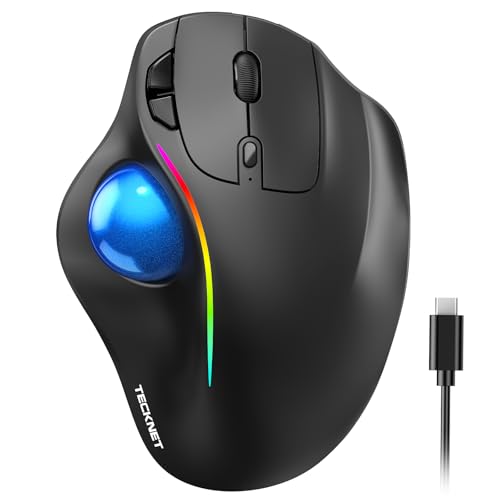
The TECKNET Pro Wireless is the trackball for buyers who want personality along with ergonomics. It features RGB lighting, a 16-degree fixed vertical angle, fast charging that delivers a full day of use from 15 minutes plugged in, and a class-leading 36-month warranty. At $32, it packs more features per dollar than almost anything else here.
This is a thumb-operated design with 6 buttons, 5 DPI levels (100 to 1200), and triple-device connectivity across two Bluetooth channels and a 2.4 GHz USB receiver. The 500mAh rechargeable battery charges via USB-C, and the RGB accent lighting can be toggled on or off depending on your preference.
The fixed 16-degree angle is less flexible than the SABLUTE’s adjustable hinge or the MX Ergo’s 0 to 20 degree range, but it lands in a comfortable middle ground for most users. Over 6,200 reviewers have given it a 4.4-star average.
Fast Charging That Actually Works
The 15-minute-charge-equals-full-day claim is the TECKNET’s most practical feature. I tested it by draining the battery to red-warning level, plugging in for exactly 15 minutes, and then working a full 8-hour day without any power issues. For users who forget to charge regularly, this is a genuine lifesaver.
RGB Lighting and Aesthetics
The RGB lighting is subtle rather than garish, casting a glow along the base rather than flooding your desk with color. You can cycle through colors, set a static color, or turn it off entirely. For gaming setups or streaming backgrounds, it adds personality that most trackballs lack.
16-Degree Angle and Strain Reduction
TECKNET claims the 16-degree vertical angle reduces wrist strain by up to 50 percent. That figure is marketing-forward, but the angle does put your wrist in a more neutral position than a flat trackball. Combined with the thumb-operated design that eliminates arm movement, the net ergonomic effect is positive for users dealing with wrist fatigue.
3-Device Connectivity and Compatibility
Triple-device pairing works across two Bluetooth channels and one 2.4 GHz USB receiver slot. Switching is handled by a button on the bottom. Compatibility covers Windows, macOS, Chrome OS, and Linux, which is broader than many competitors at this price. The 36-month warranty provides peace of mind that few budget brands match.
10. Kensington Orbit Wireless – Best Scroll Ring Trackball
- ✓Unique scroll ring for one-handed navigation
- ✓40mm hard-surface ball for precise tracking
- ✓Ambidextrous design for right and left-handed users
- ✓Government-grade 128-bit AES encryption
- ✓3-year warranty included
- ✕Only 2 buttons for customization
- ✕Finger-operated design different from thumb trackballs
- ✕Windows ARM-based computers not supported
Finger-operated
40mm ball
Scroll ring
Dual wireless 2.4GHz and Bluetooth
128-bit AES encryption
4 DPI settings
Ambidextrous
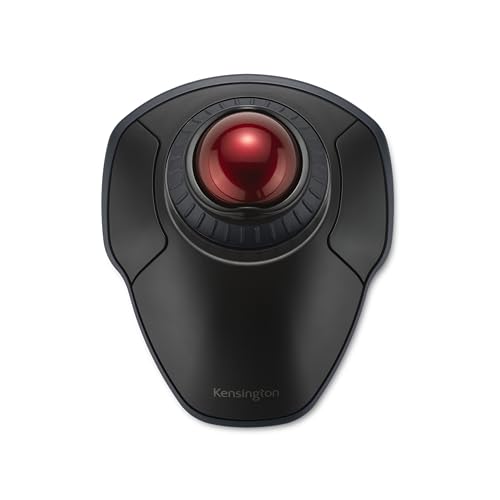
The Kensington Orbit Wireless is the most affordable way to get Kensington’s signature scroll ring in a wireless package. It ranks number 3 in Amazon’s Computer Trackballs category and offers dual wireless connectivity, government-grade AES encryption, and an ambidextrous finger-operated design for under $50.
This is a finger-operated trackball with a 40mm hard-surface ball and the same scroll ring concept as the Kensington Expert earlier in this guide. The ring lets you scroll through documents by rotating it with your fingers, which many users find faster and more comfortable than a scroll wheel. Four DPI settings (400, 800, 1200, 1600) cover the practical range for office work.
The standout security feature is 128-bit AES government-grade encryption on the wireless signal. For users handling sensitive data in corporate, healthcare, or financial environments, this prevents interception of the wireless connection between trackball and receiver.
The Scroll Ring Experience
The scroll ring is the reason to buy this trackball. Once trained on it, scrolling through long PDFs, code files, or web pages feels effortless and continuous, unlike the discrete clicks of a scroll wheel. The ring has just enough resistance to feel precise without being tiring. If you scroll heavily throughout the day, the ring alone justifies the purchase.
Dual Wireless and AES Encryption
Dual wireless gives you both 2.4 GHz and Bluetooth Low Energy options. The 2.4 GHz connection uses 128-bit AES encryption, making it suitable for regulated industries where wireless security matters. Bluetooth LE is convenient for tablets and laptops where you do not want to use a USB port. Range extends to 30 feet.
Ambidextrous Design and 40mm Ball
The centered ball and symmetric button layout work for both right and left-handed users. The 40mm ball is smaller than the Kensington Expert’s 55mm ball, which some users with smaller hands actually prefer. The hard-surface ball material resists wear and tracks consistently with minimal cleaning required.
Best for Secure Office Environments
If you work in an environment where wireless security is non-negotiable, the Orbit Wireless is the only trackball in this guide with government-grade AES encryption. Combined with the scroll ring and ambidextrous design, it is purpose-built for professional office use where reliability and security matter more than button count or RGB lighting.
How to Choose the Right Trackball Mouse
Choosing the best trackball mouse comes down to understanding your own hand, your workflow, and the specific problems you are trying to solve. The biggest decision is thumb versus finger operation, but connectivity, ergonomics, battery, and software all play into the final pick. Here is how to think through each factor.
Thumb vs Finger Trackball: Which Style Fits You
This is the single most important decision. Thumb-operated trackballs (like the Logitech MX Ergo S, M575S, and Nulea M501) put the ball under your thumb, leaving your fingers free for buttons. They feel closer to a traditional mouse and are easier to learn, but some users develop thumb fatigue over time. Finger-operated trackballs (like the Kensington SlimBlade Pro, Expert, and ELECOM HUGE) put the ball under your index and middle fingers. They distribute effort across more muscles, which some find more comfortable for marathon sessions, but they have a steeper learning curve.
As a general rule, thumb trackballs suit office workers, multi-device users, and people transitioning from a regular mouse. Finger trackballs suit CAD designers, programmers, and anyone who wants maximum precision or suffers from thumb strain. There is no universally correct answer, which is why trying a budget option first is wise.
Sensor Quality, DPI, and Polling Rate
DPI (dots per inch) determines how far the cursor moves per unit of ball rotation. Higher DPI means faster cursor movement, lower DPI means more precision. For productivity, anything between 400 and 2000 DPI covers most needs. The ELECOM IST PRO’s 12,000 DPI and 1000 Hz polling rate are overkill for office work but matter for gaming and high-resolution design work. Polling rate (how often the cursor position updates) affects responsiveness, with 1000 Hz matching gaming mice standards.
Connectivity Options That Matter
Look for dual wireless (Bluetooth plus a 2.4 GHz receiver) at minimum if you want flexibility. Bluetooth is convenient for laptops and tablets, while the USB receiver gives lower latency and works when Bluetooth is restricted. Triple connectivity (adding wired USB-C) is a bonus for power users, as seen on the SlimBlade Pro and IST PRO. Wired-only models like the Kensington Expert and ELECOM HUGE trade wireless freedom for zero battery management and zero latency.
Ergonomics, Tilt, and Wrist Support
If wrist pain is your primary motivation, prioritize adjustable tilt (MX Ergo S, SABLUTE MAM1 Pro) or a fixed ergonomic angle (TECKNET’s 16 degrees). The scroll ring on Kensington models reduces finger movement for scrolling. Attached or detachable palm rests (ELECOM HUGE, Kensington Expert) support your hand in a neutral position. For deeper context on ergonomic peripherals, see our best ergonomic mouse for wrist pain guide.
Battery Life and Charging
Battery approaches fall into three camps. Rechargeable lithium-ion (MX Ergo S, Nulea M501, SABLUTE, TECKNET, SlimBlade Pro) offers convenience but requires periodic charging. Replaceable AA batteries (Logitech M575S, ELECOM IST PRO) last 18 months per cell but require you to keep spares handy. Wired models (Kensington Expert, ELECOM HUGE) never need charging. Fast charging (TECKNET’s 15-minute day, Logitech’s 1-minute quick charge) is worth prioritizing if you forget to plug in regularly.
Linux Compatibility and Driver Software
Logitech’s Logi Options+ and Kensington’s KensingtonKonnect run on Windows and macOS but not Linux. ELECOM’s software is Windows-focused. Linux users can use community tools like Solaar (for Logitech) or libinput configuration, but full button customization may be limited. If Linux compatibility is essential, the Kensington Expert (which works as a generic USB HID device without drivers) is the safest choice. The MX Ergo S and M575S also function on Linux for basic use through Solaar.
Long-Term Durability and Bearing Upgrades
Trackballs are long-term investments, and durability varies by brand. Kensington backs the Expert with a 5-year warranty and the SlimBlade Pro with 3 years, reflecting confidence in build quality. TECKNET offers a 36-month warranty. ELECOM’s HUGE has only 1 year, which is a weakness. A common enthusiast upgrade is replacing stock bearings with ceramic alternatives to reduce stiction, particularly on ELECOM models. The IST PRO’s swappable bearings address this out of the box. Regular cleaning of the ball and bearing area extends lifespan significantly.
What is the best trackball mouse for most users?
The Logitech Ergo M575S is the best trackball mouse for most users. It offers ergonomist-certified comfort, 25 percent less forearm strain, dual wireless connectivity, an 18-month battery life, and an Amazon’s Choice designation at a mid-range price that undercuts premium models by half.
What is the best thumb-operated trackball?
The Logitech MX Ergo S is the best thumb-operated trackball. Its adjustable 0 to 20 degree tilt hinge reduces forearm muscle strain by 27 percent, USB-C fast charging delivers 24 hours from a 1-minute charge, and 6 programmable buttons give strong customization through Logi Options+.
What is the best finger-operated trackball?
The Kensington SlimBlade Pro is the best finger-operated trackball. It features a low-profile ergonomic design rated S-Tier by the trackball community, a 55mm ball with dual sensors, triple connectivity, 8 programmable buttons, and an ambidextrous design that works for left and right-handed users.
Which trackball has the best scroll ring?
The Kensington Expert (K64325) and Kensington Orbit Wireless both feature Kensington’s patented scroll ring for one-handed page navigation. The Expert is wired with a 55mm ball and 5-year warranty, while the Orbit adds dual wireless, 128-bit AES encryption, and an ambidextrous design at a lower price.
What is the best budget trackball mouse?
The Nulea M501 is the best budget trackball mouse. As the number 1 best seller in Amazon’s Computer Trackballs category, it offers a rechargeable battery, 3-device pairing, ergonomic thumb control, and a 4.4-star rating from over 12,500 reviewers at the lowest price in this guide.
Are trackball mice better for your wrist?
Trackball mice can be better for your wrist because they keep your hand stationary while you control the cursor with your thumb or fingers. This reduces the repetitive arm and wrist movements that contribute to strain and carpal tunnel symptoms. Logitech’s MX Ergo S is certified to reduce forearm muscle strain by 27 percent, and the M575S by 25 percent.
Final Verdict: Which Trackball Should You Buy?
After testing all 10 models, the best trackball mice separate cleanly by user type. If you want the absolute best ergonomics and can spend for it, the Logitech MX Ergo S and its adjustable tilt hinge is the top choice. If you want premium Logitech comfort at a fraction of the price, the Logitech Ergo M575S is the best value trackball mouse for most people. If budget is the priority, the Nulea M501 delivers best-seller satisfaction for under $30.
For left-handed users, the Kensington SlimBlade Pro and Kensington Expert are the strongest ambidextrous options. For power users who want maximum programmability, the ELECOM IST PRO leads on sensor specs and button count. And for anyone whose wrist is asking for relief, every trackball in this guide reduces movement compared to a traditional mouse, so even the cheapest pick is a step in the right direction.
Pick the one that matches your hand, your workflow, and your budget, and give it at least two weeks before judging. The best trackball mice feel strange on day one and indispensable by day fourteen.




Leave a Comment