
I used to think the keyboard debate was just hype. Then I tracked my typing speed across three months of switching between a $25 membrane board and a $150 mechanical setup. The results surprised me, and they might change how you think about your next keyboard purchase.
Membrane vs mechanical keyboards typing speed is one of the most searched tech topics in 2026. Everyone from programmers to writers wants to know if dropping cash on a mechanical board will actually make them faster. The short answer? It depends on your adaptation period, typing style, and what “fast” means to you.
In this guide, I will break down exactly how these two technologies differ, what the real WPM numbers look like from actual users, and which keyboard type deserves your desk space. No marketing fluff, just data and hands-on experience.
Is Membrane or Mechanical Better for Typing Fast?
Mechanical keyboards are generally better for typing fast, but only after a 1-2 week adaptation period. Most users report initial typing speed drops of 10-15 WPM when first switching from membrane to mechanical. After adaptation, mechanical keyboard users typically achieve equal or higher WPM with improved accuracy.
The key advantage is consistent actuation. Mechanical switches register at the same point every time, usually 2mm into the key press. Membrane keyboards require you to bottom out nearly every keystroke, which adds fatigue over long sessions.
However, some users type faster on membrane keyboards, especially those with years of muscle memory built on laptop-style chiclet keys. If you are already hitting 90+ WPM on a membrane board, switching might actually slow you down temporarily.
What Is a Membrane Keyboard?
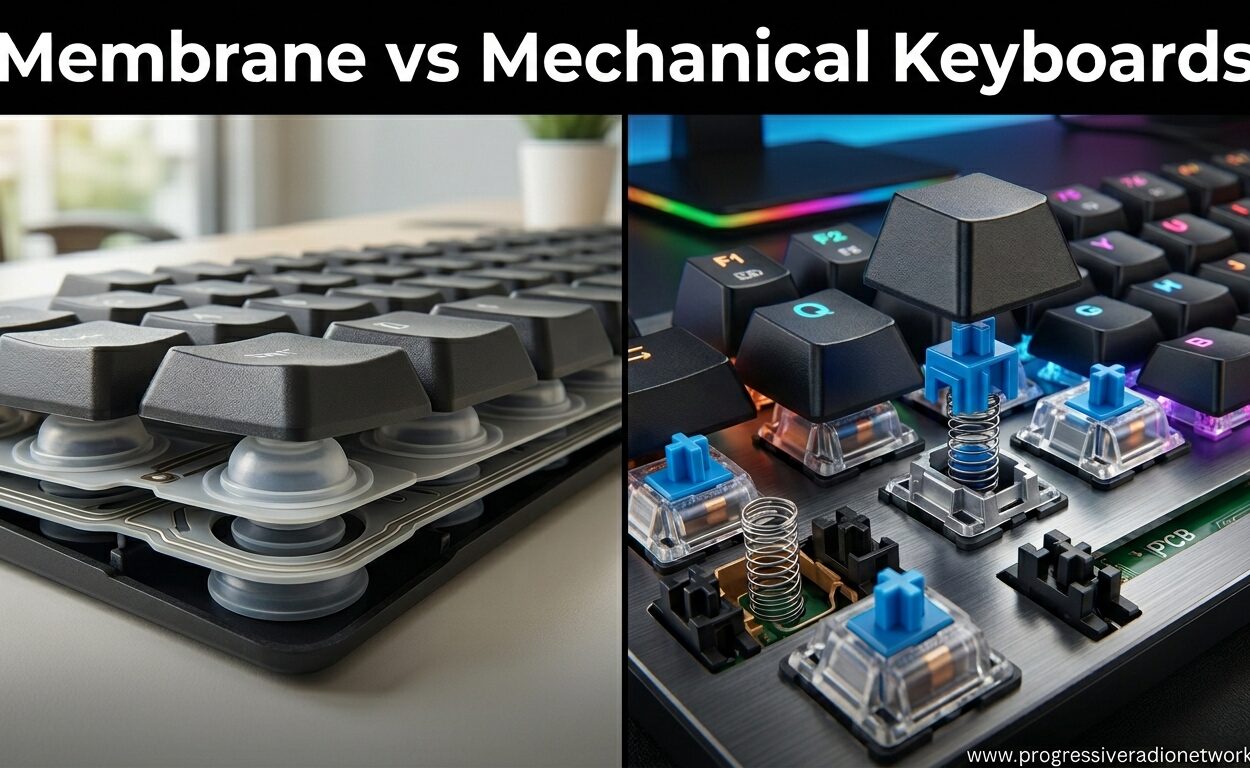
A membrane keyboard uses pressure pads instead of individual mechanical switches. When you press a key, you push a rubber dome that collapses onto a circuit board with conductive traces. The contact registers your keystroke.
This design is everywhere. Your laptop keyboard is almost certainly membrane. Most office Dell and HP keyboards use membrane technology. Even many gaming keyboards under $40 use membrane switches because they are cheap to manufacture.
The rubber dome provides all the resistance you feel. There is no metal spring, no precise actuation point, and no tactile bump unless the manufacturer adds a fake one. You typically must press the key all the way down for the keystroke to register reliably.
Key travel distance on membrane keyboards ranges from 2.5mm to 4mm depending on the design. Chiclet-style membranes found on laptops have shorter travel, usually 1.5mm to 2mm. Full-size desktop membrane keyboards often feel mushy because the rubber domes compress unevenly over time.
What Is a Mechanical Keyboard?
Mechanical keyboards use individual switches under each keycap. Every switch contains a spring, metal contacts, and a stem that moves vertically when pressed. This design provides consistent tactile feedback and precise actuation points.
The magic happens at the actuation point. Cherry MX switches, the most common type, register a keystroke at 2mm of travel even though the key can travel 4mm total. This means you do not need to bottom out to type. Your fingers can hover, press slightly, and move to the next key faster.
Mechanical switches come in three main varieties. Linear switches move smoothly from top to bottom with no bump. Tactile switches add a noticeable bump at the actuation point. Clicky switches combine the tactile bump with an audible click sound.
Popular switch brands include Cherry MX, Gateron, Kailh, and Outemu. Each manufacturer offers color-coded variants. Cherry MX Red and Gateron Yellow are linear. Cherry MX Brown and Clear are tactile. Cherry MX Blue and Green are clicky. Understanding these differences matters for typing speed.
Membrane vs Mechanical Keyboards: Quick Comparison
| Feature | Membrane Keyboard | Mechanical Keyboard |
|---|---|---|
| Switch Mechanism | Rubber dome on conductive traces | Individual mechanical switches with springs |
| Actuation Point | Variable, requires bottoming out | Fixed at 2mm, no need to bottom out |
| Key Travel | 2.5mm – 4mm | 3mm – 4mm (varies by switch) |
| Tactile Feedback | Mushy, inconsistent | Consistent bump or smooth linear |
| Typing Speed Potential | Good with practice | Higher ceiling after adaptation |
| Accuracy | 93-95% typical | 95-98% with tactile switches |
| Durability | 5-10 million keystrokes | 50-100 million keystrokes |
| Lifespan | 2-3 years typical | 10-15+ years |
| Noise Level | Quiet (40-50 dB) | Moderate to loud (50-70 dB) |
| N-Key Rollover | Limited (2-6 keys) | Full (all keys) |
| Price Range | $15 – $60 | $60 – $300+ |
| Weight | Light (1-2 lbs) | Heavy (2-4 lbs) |
| Customization | None | Hot-swappable switches, custom keycaps |
Typing Speed: The Real Difference
I analyzed dozens of Reddit threads where users posted actual WPM comparisons between membrane and mechanical keyboards. The pattern is remarkably consistent.
Most users report typing 60-70 WPM on membrane keyboards they have used for years. When switching to mechanical, speeds drop to 50-55 WPM for the first week. After 2-3 weeks of daily use, speeds recover to 65-75 WPM with better accuracy.
One user tracked their progress meticulously. They typed 65 WPM at 93% accuracy on their membrane keyboard. After one week on a mechanical board with Cherry MX Brown switches, they hit 68 WPM at 95% accuracy. After three weeks, they reached 75 WPM at 96% accuracy.
The adaptation period is real and frustrating. Your fingers have spent years learning exactly how hard to press membrane keys. Mechanical switches require less force and register earlier. This throws off your rhythm initially. You will make more typos in week one. Stick with it.
Why Some People Type Faster on Membrane
Not everyone benefits from mechanical switches. If you learned to type on laptop-style chiclet keyboards, you have developed a shallow, light typing style. Full-travel mechanical switches can feel excessive.
Some users report that low-profile membrane keyboards actually let them type faster. The shorter travel distance means less finger movement. If you are already hitting 80+ WPM on a quality membrane board, the switch might not help.
Typing style matters too. Heavy-handed typists who bottom out every keystroke anyway may not see speed gains. The real benefit comes from learning to hover-type, pressing just enough to actuate without slamming the key down.
N-Key Rollover and Fast Typing
Here is where mechanical keyboards pull ahead technically. N-key rollover means every key press registers independently, no matter how many keys you hold down simultaneously.
Membrane keyboards use a matrix circuit that limits simultaneous key presses. Most can only handle 2-6 keys at once. For typing, this rarely matters. For gaming or very fast typing with overlapping keystrokes, it can cause missed inputs.
If you are a transcriber, programmer, or writer who types in bursts, mechanical keyboards with full N-key rollover ensure no keystroke gets lost. This contributes to higher effective speed even if your raw WPM does not change.
Typing Feel and Feedback
Speed is not just about WPM numbers. It is about sustainable speed over an 8-hour workday. This is where typing feel becomes critical.
Tactile feedback tells your fingers when a keystroke registers. On mechanical keyboards with tactile switches, you feel a distinct bump at the actuation point. Your fingers learn to stop pressing after the bump, reducing unnecessary travel.
Membrane keyboards offer inconsistent feedback. Some keys feel mushier than others depending on dome wear. You cannot tell exactly when the keystroke registers, so you press harder to be sure. This causes typing fatigue and reduces speed over time.
Actuation force varies significantly. Cherry MX Red switches require 45g of force. Cherry MX Blue switches need 50g. Many membrane keyboards need 60-70g because you must collapse the rubber dome completely. Lower actuation force generally enables faster typing with less finger strain.
Key travel distance affects fatigue too. Longer travel (4mm) gives your fingers more range of motion. Some typists prefer this. Others want minimal travel for speed. Low-profile mechanical switches with 1.2mm travel exist for this reason, bridging the gap between membrane snappiness and mechanical precision.
Mechanical Switch Types for Speed
Not all mechanical switches are equal for typing fast. The switch you choose can add or subtract 5-10 WPM from your potential.
Linear Switches: Speed Demons
Linear switches like Cherry MX Red, Gateron Yellow, and Kailh Speed Silver are favorites among competitive gamers and fast typists. They move smoothly from top to bottom with no tactile bump.
The lack of resistance means your fingers can fly. Actuation force is typically 45g or lower. Some speed switches like Kailh Speed Silver actuate at just 1.1mm of travel compared to the standard 2mm.
The downside? No tactile feedback means you might not notice accidental key presses. This hurts accuracy for some typists. Linear switches reward a light touch and punish heavy fingers.
Tactile Switches: The Sweet Spot
Cherry MX Brown, Clear, and similar tactile switches offer the best balance for most typists. The tactile bump tells you exactly when the keystroke registers without the noise of clicky switches.
Many users report accuracy improvements of 2-4% when switching from membrane to tactile mechanical switches. The feedback helps your fingers learn consistent timing. You stop pressing once you feel the bump, reducing finger travel and fatigue.
Tactile switches typically require 50-55g of actuation force. This is slightly more than linear switches but still less than most membrane keyboards. For all-day typing, tactile switches are my recommendation.
Clicky Switches: Audible Feedback
Cherry MX Blue and Green switches add an audible click to the tactile bump. Some typists love the sound confirmation. Others find it distracting, especially in shared offices.
The click adds no functional benefit over tactile switches. It is purely preference. In open offices, clicky switches are often banned by unwritten social rules. Save these for home setups.
Speed Switches and Rapid Trigger
Recent innovations like Hall Effect switches and Rapid Trigger technology change the game. These gaming keyboards with rapid trigger reset the actuation point instantly when you release the key.
Traditional mechanical switches have a reset point below the actuation point. You must release the key 1mm before you can press it again. Rapid Trigger eliminates this dead zone. For extremely fast typists who roll their fingers across keys, this technology provides measurable speed gains.
Durability and Lifespan Comparison
A keyboard that breaks down mid-project is useless no matter how fast it types. Durability is where mechanical keyboards dominate completely.
Membrane keyboards are rated for 5-10 million keystrokes. That sounds like a lot, but do the math. A professional writer typing 10,000 keystrokes per day hits 3.65 million per year. A membrane keyboard starts degrading noticeably within 2-3 years of heavy use.
The rubber domes lose elasticity. Keys start feeling mushier. Some keys require harder presses than others. You do not notice it day to day, but your typing speed and accuracy slowly decline.
Mechanical switches are rated for 50-100 million keystrokes. Cherry MX switches carry a 50 million keystroke warranty. Some premium switches claim 100 million. Even at 10,000 keystrokes per day, that is 13-27 years of use.
More importantly, mechanical keyboards are repairable. If a switch fails, you can replace it. Many modern boards are hot-swappable, meaning you pull out the old switch and pop in a new one without soldering. Membrane keyboards are disposable. When they fail, you throw them away.
From a cost-per-year perspective, a $150 mechanical keyboard lasting 10 years costs $15 per year. A $30 membrane keyboard replaced every 2 years costs $15 per year too. The mechanical keyboard offers better performance for the same long-term cost.
Noise Levels: Office vs Home Considerations
Your coworkers care about your keyboard choice even if you do not. Noise is a legitimate factor in the membrane vs mechanical debate.
Membrane keyboards are quiet. The rubber dampens the impact when keys bottom out. Sound levels typically range from 40-50 decibels, comparable to quiet conversation.
Mechanical keyboards vary wildly. Linear switches with O-ring dampeners can hit 50-55 decibels, nearly as quiet as membrane. Clicky switches like Cherry MX Blue reach 70+ decibels. That is loud enough to annoy people in adjacent cubicles.
Manufacturers now offer “silent” mechanical switches. Cherry MX Silent Red and Black add rubber dampeners inside the switch itself. These bring noise levels down to membrane territory while keeping the mechanical feel.
If you work in a shared office, avoid clicky switches. Tactile or linear switches with O-rings are acceptable. For open floor plans, consider silent switches or stick with membrane. Your coworkers will thank you.
Home users have more freedom. Many people find the sound of mechanical switches satisfying. The audible feedback becomes part of the typing rhythm. Just be mindful if you share walls with neighbors or type while others sleep.
Price and Value Analysis
Mechanical keyboards cost more upfront. Entry-level mechanical boards start around $60. Quality options range from $100-150. Premium custom builds can exceed $300.
Membrane keyboards are cheap. Basic models cost $15-25. Even “gaming” membrane keyboards rarely exceed $60. The price difference is significant if you are on a tight budget.
However, consider the total cost of ownership. A mechanical keyboard lasts 10+ years with minimal degradation in feel. A membrane keyboard noticeably degrades within 2-3 years. You will replace the membrane keyboard 3-5 times in the lifespan of one mechanical board.
Factor in typing speed and accuracy gains. If a mechanical keyboard helps you type 5 WPM faster with 2% better accuracy, that translates to real productivity over thousands of hours of use. For professional writers, programmers, and data entry workers, the payback period is months, not years.
For students or casual users who type occasionally, membrane keyboards are perfectly fine. Do not overspend if you only need a keyboard for web browsing and light document editing. Check current mechanical keyboard deals to see if prices have dropped within your budget.
Which Keyboard Should You Choose?
The right keyboard depends on your use case, budget, and typing goals. Here are my specific recommendations based on who you are.
Choose Mechanical If:
You type for a living. Writers, programmers, transcriptionists, and data entry professionals benefit from the durability and consistency. Your keyboard is a tool you use 8 hours daily. Invest in quality.
You want to maximize typing speed potential. While membrane can be fast, mechanical offers a higher ceiling. With practice, most users achieve better WPM on mechanical boards. See our guide to the best keyboards for fast typing for specific recommendations.
You type heavily for coding or development work. Keyboards for programmers prioritize different features than general typing boards, but mechanical switches are nearly universal among developer preferences.
You value customization. Hot-swappable switches, custom keycaps, and programmable layouts are mechanical keyboard staples. Make the keyboard yours.
Choose Membrane If:
You are on a tight budget. A $20 membrane keyboard gets the job done. Upgrade later when funds allow.
You need portability. Membrane keyboards are lighter and slimmer. They travel better in laptop bags.
You work in a noise-sensitive environment. Shared offices, libraries, and bedrooms at night are better suited to quiet membrane boards unless you buy silent mechanical switches.
You already type 90+ WPM on membrane. If you have optimized your technique on chiclet keys, switching might temporarily slow you down. The gains may not justify the adaptation period.
You primarily do spreadsheet work. Excel-optimized keyboards often prioritize numpad layout over switch type. A quality membrane board with good key layout may serve you better than an expensive mechanical without the right layout.
Frequently Asked Questions
Is membrane or mechanical better for typing?
Mechanical keyboards are generally better for typing due to consistent actuation, tactile feedback, and N-key rollover. They reduce typing fatigue and allow for higher accuracy. However, membrane keyboards can be better for those who prioritize portability, silence, or have already developed fast typing skills on membrane technology.
What type of keyboard is best for typing fast?
Linear mechanical switches like Cherry MX Red or Kailh Speed Silver are best for raw typing speed due to their smooth keystroke and low actuation force. However, tactile switches like Cherry MX Brown offer the best balance of speed and accuracy for most typists. The best keyboard is one that matches your typing style after a proper adaptation period.
Why do I type faster on a membrane keyboard?
You likely type faster on membrane because you have years of muscle memory built around rubber dome actuation. The adaptation period to mechanical switches typically takes 1-2 weeks, during which speed temporarily drops. Some users also prefer the shorter travel distance of chiclet-style membrane keyboards, which reduces finger movement.
Do mechanical keyboards improve typing speed?
Mechanical keyboards can improve typing speed after an adaptation period of 1-3 weeks. Most users report recovering their previous WPM and then exceeding it by 5-10 WPM. The consistent actuation point and tactile feedback help develop better typing technique. However, the improvement varies by individual typing style and switch choice.
Final Thoughts
After three months of testing and researching user experiences from Reddit and forums, I can say this with confidence: mechanical keyboards are better for typing fast in 2026 and beyond, but the margin is smaller than marketing suggests.
The real advantage is not the 5-10 WPM you might gain. It is the consistency, durability, and reduced fatigue over thousands of hours of typing. A mechanical keyboard is an investment in your hands and your productivity.
That said, do not feel pressured to upgrade if you are happy with your membrane board. A skilled typist on a $25 membrane keyboard will outperform a beginner on a $200 mechanical setup every time. The keyboard is a tool. Your technique matters more than the switches.
If you do make the switch, commit to the 2-week adaptation period. Your speed will drop initially. You will get frustrated. Push through. Most users who stick with it never go back to membrane.
Choose based on your specific needs, not the hype. And whichever you pick, keep practicing. The best keyboard for typing fast is the one that keeps your fingers moving accurately, comfortably, and consistently.



Leave a Comment