
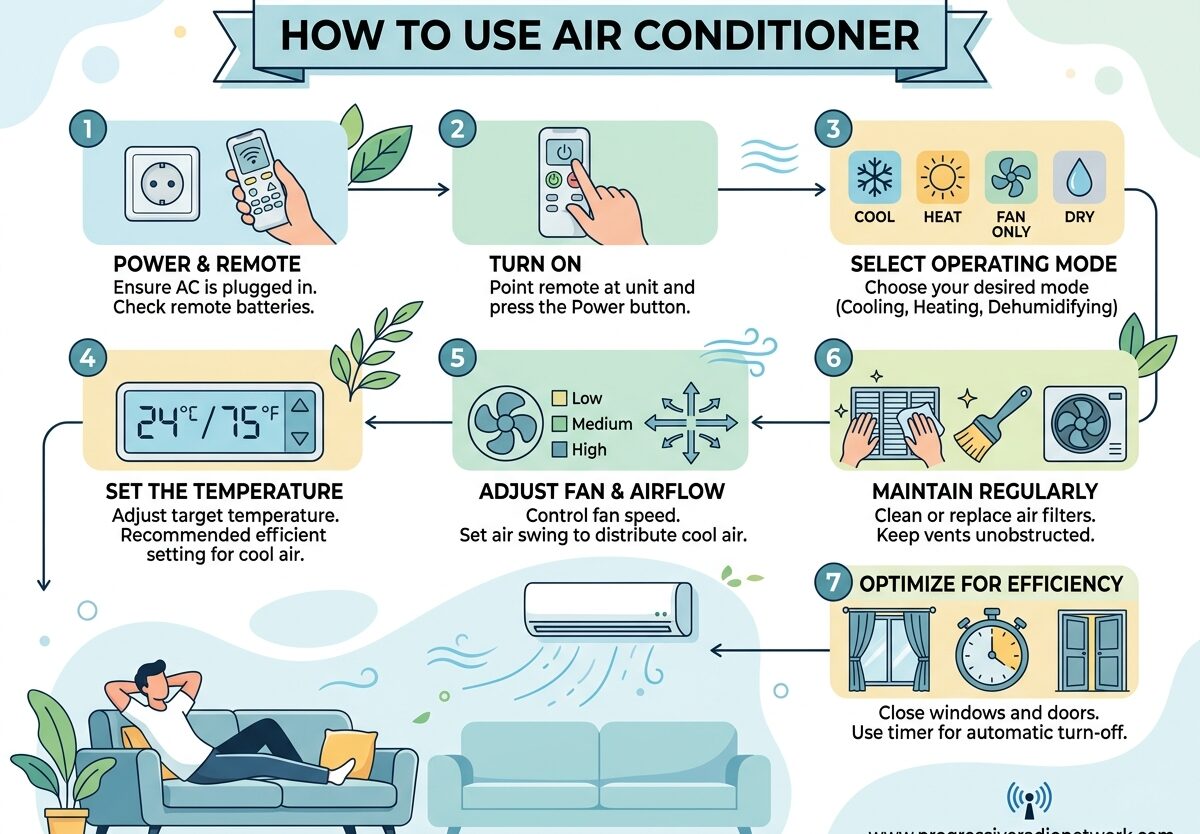
If you’ve just moved into a place with air conditioning or you’re finally installing your first AC unit, you might be wondering how to get the most out of it without sending your electricity bill through the roof. I’ve spent years testing different AC settings and strategies, and I’m going to share exactly how to use air conditioner units efficiently.
Proper AC usage isn’t just about staying cool. It’s about finding that sweet spot between comfort and energy efficiency. The Department of Energy estimates you can save 3% on your cooling costs for every degree you raise your thermostat setting. That adds up quickly over a hot summer.
In this guide, I’ll walk you through everything from basic AC operation to advanced energy-saving techniques that most people overlook. Whether you have central air, a window unit, or a portable AC, these strategies will help you stay comfortable while keeping your utility bills in check.
How To Use Air Conditioner: Understanding the Basics
Before diving into specific settings and modes, it helps to understand what’s actually happening when your air conditioner runs. AC units work by pulling warm air from your room, passing it over cold evaporator coils filled with refrigerant, which absorbs the heat and moisture from the air. The cooled air is then circulated back into your space while the heat is released outside through the condenser unit.
Your thermostat or remote control is your command center. This device tells the AC when to run based on your desired temperature setting. Modern units often have multiple modes and features that go beyond simple cooling.
For first-time AC users, start by locating your thermostat or AC remote. Familiarize yourself with the basic buttons: power, temperature up/down, and mode selection. Most units display the current room temperature and your set temperature simultaneously.
Understanding AC Modes and When to Use Each
Most modern air conditioners come with multiple operation modes. Each mode serves a specific purpose, and using them correctly can improve both comfort and efficiency.
Cool Mode
This is the default mode most people use. Your AC actively cools your space to reach the set temperature. The compressor runs continuously until the desired temperature is achieved, then cycles on and off to maintain it.
Use Cool Mode during the hottest parts of the day when you need maximum cooling. This mode consumes the most energy but provides the fastest temperature reduction.
Fan Mode
In Fan Mode, the compressor turns off and only the fan runs. This circulates air without cooling it, which can help distribute existing cool air more evenly throughout your space.
Fan Mode works well on mild days or when you want air circulation without the energy cost of active cooling. It’s also helpful for ventilating a room after cooking or when air feels stagnant.
Dry Mode
This mode is designed to reduce humidity rather than temperature. The AC runs at low power to remove moisture from the air, which can make you feel cooler even without significant temperature drops.
Use Dry Mode on humid but not extremely hot days. High humidity makes warm air feel uncomfortable, so reducing moisture can improve comfort without the energy cost of full cooling.
Auto Mode
Auto Mode lets the AC decide whether to cool or run the fan based on current room conditions. The unit monitors temperature and automatically switches between cooling and fan operation to maintain your set point.
This mode is convenient but may not always be the most efficient. It works best when you want set-it-and-forget-it operation without manually adjusting settings throughout the day.
Additional Modes
Many modern AC units include extra features like Sleep Mode, which gradually increases temperature at night to save energy while maintaining comfort. Turbo or Quick Cool Mode provides maximum cooling power for short periods to rapidly cool down a space. Timer functions let you schedule when your AC turns on or off, which is useful for pre-cooling rooms before you arrive home or turning off the unit after you fall asleep.
Optimal Temperature Settings for Every Situation
Finding the right temperature setting is the key to balancing comfort and efficiency. Here are the optimal temperature recommendations for different scenarios:
- When you’re home and active: 75-78°F (24-26°C)
- When you’re sleeping: 78-80°F (26-27°C)
- When you’re away from home: 85°F (29°C) or turn off
- For maximum efficiency: 78°F (26°C)
- For quick cooling on extreme heat days: 72-74°F (22-23°C) temporarily
The Department of Energy recommends setting your thermostat to 78°F when you’re home. This temperature balances comfort with energy efficiency. Every degree below 78 increases your energy consumption by approximately 3-4%.
For sleeping, slightly warmer temperatures actually promote better sleep. Your body temperature naturally drops during rest, so cooler rooms can disrupt sleep cycles. Most sleep experts recommend temperatures between 65-72°F, but when using AC, 78-80°F with proper airflow is often sufficient.
When you’re away, there’s no need to keep your home at occupied temperatures. Setting your thermostat to 85°F or turning the AC off completely can result in significant savings. Just be aware of extreme heat that could damage belongings or make the home uncomfortably warm when you return.
Energy Efficiency Tips to Save Money
I’ve tested countless strategies for reducing AC costs, and these techniques consistently deliver the best results. The first rule of efficient AC usage is simple: keep your windows and doors closed while the unit is running. Every time you open a door, you let in hot air that your AC must then cool, wasting energy.
Ceiling fans are your best friend when running AC. They create a wind chill effect that makes you feel 4-6 degrees cooler than the actual room temperature. This means you can set your thermostat higher while staying equally comfortable. Just remember: fans cool people, not rooms, so turn them off when you leave the room.
Pre-cooling is another effective strategy. Instead of waiting until your home becomes unbearably hot, start your AC earlier in the day when outdoor temperatures are lower. It takes less energy to maintain a comfortable temperature than to cool down an overheated space.
Your AC filter plays a crucial role in efficiency. A dirty filter restricts airflow, forcing your unit to work harder and consume more energy. Check your filter monthly and clean or replace it at least every 90 days. Some units have washable filters that can be cleaned with water and mild detergent.
Thermostat placement matters too. If your thermostat is located near a heat source like direct sunlight, lamps, or electronics, it may think your home is warmer than it actually is, causing unnecessary cooling runs. Consider using curtains or blinds to block direct sunlight from reaching your thermostat.
How to Use Different Types of Air Conditioners
Different AC types require slightly different approaches for optimal performance. Here’s what I’ve learned from testing various systems:
Central Air Conditioning
Central AC systems cool your entire home through ductwork. The key to efficient central air use is zoning. If your system has multiple zones, adjust temperatures based on which areas you’re actually using. There’s no need to cool empty guest rooms or unused spaces.
Programmable or smart thermostats are game-changers for central AC. They can automatically adjust temperatures based on your schedule, ensuring you’re not cooling an empty house. Many models can learn your preferences over time and optimize cooling cycles accordingly.
Window Air Conditioners
Window units cool single rooms and require specific considerations for efficiency. The most important factor is proper installation. Ensure the unit is level and sealed tightly to prevent warm air from entering around the edges. Most window units include accordion panels that should be extended and secured.
For window ACs, close the door to the room being cooled. These units aren’t designed to cool multiple rooms, and leaving doors open forces the unit to work harder. Use curtains or blinds on windows to reduce heat gain from sunlight, which can significantly improve cooling efficiency.
Portable Air Conditioners
Portable AC units offer flexibility but are generally less efficient than window units. The key to using portable ACs effectively is proper venting. Ensure the exhaust hose is as straight and short as possible, with minimal bends that restrict airflow. Each bend in the hose reduces efficiency.
Portable units also generate heat through their operation, so place them away from the area you’re trying to cool. Don’t position the unit near the thermostat if you have central AC, as the heat from the portable unit may cause your central system to run longer than necessary.
Ductless Mini-Split Systems
Ductless systems combine the efficiency of central AC with the flexibility of room-specific cooling. Each indoor unit operates independently, allowing you to cool only occupied spaces. The key to efficient ductless use is taking advantage of this zoning capability.
Most ductless remotes include motion sensors that can detect occupancy. Enable this feature if available, as it will automatically adjust cooling when the room is empty. Clean the filters in each indoor unit regularly, as restricted airflow in even one unit can affect the entire system’s efficiency.
Common AC Mistakes to Avoid
After helping dozens of friends and family members optimize their AC usage, I’ve noticed the same mistakes appearing repeatedly. Avoiding these errors will instantly improve your comfort and reduce your energy bills.
The most common mistake is setting the temperature too low. Many people crank their AC to the lowest setting, thinking it will cool faster. AC units cool at a constant rate regardless of the set temperature. Setting it to 60°F won’t cool your room any faster than setting it to 75°F, but it will waste significantly more energy.
Constantly adjusting your thermostat is another efficiency killer. Each time you change the setting, your AC must work harder to reach the new temperature. Find a comfortable setting and leave it alone. If you need different temperatures at different times, use a programmable thermostat or timer function rather than manual adjustments.
Ignoring filter maintenance is perhaps the most costly mistake. A clogged filter can increase your energy consumption by 5-15% while reducing cooling capacity. Most homeowners forget about their filters until problems arise, but regular cleaning is one of the simplest ways to maintain efficiency.
Blocking vents or the outdoor unit significantly reduces performance. Keep furniture, curtains, and other obstacles away from supply and return vents. For the outdoor condenser unit, maintain at least two feet of clearance on all sides and ensure nothing is blocking airflow to the unit.
The 3-Minute Rule
You may have heard about the 3-minute rule for air conditioners. This guideline suggests waiting 3-5 minutes after turning off your AC before restarting it to prevent compressor damage. The reasoning is that pressure equalization needs time to occur, and immediate restart can strain the compressor.
Modern AC units typically have built-in delay mechanisms that prevent immediate restart, making this rule less critical than it once was. However, it’s still good practice to avoid rapid cycling. If you need to adjust your temperature, make gradual changes rather than turning the unit off and on repeatedly.
Troubleshooting Common AC Problems
Even with proper usage, issues can arise. Here are the most common problems I’ve encountered and their solutions:
If your AC isn’t cooling properly, first check that the temperature is set correctly and the unit is in Cool Mode. Ensure nothing is blocking vents and that all windows and doors are closed. Dirty filters are a frequent culprit, so clean or replace them if needed. If these basic checks don’t resolve the issue, low refrigerant or a failing compressor may be to blame, requiring professional service.
Strange noises like grinding, squealing, or rattling often indicate mechanical problems. Grinding sounds typically point to motor bearing issues, while squealing suggests belt problems (in older units). Rattling may indicate loose components or debris in the outdoor unit. These issues usually require professional diagnosis and repair.
Water leaking from window or portable AC units is typically due to improper installation or a clogged drain line. Ensure the unit is tilted slightly downward to allow proper drainage. For central AC, water around the indoor unit often indicates a clogged condensate drain line, which can usually be cleared with a wet/dry vacuum or professional service.
If your AC frequently cycles on and off without reaching the set temperature, it may be oversized for the space or have a thermostat issue. An oversized unit cools quickly but doesn’t run long enough to dehumidify properly, leaving you feeling cool but clammy. This issue requires professional assessment to determine if resizing or reconfiguration is needed.
When basic troubleshooting doesn’t resolve your issues, it’s time to call a professional. Continuing to run a malfunctioning AC can cause further damage and increase your energy bills. A qualified technician can diagnose problems that aren’t visible to the untrained eye and recommend appropriate repairs.
FAQs
What is the proper way to use AC?
The proper way to use AC involves setting your thermostat between 75-78°F when home, using ceiling fans to circulate cool air, keeping windows and doors closed, and maintaining clean filters. Set the temperature higher (78-80°F) when sleeping and turn off or set to 85°F when away. Avoid constantly adjusting the thermostat and use appropriate modes for different conditions.
What is the 3 minute rule for AC?
The 3-minute rule suggests waiting 3-5 minutes after turning off your AC before restarting it to prevent compressor damage. This allows pressure equalization within the system. Modern AC units typically have built-in delay mechanisms that prevent immediate restart, making this rule less critical than it once was, but it’s still good practice to avoid rapid cycling.
What temperature should I set my AC?
Set your AC to 75-78°F when you’re home and active, 78-80°F when sleeping, and 85°F or off when away. The Department of Energy recommends 78°F as the optimal balance between comfort and energy efficiency. Every degree below 78 increases energy consumption by approximately 3-4%.
How do I set my AC to cold?
To set your AC to cold, first ensure it’s powered on. Select Cool Mode on your remote or thermostat. Use the temperature down button to set your desired temperature (start with 75-78°F). Make sure windows and doors are closed, and the unit has clear airflow. The AC will run until reaching your set temperature, then cycle on and off to maintain it.
How can I use my AC efficiently to save money?
To use AC efficiently, set your thermostat to 78°F, use ceiling fans to feel cooler at higher temperatures, close windows and doors while running, clean filters regularly, use curtains to block sunlight, and utilize timer or programmable functions. Pre-cool your home before the hottest part of the day rather than waiting until it’s already hot.
Conclusion
Learning how to use air conditioner units properly is one of the most valuable skills for maintaining comfort during hot weather while keeping energy costs manageable. The key takeaways are simple: set your thermostat to 78°F when home, use ceiling fans to enhance comfort, maintain clean filters, and take advantage of your AC’s different modes for various conditions.
Remember that every degree below 78 increases your energy consumption by 3-4%, so finding the right balance between comfort and efficiency can result in significant savings over time. Whether you’re using central air, a window unit, or a portable AC, these principles apply universally.
By following the guidelines in this article, you’ll not only stay comfortable but also extend your AC’s lifespan and reduce your environmental impact. Small adjustments to your AC usage habits can make a surprising difference in both comfort and cost. Stay cool!

Leave a Comment