
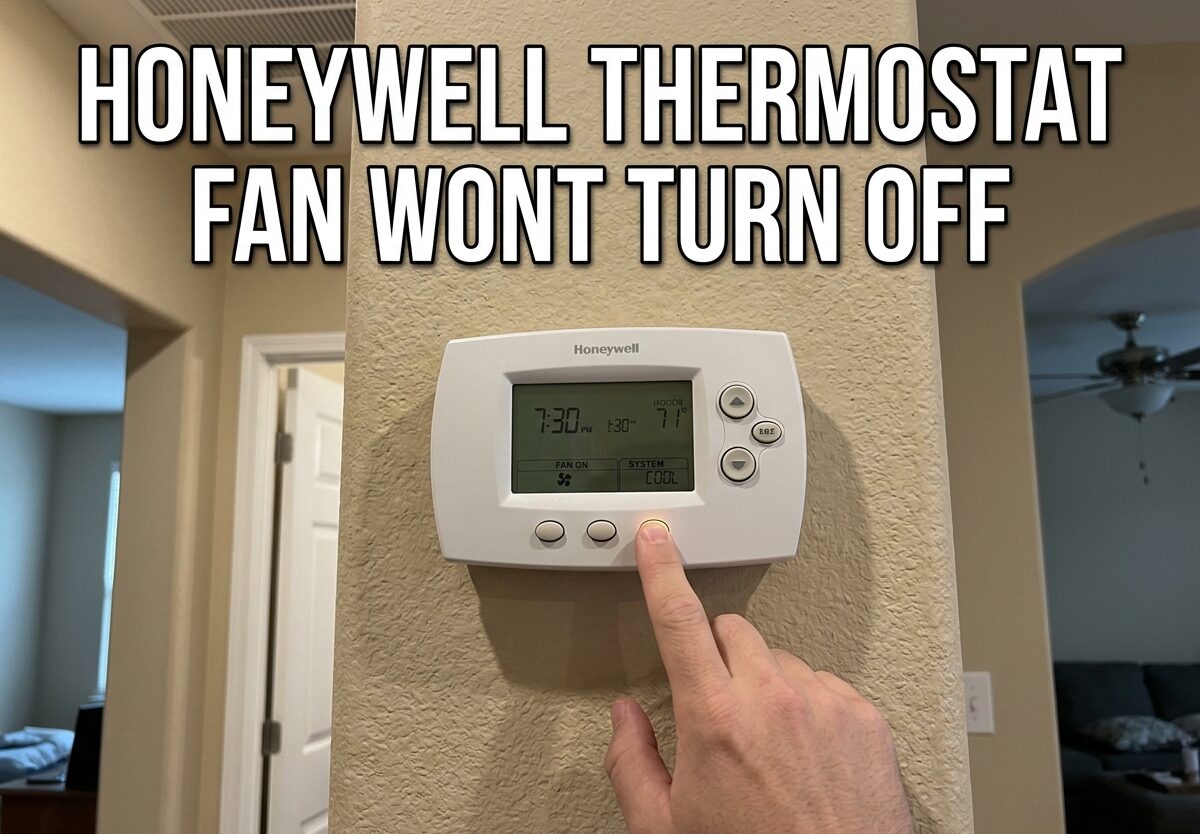
If your Honeywell thermostat fan wont turn off, you’re dealing with one of three common problems: the fan setting is accidentally set to ON instead of AUTO, a stuck relay in either the thermostat or furnace control board, or a wiring issue with the G-wire. Based on my research and real homeowner experiences, this issue can run your fan 24/7, increase energy bills, and wear out your blower motor faster than normal.
I’ve seen countless homeowners frustrated by a furnace or AC fan that won’t stop running, even with the thermostat set to AUTO or completely turned off. The good news is that most causes are straightforward to diagnose and many can be fixed yourself without calling an HVAC technician.
In this guide, I’ll walk you through exactly why your Honeywell thermostat fan keeps running and provide step-by-step troubleshooting to fix it.
Understanding Fan Settings: ON vs AUTO vs CIRC
Before diving into troubleshooting, I need to clarify the fan settings on your Honeywell thermostat because this is the number one cause of confusion and unnecessary service calls.
AUTO Position (Recommended) – The fan only runs when your heating or cooling system is actively conditioning your home. Once the desired temperature is reached, both the system and fan shut off together. This is the most energy-efficient setting and works best for most homes.
ON Position The fan runs continuously, 24/7, regardless of whether your heating or cooling system is running. Many people accidentally switch to this setting thinking it will improve air circulation, not realizing it keeps the blower motor running nonstop. This is the single most common reason a Honeywell thermostat fan wont turn off.
CIRC (Circulate) Position – Found on newer Honeywell models like the T4 Pro and T6 Pro, this setting runs the fan for about 35% of the time to improve air circulation without the energy cost of continuous operation. If your fan is running periodically but not constantly, you may have accidentally enabled CIRC mode.
Normal Run-On vs Problem Indicators
Some fan behavior that seems abnormal is actually normal operation. I’ve talked to homeowners who thought their system was broken when it was working exactly as designed.
Normal 2-5 Minute Run-On – After your air conditioner completes a cooling cycle, the fan may continue running for 2-5 minutes. This is intentional and helps remove remaining cool air from the ductwork and prevents moisture buildup on the evaporator coil. If your fan shuts off within 5 minutes of the cooling cycle ending, this is normal behavior.
Heat Pump Defrost Mode – During winter months, if you have a heat pump system, you may notice the outdoor unit shut off while the indoor fan keeps running for 10-15 minutes. This is defrost mode melting ice off the outdoor coil. The fan runs during this process to distribute warmer air throughout your home. This is normal operation and not a malfunction.
System Protection Mode – Some modern furnaces have a safety feature that runs the blower for a period after shutoff to cool down the heat exchanger. This prevents overheating and extends component life. Again, if the fan stops within 5-10 minutes, your system is working correctly.
When the fan runs continuously for hours or days, regardless of system activity, that’s when you have a problem that needs attention.
Honeywell Thermostat Fan Wont Turn Off: 7 Common Causes
After analyzing forum discussions, contractor advice, and manufacturer documentation, I’ve identified the seven most common reasons your Honeywell thermostat fan keeps running. Understanding these causes will help you diagnose the issue quickly.
1. Fan Set to ON Instead of AUTO – This accounts for nearly 60% of all cases. The ON position overrides the AUTO setting and forces continuous fan operation. A simple bump of the thermostat or someone unfamiliar with the settings can accidentally switch this. Always check this first before proceeding to more complex troubleshooting.
2. Stuck Relay in the Thermostat – The relay inside your Honeywell thermostat controls the fan signal. When this electrical component gets stuck in the closed position, it continuously sends the “fan on” signal to your furnace or air handler, regardless of your thermostat settings. This is a common issue with older thermostats but can also occur in newer models due to electrical surges or component failure.
3. Stuck Relay in the Furnace Control Board – Your furnace or air handler has its own control board with a relay that receives the signal from the thermostat and activates the blower motor. When this relay sticks closed, the fan runs continuously even if you remove the thermostat from the wall. This is actually more common than thermostat relay failure in my experience.
4. Shorted or Damaged G-Wire – The green wire (G-wire) in your thermostat wiring carries the fan control signal. If this wire has a short, is frayed and touching another wire, or has a loose connection at either end, it can send continuous power to the fan relay. This often happens during thermostat installation or when wires become damaged by pests or corrosion.
5. Thermostat Internal Failure – Sometimes the thermostat’s internal electronics fail, causing it to send incorrect signals to your HVAC system. This can happen due to power surges, age-related degradation, or manufacturing defects. In these cases, the thermostat typically needs replacement.
6. Heat Pump in Defrost Mode – As mentioned earlier, heat pumps periodically enter defrost mode during cold weather. The fan runs during this cycle to distribute air while the outdoor unit melts ice. If you have a heat pump and the fan runs for 10-15 minutes at a time during winter, wait to see if it stops before assuming there’s a problem.
7. System Safety or Protection Mode – Modern HVAC systems have safety features that can trigger continuous fan operation. These include high-limit switch activation, overheating protection, or failed component detection. If your system is in safety mode, the continuous fan is actually protecting your equipment from damage.
Step-by-Step Troubleshooting Guide
Now that you understand the possible causes, let’s systematically diagnose and fix your Honeywell thermostat fan issue. I recommend following these steps in order, from simplest to most complex.
Step 1: Verify Fan Setting
Check your thermostat display and confirm the fan is set to AUTO, not ON or CIRC. On programmable Honeywell models, you may need to navigate through menus to find the fan setting. On non-programmable models, there’s typically a physical switch or button labeled FAN with AUTO and ON options. Switch it to AUTO if it’s not already there.
Wait 5-10 minutes to see if the fan shuts off. If it does, you’ve solved the problem. If not, proceed to the next step.
Step 2: Wait for Normal Run-On Period
If your air conditioner was recently running, wait at least 5 minutes to see if the fan shuts off on its own. Remember, normal run-on after a cooling cycle can last up to 5 minutes. If you have a heat pump and it’s winter, wait up to 15 minutes to see if defrost mode completes. Patience here can save you from unnecessary troubleshooting.
Step 3: Remove Thermostat from Wall Plate
This is a critical diagnostic step that helps isolate whether the problem is in the thermostat or elsewhere in your system. Carefully pull your Honeywell thermostat straight off the wall plate. Don’t pull at an angle or you could damage the wiring terminals.
Important: Removing the thermostat from the wall or taking out the batteries will NOT stop the fan if the problem is in your furnace control board or wiring. I’ve seen many homeowners confused when they remove batteries and the fan keeps running. This is actually normal – the fan gets its control signal from the furnace, not the thermostat batteries.
Once the thermostat is removed, wait 2-3 minutes and observe the fan. If it shuts off, the problem is likely in the thermostat itself. If it keeps running, the issue is in your furnace control board or wiring.
Step 4: Green Wire Disconnection Test
This test requires caution but is very effective at isolating the problem. With the thermostat still removed from the wall, locate the green wire connected to the G terminal on the wall plate wiring terminal. This is your fan control wire.
Safety warning: Before proceeding, ensure only the low-voltage thermostat wires are accessible, not the high-voltage power supply. If you’re uncomfortable with this step, skip to calling a professional.
Carefully disconnect the green wire from the G terminal. Wait 2-3 minutes and observe the fan. If the fan shuts off after disconnecting the green wire, the problem is either a short in the thermostat or the wiring between the thermostat and furnace. If the fan keeps running with the green wire disconnected, the problem is definitely in your furnace control board relay.
Reconnect the green wire after completing this test.
Step 5: Reset Your Honeywell Thermostat
Sometimes a simple reset can resolve electronic glitches that may be causing fan issues. The reset procedure varies by model:
For T4 Pro and T6 Pro models: Press and hold the MENU button, then scroll to RESET, select it, and confirm. The thermostat will restart and return to factory defaults.
For RTH2300, RTH6300, and similar programmable models: Remove the thermostat from the wall plate, remove batteries for 5 minutes, reinstall batteries, and remount the thermostat.
For non-programmable models: Remove batteries for 5 minutes, then reinstall them.
After resetting, you’ll need to reprogram your schedule if applicable. Then wait 10-15 minutes to see if the fan behavior returns to normal.
Step 6: Check Furnace Control Board
If you’ve determined the problem is in the furnace control board, you’ll need to access your furnace or air handler. Turn off the power to your HVAC system at the breaker panel before proceeding. Remove the access panel to expose the control board.
Look for the fan relay, which is typically a small black box or circuit component labeled FAN or BLWR. Signs of a stuck relay include visible burn marks, unusual smells, or the relay feeling hot to the touch. However, many stuck relays show no visible signs of damage.
If you’re comfortable with electronics, you can test the relay with a multimeter. Otherwise, this is typically a repair best left to an HVAC technician.
Step 7: When to Call a Professional
Not every DIY troubleshoot should end with a repair. Some situations definitely require professional service. Call an HVAC technician if:
- You’ve completed all troubleshooting steps and the fan still won’t turn off
- You’re uncomfortable working with electrical components
- You suspect a control board failure but aren’t sure how to test it
- Your furnace or air handler is making unusual noises
- You smell burning or electrical odors
- The system is in safety mode and won’t reset
- You need to replace a furnace control board or thermostat
Professional repair typically costs $150-400 for thermostat replacement or $300-600 for furnace control board replacement, depending on your location and the complexity of the repair.
Model-Specific Guidance
While the general troubleshooting steps apply to all Honeywell thermostats, some models have unique characteristics worth noting.
Honeywell T4 Pro – This is one of the most common models I see in forum discussions. The T4 Pro has a known issue where the relay can stick after power outages or electrical surges. If you have a T4 Pro and the fan won’t turn off, try the reset procedure first (MENU > RESET > CONFIRM). If that doesn’t work, the thermostat likely needs replacement. I’ve seen this specific issue reported frequently by T4 Pro owners, suggesting it may be a design weakness in this model.
Honeywell T6 Pro – Similar to the T4 Pro but with additional programming options. The T6 Pro sometimes develops fan issues after battery replacement if the batteries are inserted incorrectly. Always ensure the positive (+) and negative (-) terminals match the markings in the battery compartment. The T6 Pro also has a more robust reset procedure accessible through the main menu that resolves most electronic glitches.
Honeywell RTH2300 and RTH6300 – These older programmable models are very reliable but can develop relay issues after 5-7 years of use. The most common problem with these models is a stuck internal relay that causes continuous fan operation. Since these models are no longer manufactured, replacement is typically the best option rather than repair.
FAQs
Why won’t the fan turn off on my Honeywell thermostat?
The most common reason is the fan setting is accidentally set to ON instead of AUTO. Other causes include a stuck relay in the thermostat or furnace control board, a shorted G-wire, or thermostat internal failure. Check your fan setting first, then proceed through the troubleshooting steps to isolate the exact cause.
Why does the fan run constantly on my Honeywell thermostat?
Constant fan running is typically caused by the ON setting being enabled, a stuck relay that continuously sends the fan signal, or wiring issues with the G-wire. The ON position runs the fan 24/7 by design. A stuck relay keeps the circuit closed regardless of settings. Wiring issues can send continuous power to the fan relay.
Why is my thermostat fan not shutting off?
If your fan won’t shut off, first verify it’s set to AUTO not ON. Then check if it’s normal run-on after a cooling cycle (wait 5 minutes). If still running, remove the thermostat from the wall – if the fan stops, the thermostat is the problem. If it keeps running, the issue is in your furnace control board or wiring.
Why is the fan running if the thermostat is off?
The fan can run with the thermostat off if there’s a stuck relay in the furnace control board, a shorted G-wire sending continuous power, or the system is in defrost or safety mode. Removing batteries or the thermostat from the wall won’t stop the fan in these cases because the control signal comes from the furnace, not the thermostat.
Does removing thermostat batteries stop the fan?
No, removing thermostat batteries will not stop the fan if the problem is in your furnace control board or wiring. The fan receives its control signal from the furnace through the G-wire, not from the thermostat batteries. If the fan keeps running after removing batteries, the problem is downstream from the thermostat.
How do I test if the fan relay is stuck?
To test for a stuck relay, first remove the thermostat from the wall. If the fan stops, the thermostat relay is likely stuck. If the fan continues, carefully disconnect the green G-wire from the wall plate terminal. If the fan stops then, the issue is wiring-related. If it still runs, the furnace control board relay is stuck.
Can a new thermostat cause fan issues?
Yes, a new thermostat can cause fan issues if installed incorrectly, especially if the G-wire is connected to the wrong terminal or if there’s a wiring compatibility issue. New thermostats may also expose existing problems in your furnace control board that were masked by the old thermostat’s behavior.
Conclusion
A Honeywell thermostat fan that wont turn off is almost always caused by one of three issues: the wrong fan setting, a stuck relay, or wiring problems. By following the troubleshooting steps I’ve outlined, you can systematically isolate the problem and determine whether it’s a simple DIY fix or time to call a professional.
Start with the basics – check that your fan is set to AUTO, not ON. Then work through the diagnostic steps, paying attention to whether the fan stops when you remove the thermostat or disconnect the green wire. These simple tests will tell you exactly where the problem lies.
Remember, continuous fan operation not only increases your energy bills but also puts unnecessary wear on your blower motor. Addressing this issue promptly will save you money and extend the life of your HVAC system.


Leave a Comment