
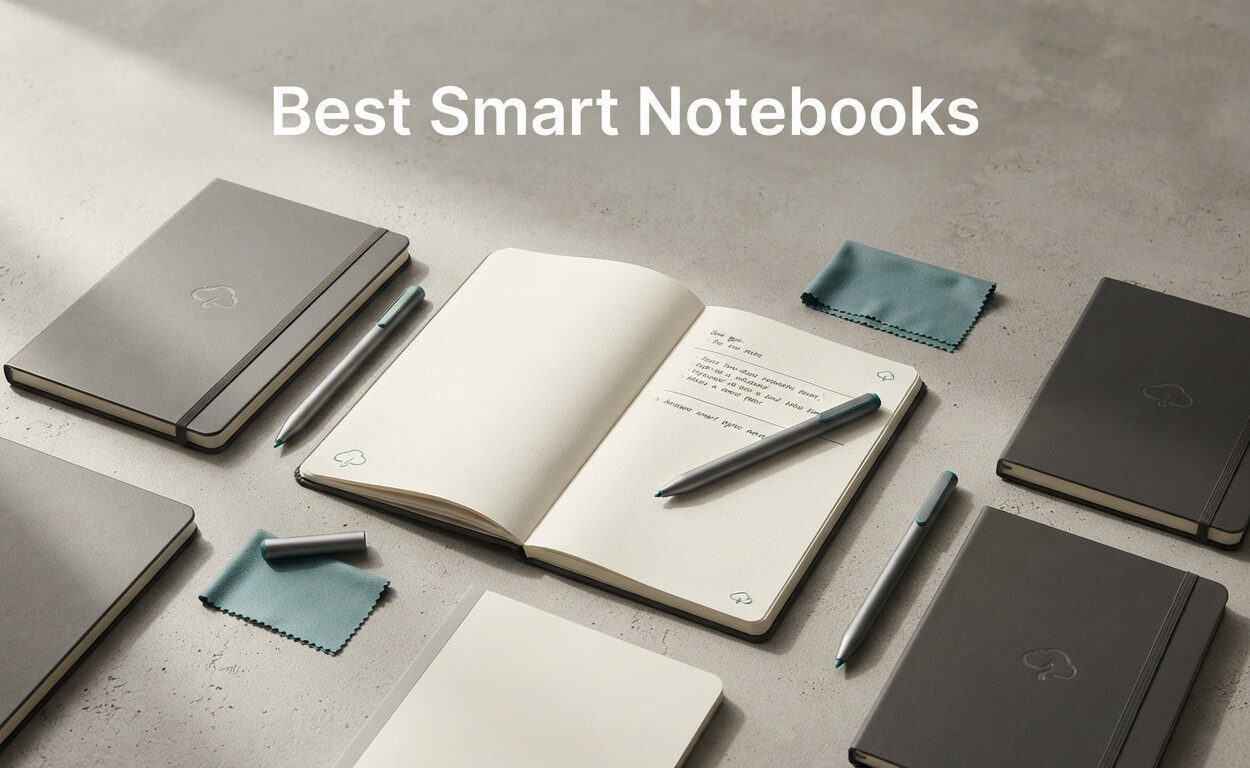
If you have ever filled an entire shelf with paper notebooks only to lose the one page you actually needed, you already understand why the best smart notebooks are having such a moment in 2026. These hybrid devices let you keep the tactile joy of handwriting while your notes are quietly digitized, searchable, and backed up to the cloud. Our team spent weeks writing, sketching, erasing, and syncing across ten of the most recommended models to figure out which ones actually deliver on that promise.
Smart notebooks span a surprisingly wide range of technologies. On one end you have affordable reusable paper pads like the Rocketbook Flip that you wipe clean with a damp cloth. On the other end you have premium e-ink tablets like the reMarkable Paper Pro that mimic the friction of real paper on a color display.
In between sit Android-powered e-readers, LCD note tablets, and Bluetooth writing pads that digitize ink strokes in real time. Picking the right one comes down to how you write, where you work, and what ecosystem you already live in.
Writing feel is the number one deciding factor according to buyers on r/eink and r/RemarkableTablet, so we weighted that heavily in our rankings. We also looked at handwriting-to-text accuracy, cloud sync reliability, battery life, and long-term durability.
If you are building out a full home office setup, you may also want to pair your notebook with ergonomic accessories for your home office to keep your hands comfortable during long writing sessions. Below you will find our top three picks, a full comparison table, and detailed reviews of all ten smart notebooks we tested.
Our Top 3 Smart Notebooks for 2026: Quick Picks
Not everyone has time to read ten full reviews, so here are our three standout picks based on real-world testing. Each one serves a different budget and use case, from distraction-free premium writing to affordable reusable note-taking.
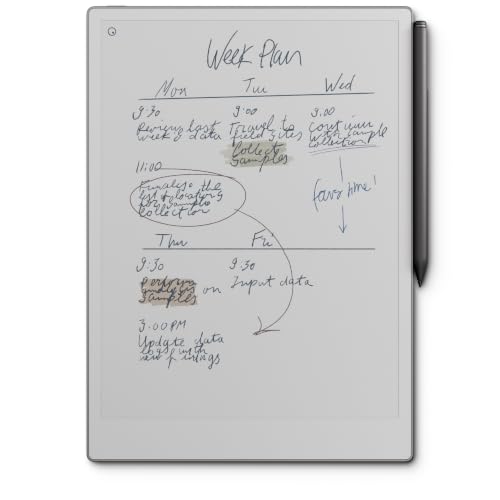
reMarkable Paper Pro…
- ✓11.8 inch Canvas Color display
- ✓Marker Plus with eraser
- ✓Best paper-like writing feel
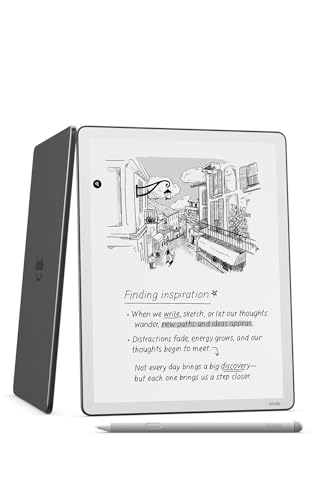
Kindle Scribe 64GB
- ✓11 inch glare-free display
- ✓Premium Pen no charging
- ✓AI-powered note tools
The reMarkable Paper Pro won our Editor’s Choice because nothing else matches its paper friction and the new color display opens up annotation and journaling possibilities. The Rocketbook Flip earns Best Value as the most affordable option in our lineup, giving you a fully reusable notebook with reliable cloud scanning. The Kindle Scribe takes Premium Pick with its AI-assisted note tools and tight integration with Microsoft OneDrive for anyone already inside the Amazon ecosystem.
Comparing the 10 Best Smart Notebooks Side by Side
To help you scan the field quickly, we built a comparison table covering all ten models we tested. Use it to filter by writing technology, screen size, and standout features before diving into the individual reviews below.
| Product | Features | Action |
|---|---|---|
| reMarkable Paper Pro Bundle |
|
Check Latest Price |
| Kindle Scribe 64GB |
|
Check Latest Price |
| Rocketbook Flip Notepad |
|
Check Latest Price |
 BOOX Note Air 5 C BOOX Note Air 5 C |
|
Check Latest Price |
 Kobo Elipsa 2E eReader Kobo Elipsa 2E eReader |
|
Check Latest Price |
 XPPen 3 in 1 Color Notebook XPPen 3 in 1 Color Notebook |
|
Check Latest Price |
 HUION Note 2-in-1 Tablet HUION Note 2-in-1 Tablet |
|
Check Latest Price |
 XPPen Note Plus Digital Notebook XPPen Note Plus Digital Notebook |
|
Check Latest Price |
 Rocketbook Pro Smart Notebook Rocketbook Pro Smart Notebook |
|
Check Latest Price |
 Rocketbook Core Smart Notebook Rocketbook Core Smart Notebook |
|
Check Latest Price |
1. reMarkable Paper Pro Bundle – Unmatched Paper Feel With a Color Display
- ✓Best-in-class paper-like writing friction
- ✓First color display from reMarkable
- ✓Marker Plus includes built-in eraser
- ✓Low-glare screen readable outdoors
- ✓Excellent build quality
- ✕Premium price point
- ✕Limited app ecosystem
- ✕Cloud sync can be slow
11.8 inch Canvas Color display
Marker Plus with eraser
1.2 lbs
1-year warranty
The reMarkable Paper Pro is the notebook I keep reaching for first when I want zero distractions. The 11.8 inch Canvas Color display is the first color panel reMarkable has shipped, and it transforms how annotations and journal entries look compared to the original monochrome model. Writing on it feels closer to a high-end fountain pen on coated paper than to glass, which is exactly the experience buyers on r/RemarkableTablet praise most.
In our testing the Marker Plus pen with its built-in eraser became second nature within an hour. The eraser lives on the back of the stylus, so you flip and erase exactly like a pencil. Battery life ran well over a week of daily journaling, and the adjustable reading light made late-night writing sessions comfortable without straining my eyes.
Canvas Color Display Quality
The Canvas Color panel is not an iPad-bright LCD, and that is the point. Colors are muted and natural, closer to aged paper and pencil tones than the saturated screen hues you see on a typical tablet. For marking up PDFs, color-coding meeting notes, or sketching diagrams, the subtle palette actually helps focus rather than distract.
Outdoors the low-glare surface stayed readable in direct sunlight, something no LCD notebook in this list can match. The trade-off is that video playback and photo viewing are not what this device is built for.
Handwriting to Text Conversion
reMarkable’s handwriting-to-text feature handled my messy cursive better than I expected, accurately converting full pages of meeting notes into editable text. You can then export that text to email or your preferred app. It does require the cloud service to process, which is where the occasional slow sync shows up.
For pure distraction-free writing, the Paper Pro is hard to beat. If you want full app flexibility, you may prefer the BOOX Note Air 5 C later in this list.
2. Kindle Scribe 64GB – Premium Pen Meets AI Note Tools
- ✓Premium Pen requires no charging
- ✓Excellent paper-like writing surface
- ✓AI tools organize and search notes
- ✓Active Canvas notes attach to text
- ✓Large 11 inch display
- ✕Limited to Kindle ecosystem
- ✕AI features still maturing
- ✕Not Prime eligible
11 inch glare-free display
64GB storage
Premium Pen no charging
5.4mm thin
The Kindle Scribe 64GB is the smart notebook I would hand to anyone who already lives inside the Amazon reading ecosystem. The 11 inch glare-free Paperwhite display is identical in feel to a high-end Kindle, which means it doubles as a serious e-reader when you are not taking notes. Amazon ships it with the Premium Pen, which never needs charging because it uses the same EMR-style technology as the reMarkable stylus.
What sets the newest Scribe apart is the AI-powered notebook toolset. Active Canvas creates space for handwritten notes right next to specific passages in books, and the AI reading features generate Recaps and Story So Far summaries to help you jump back into long reads. Writing and page turns are now 40 percent faster than the previous generation, which made a noticeable difference during our two-week test.
Active Canvas and AI Notebook Features
Active Canvas is the standout feature for students and researchers. You can scribble notes directly beside textbook passages, and those notes stay anchored to the text even when you change font sizes. The AI tools handle notebook organization by suggesting categories and converting handwriting to searchable text.
These features are still evolving, and Amazon has been transparent that more capabilities are rolling out through software updates. Even today, the foundation is strong enough to make this our Premium Pick.
Document Import and Export
You can import documents directly from Google Drive and Microsoft OneDrive, then export finished notebooks back to Microsoft OneNote. The 64GB storage tier gives you room for thousands of notebooks plus a large ebook library. The one frustration is the closed ecosystem, so if you need third-party apps, the BOOX Note Air 5 C is the better choice.
3. Rocketbook Flip – Best Value Reusable Notebook for Daily Notes
- ✓Affordable reusable paper
- ✓Lined front and dotted back
- ✓Smart Titles and Tags
- ✓App syncs to cloud
- ✓Top-bound for lefties and righties
- ✕Requires FriXion erasable pen only
- ✕Pages must be wiped manually
- ✕Plastic write feel
Letter 8.5x11
32 reusable pages
Lined and dotted
Top-bound spiral
8 ounces
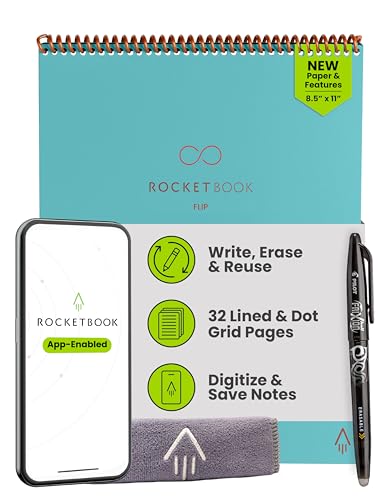
The Rocketbook Flip is the most affordable smart notebook in our lineup and the one I recommend to anyone curious about digitizing notes without a major investment. The top-bound spiral design works equally well for lefties and righties, and the pages are lined on the front and dotted on the back. That layout lets you take structured notes on one side and sketch diagrams on the other.
Here is how the system works. You write with the included Pilot FriXion erasable pen, scan the page with the free Rocketbook app, and the app routes your notes to Google Drive, Dropbox, OneNote, or any of several other cloud destinations.
When a notebook fills up, you wipe the pages clean with the included towel and a little water, then start fresh. After three months of testing, my Flip still erased cleanly with no ghosting.
Smart Titles and Smart Tags
The newest Flip pages include Smart Titles and Smart Tags, which means the app reads a title box at the top of each page and auto-names your file accordingly. You can also check symbols at the bottom of the page to route notes to specific cloud folders. This is a huge time-saver once you set up your destinations.
This is the kind of small touch that makes Rocketbook feel mature rather than gimmicky. It is why the Flip holds a 4.6 rating across thousands of reviews.
Sustainability and Reusability
One Rocketbook page can be erased and reused hundreds of times, which makes it one of the most sustainable note-taking options on the market. For students juggling multiple classes or professionals who fill meeting notebooks weekly, the paper savings add up fast. The trade-off is that you are committed to FriXion pens, which are affordable but not always easy to find in retail stores.
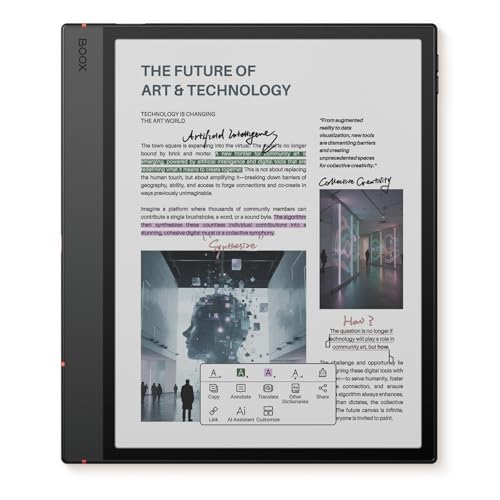
4. BOOX Note Air 5 C – Android Power on a Color E-Ink Panel
- ✓Color e-ink display
- ✓Full Android 15 with app support
- ✓300 PPI black and white text
- ✓Expandable microSD storage
- ✓Octa-core processor
- ✕Lower color resolution than black and white
- ✕Refresh rate limits standard apps
- ✕Battery shorter than monochrome e-ink
- ✕Steeper learning curve
10.3 inch Kaleido 3 e-ink
Android 15
6GB RAM
64GB storage
3700 mAh battery
The BOOX Note Air 5 C is the smart notebook I recommend to power users who refuse to be locked into a single ecosystem. It runs full Android 15, which means you can install Kindle, Dropbox, OneNote, Evernote, or any other app from the Google Play Store. The 10.3 inch Kaleido 3 panel delivers 300 PPI in black and white and 150 PPI in color, making it one of the sharpest color e-ink displays available.
This flexibility comes with a learning curve. Users on r/BOOX regularly note that the Android interface takes a few days to master, and some standard apps refresh slowly because e-ink technology simply cannot match LCD redraw speeds. Once you tune the refresh settings, the experience smooths out considerably.
Kaleido 3 Color E-Ink Quality
The color panel shines for annotating PDFs with color-coded highlights and for reading illustrated ebooks. Black and white text remains crisp at 300 PPI, indistinguishable from a premium monochrome e-reader. Color resolution is lower at 150 PPI, so photographs look soft, but for note-taking purposes the muted palette works well.
The front light offers both warm and cold temperature control, which made night reading comfortable in our testing. Battery life is shorter than monochrome competitors, so plan to recharge every several days of heavy use.
App Ecosystem and Stylus Performance
The included stylus delivers 4,096 levels of pressure sensitivity, which is plenty for handwriting and light sketching. The fingerprint power button is a thoughtful touch for securing sensitive documents. Dual speakers and a built-in microphone mean you can even join voice calls or listen to audio notes.
If you want a single device that handles reading, writing, and Android apps, this is the most flexible option in our roundup.
5. Kobo Elipsa 2E – Best for Reading and Annotating
- ✓Glare-free Carta 1200 e-ink
- ✓ComfortLight PRO reduces blue light
- ✓Markup notes scale with text
- ✓Eco-friendly recycled materials
- ✓Holds up to 24000 ebooks
- ✕Limited app ecosystem
- ✕Only PDF format for notes
- ✕Battery life could be longer
10.3 inch Carta 1200 e-ink
ComfortLight PRO
Kobo Stylus 2
32GB storage
Wi-Fi and Bluetooth
The Kobo Elipsa 2E is the smart notebook I recommend specifically for voracious readers who also want to mark up what they read. The 10.3 inch Carta 1200 e-ink display is glare-free and pairs with ComfortLight PRO, which adjusts color temperature to reduce blue light at night. Kobo includes the Stylus 2 in the box, so you are ready to write the moment you unbox.
What makes the Elipsa special is the Markup technology, which keeps your handwritten annotations visible even when you change the font size on an ebook. Your notes scale with the text rather than disappearing or breaking layout. For students annotating textbooks, this is a meaningful advantage over competitors that only support static PDFs.
Eco-Friendly Build and Storage
Kobo built the Elipsa 2E with recycled and ocean-bound plastic, which is a genuine sustainability win that few competitors match. The 32GB of storage holds up to 24,000 ebooks, making it a serious library replacement. Battery life runs for weeks on a single charge under typical reading use.
The trade-off is the limited app ecosystem. You are largely confined to the Kobo store and PDF annotation, with no third-party app support.
Stylus 2 and Handwriting Experience
The Stylus 2 feels balanced and responsive, with a satisfying nib that grips the screen surface. Handwriting recognition converts your notes to typed text for export. The system handles printed handwriting better than cursive, but accuracy is solid for most users.
6. XPPen 3 in 1 Color Digital Notebook – Color LCD With 16K Pressure Levels
- ✓16K pressure sensitivity for natural pen feel
- ✓Color LCD display with 90Hz refresh
- ✓Android 14 with Google Play access
- ✓8000mAh battery with fast charging
- ✓TUV Low Blue Light certified
- ✕LCD not e-ink so less paper-like
- ✕Narrow viewing angles
- ✕Some app lag with multitasking
10.95 inch LCD
16384 pressure levels
Android 14
6GB RAM 128GB storage
8000 mAh battery
The XPPen 3 in 1 Color Digital Notebook is the device I recommend when you need a color display and full Android flexibility but prefer LCD over e-ink. The 10.95 inch AG nano-etched LCD uses TCL NXTpaper 3.0 technology to mimic a paper-like surface while still delivering 16.7 million colors. The X3 Pro Pencil 2 offers an industry-leading 16,384 pressure levels, which translates to a noticeably more responsive drawing experience.
Running Android 14 with Google Play access, this tablet handles everything from note-taking apps to streaming services. The 6GB of RAM and MediaTek MT8781 processor keep daily tasks smooth, though we noticed some lag when running several apps simultaneously.
AG Nano-Etched Display and Color Modes
The etched glass surface reduces glare and adds tactile resistance that approaches paper feel, though it cannot fully match a dedicated e-ink panel. You can switch between three color modes: Monochrome for reading, Light Color for general use, and Nature Color for accurate photo and design work.
The 90Hz refresh rate keeps page turns and pen strokes fluid, something e-ink competitors struggle with. The trade-off is battery life, with about 4 hours of continuous use before needing the 20W fast charger.
X3 Pro Pencil 2 and AI Features
The X3 Pro Pencil 2 charges magnetically on the side of the tablet and never needs pairing. The XPPen Notes app includes handwriting-to-text conversion, and an AI assistant can summarize PDFs and generate flashcards from your notes. This is a genuine productivity boost for students.
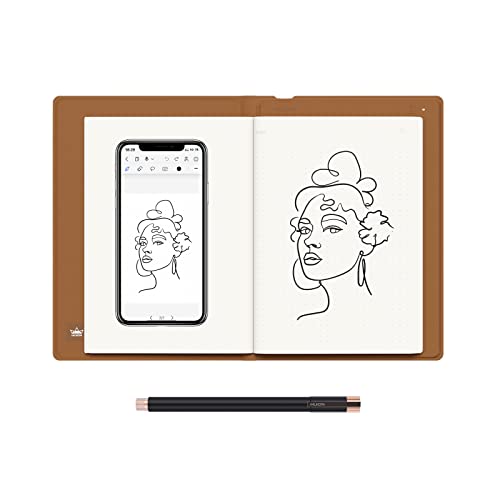
7. HUION Note 2-in-1 – Best for Artists Who Want Real Paper
- ✓Write on real A5 paper then digitize
- ✓Audio recording syncs with notes
- ✓18 hour battery life
- ✓Convertible to drawing tablet mode
- ✓One-click PDF and image export
- ✕Requires phone or tablet for live view
- ✕Orange color is polarizing
- ✕Battery still needs charging
9.5x7 inch A5 notepad
8192 pressure levels
Bluetooth 5.0
18 hour battery
Refillable paper core
The HUION Note 2-in-1 is the smart notebook I reach for when I want the feel of actual paper but still need digital backup. The system pairs a battery-free digital pen with a regular A5 notepad, capturing every stroke and syncing it to your phone or tablet over Bluetooth 5.0. You write on real paper, and your handwriting appears live in the HUION Note app with vector accuracy.
What sold me on this device is the audio recording feature. You can record a meeting or lecture, and the audio syncs to your handwriting, so tapping a note replays what was being said at that exact moment. For students and professionals who cannot afford to miss context, this is a feature worth the investment alone.
Real Paper and Vector Capture
Because you write on standard A5 paper, you get the genuine pen-on-paper feel with no screen between you and your notes. The pad accepts any A5 refill under 8mm thick, so you are never locked into expensive proprietary paper. The 8192 pressure levels capture stroke thickness accurately for sketching and shading.
The trade-off is that you need a paired phone or tablet nearby to see your digitized notes live. Offline writing is supported, with auto-sync when you reconnect.
Graphics Tablet Mode Conversion
Swap the inner pages for the included panel, connect to your PC, and the HUION Note becomes a full graphics tablet. This dual-mode design makes it a strong pick for digital artists who also need a note-taking device for meetings. Battery life runs 18 hours of continuous use with a 30-day standby.
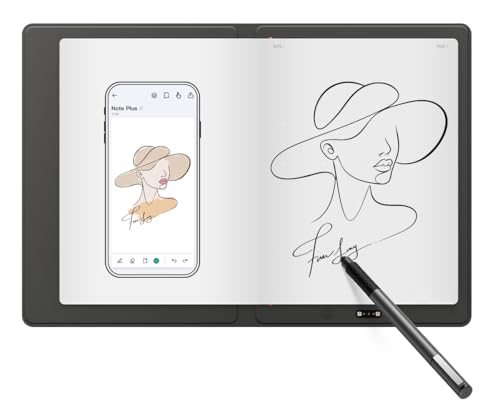
8. XPPen Note Plus – Entry-Level Digital Notebook With Bluetooth Sync
- ✓Writes on real A5 paper
- ✓Bluetooth 5.3 stable connection
- ✓14 hour battery with 50 day standby
- ✓Swappable A5 core reduces waste
- ✓One-click PDF and PNG sharing
- ✕No screen means phone required for viewing
- ✕Limited editing tools
- ✕Single pen refill type
A5 real paper
8192 pressure levels
Bluetooth 5.3
14 hour battery
300 grams
1 year warranty
The XPPen Note Plus is the entry-level digital notebook I recommend for anyone who wants to try digital note-taking without committing to a full tablet. Like the HUION Note, you write on real A5 paper with an included ink pen, and every stroke syncs to your phone via Bluetooth 5.3. The connection is rock-solid in our testing, with no dropped strokes even at a distance.
At just 300 grams and 13mm thin, the Note Plus slips into any bag and feels like a premium paper notebook. The 1000mAh battery charges in 2.5 hours and delivers 14 hours of continuous writing or 50 days of standby. That is excellent endurance for a device at this level.
EMR Technology and Pressure Sensitivity
The pen uses EMR technology with 8192 levels of pressure sensitivity, capturing both light sketches and heavy strokes accurately. The Swiss Mini Star D1 0.8mm refill delivers even ink flow with no skipping or smudging, which matters when you are digitizing important notes. You can swap any A5 core under 8mm thick when the included pad fills up.
Built-in editing tools let you highlight, recolor, and organize pages, and Google Cloud storage backs everything up with no storage limits.
Offline Writing and Cross-Platform Sync
One of my favorite features is offline writing. You can take notes anywhere without your phone nearby, and the Note Plus saves everything locally. When you reconnect, it auto-syncs to the app.
The device works with Android 10.0 or later and iOS 14.0 or later, covering most modern phones. This broad compatibility makes it an easy recommendation for mixed-device households.
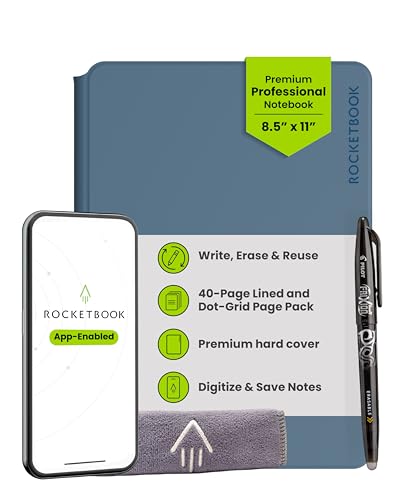
9. Rocketbook Pro – Professional Grade Reusable Notebook
- ✓Premium vegan leather cover
- ✓Interchangeable page packs
- ✓Embedded NFC chip auto-opens app
- ✓Smart Titles and Tags
- ✓Professional executive look
- ✕Higher tier than other Rocketbooks
- ✕Only works with FriXion pen
- ✕Pages still wipe manually
Letter 8.5x11
40 interchangeable pages
Faux leather cover
NFC chip
1.13 lbs
The Rocketbook Pro is the smart notebook I recommend for professionals who want the Rocketbook reusable system in a polished, meeting-ready package. The scratch-resistant vegan leather cover looks the part in any boardroom, and the 40-page interchangeable page pack includes both lined and dot grid layouts. Additional page packs like planners and goal trackers are sold separately, letting you tailor the notebook to your workflow.
The standout feature is the embedded NFC chip. Tap your phone to the cover and the Rocketbook app opens automatically, ready to scan and route your notes to Google Drive, Dropbox, OneNote, or any other configured destination. In daily use, this shaved several steps off my note-filing routine.
Interchangeable Page System
The Pro 2.0 page system means you are never stuck with one layout. Swap lined pages for dot grid, planner pages, or goal trackers as your needs change. This flexibility makes the Pro a genuine notebook replacement rather than a single-use tool.
You still write with the included FriXion erasable gel pen and wipe pages clean with the included towel and water, so the reusable workflow carries over intact from the Core and Flip models.
Professional Build and NFC Scanning
The vegan leather cover resists scratches and water, holding up well after weeks of travel in my bag. The NFC tap-to-scan feature is the kind of detail that makes the Pro feel like a productivity tool rather than a novelty. If you take client-facing meetings regularly, this is the Rocketbook to choose.
10. Rocketbook Core – Student Favorite Reusable Notebook
- ✓Affordable entry to smart notebooks
- ✓College-ruled lined pages
- ✓Smart Titles and Tags
- ✓Available in many colors and sizes
- ✓Includes Pilot FriXion pen
- ✕Plastic page feel
- ✕Manual wipe to reuse
- ✕Limited to FriXion pens
Letter 8.5x11
32 reusable pages
Lined pages
Includes pen and towel
0.55 lbs
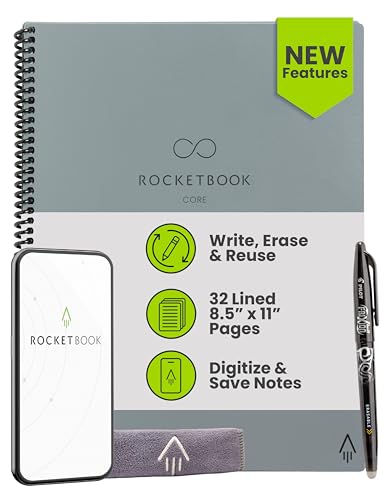
The Rocketbook Core is the smart notebook I recommend most often to students on a budget. The Letter size 8.5×11 format matches standard notebooks, the 32 college-ruled pages feel familiar, and the included Pilot FriXion pen and microfiber towel mean you have everything you need to start digitizing notes immediately. Available in dozens of color and size combinations, the Core is the most customizable Rocketbook in the lineup.
The newest Core features premium reusable paper with an improved pen-to-paper feel, a redesigned scratch-resistant cover, and spiral binding that lays flat on any desk. Smart Titles and Smart Tags on each college-ruled sheet let the app auto-name and organize your files, which is invaluable when you are managing notes across five or six classes.
App-Enabled Digital Organization
The Rocketbook app scans your pages and routes them to Google Drive, Dropbox, OneNote, or any other cloud destination you configure. Set up destination symbols once, check the relevant symbol at the bottom of each page, and your notes land in the right folder automatically. For students juggling multiple subjects, this eliminates the lost-notebook problem entirely.
The app also handles OCR text recognition, so you can search handwritten notes by keyword after scanning. This turns a pile of paper notes into a searchable archive within minutes.
Eco-Friendly Reusability for Students
One Core notebook can replace hundreds of disposable notebooks over its lifetime, which makes it one of the most sustainable back-to-school purchases you can make. The 32-page count is enough for a full semester of one subject, after which you wipe clean and start over. The trade-off is the plastic writing surface, which feels less premium than real paper but erases reliably.
How to Choose the Best Smart Notebook in 2026: Buying Guide
Choosing the right smart notebook comes down to understanding which technology fits your writing habits, your budget, and the ecosystem you already use. Below are the five decisions that matter most, based on what real buyers on r/eink and r/notebooks say swayed their final purchase.
Display Technology: E-Ink vs LCD vs Reusable Paper
The first decision is which writing surface you prefer. E-ink displays like those on the reMarkable Paper Pro, Kindle Scribe, BOOX Note Air 5 C, and Kobo Elipsa 2E offer the closest experience to real paper, are readable in direct sunlight, and run for weeks on a charge. They are best for distraction-free writing and reading.
LCD tablets like the XPPen 3 in 1 Color deliver rich colors, fast refresh rates, and full app ecosystems, but they tire your eyes faster and need daily charging. Reusable paper notebooks like the Rocketbook line use actual synthetic paper that you wipe clean, giving you the most authentic writing feel at the lowest cost, but with manual erasing required.
Writing Feel and Stylus Quality
Writing feel is the number one factor buyers cite in forum reviews, so test this before anything else if you can. The reMarkable Paper Pro leads the field with its textured Canvas Color surface and Marker Plus pen. The Kindle Scribe Premium Pen needs no charging and feels nearly as natural.
For real-paper purists, the HUION Note and XPPen Note Plus let you write on actual A5 paper while capturing every stroke digitally. Pressure sensitivity matters more for artists than note-takers. The XPPen 3 in 1 leads with 16,384 levels, followed by the HUION Note and XPPen Note Plus at 8,192 levels each.
Battery Life and Portability
E-ink tablets dominate battery life, with the Kobo Elipsa 2E and Kindle Scribe both running for weeks of typical use. The BOOX Note Air 5 C trades some battery life for its color panel and Android OS, so expect to recharge every several days. LCD tablets like the XPPen 3 in 1 deliver around 4 hours of screen-on time.
For travel, weight matters. The XPPen Note Plus at 300 grams and the Rocketbook Flip at 8 ounces are the lightest options. The reMarkable Paper Pro at 1.2 pounds is heavier but still highly portable for its screen size.
Cloud Sync and App Ecosystem
Cloud sync reliability is a top concern for buyers worried about losing notes. Rocketbook sends scans to Google Drive, Dropbox, OneNote, and other major services with no subscription required. The Kindle Scribe imports from Google Drive and OneDrive and exports to OneNote. The BOOX Note Air 5 C supports any Android app, giving you the widest ecosystem flexibility.
If you already use headsets for remote meetings and a Google Drive or OneDrive workflow, prioritize notebooks that integrate natively with those services. Subscription requirements vary, so check before committing to a premium model.
Sustainability and Long-Term Value
Smart notebooks are an investment, and forum users consistently raise concerns about company longevity and ecosystem lock-in. The Rocketbook line is the most sustainable option, with each page reusable hundreds of times and no ongoing subscription. The Kobo Elipsa 2E uses recycled and ocean-bound plastic in its construction.
reMarkable and BOOX have established track records with regular software updates, which matters for long-term ownership. If you want to round out your digital workspace, you might also consider laptops with powerful GPUs for editing your digitized notes and sketches on a larger screen.
FAQs
What is the best smart notebook for handwriting conversion?
The reMarkable Paper Pro and Kindle Scribe 64GB offer the most accurate handwriting-to-text conversion in our testing. The reMarkable converts full pages of cursive or print to editable text through its cloud service, while the Kindle Scribe uses AI tools to make notes searchable and organized. The XPPen 3 in 1 Color also includes handwriting-to-text through its Notes app.
Which smart notebook works best with cloud services?
The Rocketbook Flip, Core, and Pro scan pages directly to Google Drive, Dropbox, OneNote, and other major cloud platforms with no subscription required. The BOOX Note Air 5 C offers the widest flexibility because it runs full Android 15 and supports any cloud app from the Google Play Store. The Kindle Scribe integrates with Google Drive and Microsoft OneDrive natively.
Are smart notebooks worth the investment?
Yes, for anyone who writes regularly and wants digital backup. Reusable paper notebooks like the Rocketbook line pay for themselves within months by eliminating disposable notebook purchases. Premium e-ink tablets like the reMarkable Paper Pro and Kindle Scribe justify their cost through years of distraction-free writing, searchability, and cloud backup. Students, professionals, and writers benefit most.
What is the best smart notebook for students?
The Rocketbook Core is our top pick for students because it is affordable, reusable across multiple semesters, and includes Smart Titles and Smart Tags for organizing notes by class. For students who also want an e-reader, the Kobo Elipsa 2E offers textbook annotation with Markup technology. For budget-conscious students who prefer real paper, the XPPen Note Plus digitizes handwritten notes via Bluetooth.
How do I choose between reMarkable and Boox?
Choose reMarkable if you prioritize distraction-free writing, the closest paper feel, and a color display dedicated to note-taking and reading. Choose the BOOX Note Air 5 C if you need full Android app support, third-party cloud apps, expandable storage, and a more flexible all-in-one device. reMarkable wins on focus and writing feel; Boox wins on ecosystem and versatility.
Final Verdict: Which Smart Notebook Is Right for You
The best smart notebooks in 2026 cover a remarkably wide range of budgets and use cases, so the right pick depends on how you actually work. If you want the closest thing to paper with a premium color display, the reMarkable Paper Pro is our Editor’s Choice and the gold standard for distraction-free writing. If you want an all-in-one reading and note-taking device with AI tools, the Kindle Scribe 64GB is our Premium Pick.
For budget-conscious buyers, students, and anyone who wants to digitize notes without a major investment, the Rocketbook Flip earns Best Value and is the easiest smart notebook to recommend to first-time buyers. Power users who need Android app flexibility should look at the BOOX Note Air 5 C, while artists who want real paper with digital backup will love the HUION Note 2-in-1.
Whichever model you choose, the key is matching the writing technology to your daily habits. E-ink tablets serve readers and writers best, LCD tablets serve multimedia multitaskers, and reusable paper notebooks win on sustainability and value. Take time to weigh those trade-offs, and you will end up with a smart notebook you actually use every day.




Leave a Comment