
Your microwave just stopped working. The display went dark or the buttons won’t respond. Before you call a repair technician or buy a replacement, you should try to reset your microwave. I’ve helped countless homeowners troubleshoot their appliances, and I can tell you that a simple reset resolves most common microwave issues.
This guide will walk you through everything you need to know about how to reset a microwave. I’ll cover the three main reset methods, brand-specific instructions, and tell you when a reset won’t fix the problem.
What Does It Mean to Reset a Microwave
When you reset a microwave, you’re essentially rebooting its control board. Just like restarting a frozen computer, a power cycle clears temporary software glitches and error codes that accumulate during normal operation.
The control board is the microwave’s brain. It manages everything from the clock display to cooking power levels. When this board encounters an error or power fluctuation, it can freeze or display confusing error messages. A reset allows the capacitors to fully discharge and the board to restart fresh.
There are three types of resets you can perform: a soft reset through the control panel, a hard reset by unplugging the unit, and a factory reset that restores all default settings. Each method addresses different types of problems.
Common Reasons You Need to Reset Your Microwave
Microwaves develop issues for several reasons. I’ve seen these problems repeatedly during my years working with appliance troubleshooting:
Power surges from electrical storms can scramble the control board’s memory. The microwave might work but display strange symbols or refuse to accept commands.
Power outages often leave microwaves in a confused state. When power returns, the control board may not initialize properly, leaving you with a blank display or unresponsive buttons.
Error codes appear when the microwave detects a problem. Sometimes these codes persist even after the underlying issue is resolved. A reset clears these codes from memory.
Frozen displays happen when the clock gets stuck on a specific time or shows random characters. This usually indicates the control board needs to restart.
Unresponsive buttons can result from keypad lock mode or a temporary software glitch. Either way, a reset often restores normal function.
Child lock activation locks the control panel intentionally. This safety feature prevents accidental operation, but many people don’t know how to deactivate it.
Safety Precautions Before You Begin
Before attempting any reset method, I want to share some important safety considerations. Microwaves contain high-voltage components even when unplugged. The internal capacitors can hold a dangerous electrical charge for several minutes after power is disconnected.
Never remove the microwave’s outer casing. The high-voltage diode, magnetron, and capacitor assemblies can deliver lethal shocks even when the unit is unplugged. The reset methods in this guide only involve external controls and power connections.
Always ensure your hands are dry when touching the microwave or its power cord. Water and electricity don’t mix, and a damp hand could receive a shock from even a unplugged appliance that still has residual charge.
For built-in and over-the-range microwaves, be cautious when accessing the power supply. Some units are hardwired directly to your home’s electrical system. If you’re uncomfortable working with circuit breakers or electrical panels, contact a professional.
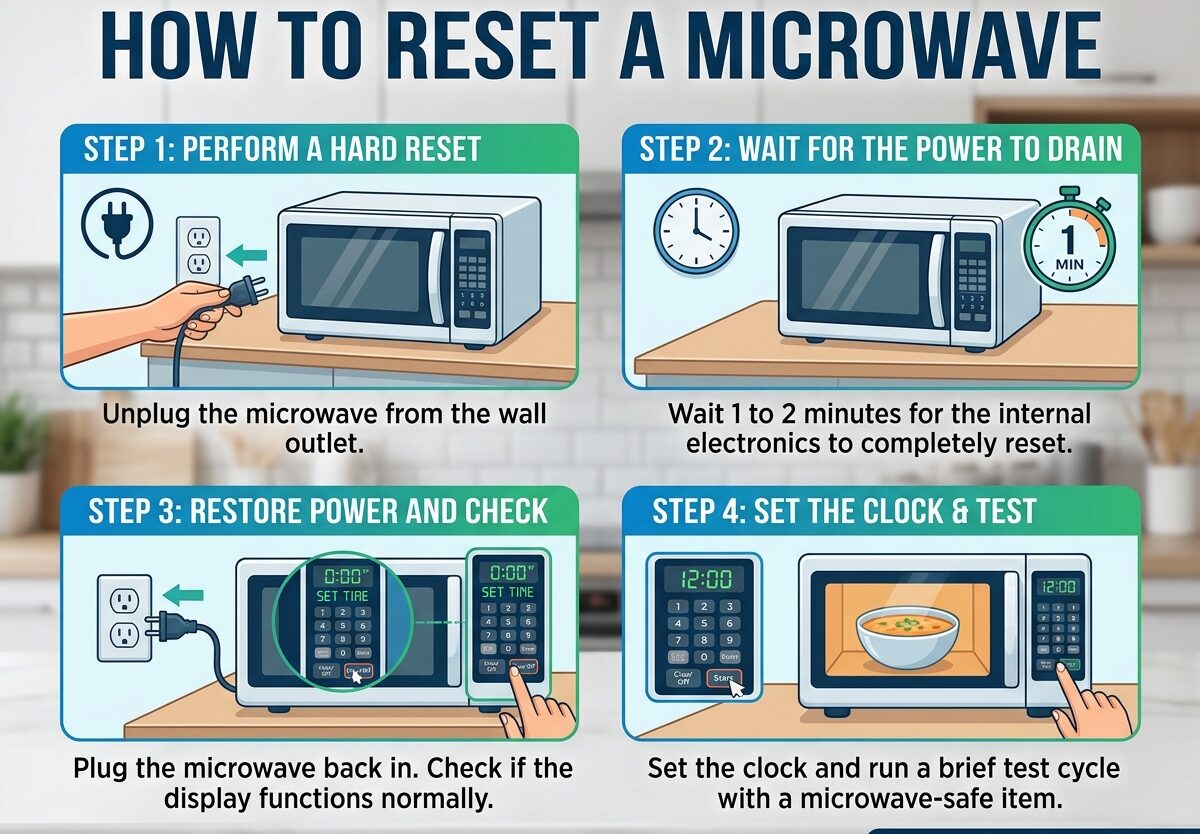
Method 1: Power Cycle Reset (Unplug Method)
The power cycle reset is the most effective method for clearing stubborn errors. I use this approach first because it works for almost any microwave issue. This hard reset completely drains power from the control board, forcing a full restart.
Step 1: Turn off the microwave if it has any power. Open the door and stop any active cooking cycle. Remove any food or containers from inside the unit.
Step 2: Locate the power cord where it enters the microwave. For countertop models, follow the cord to the wall outlet. For built-in units, you may need to access the power from a nearby cabinet or the junction box in the wall.
Step 3: Unplug the microwave from the electrical outlet. If the cord is difficult to reach, you can unplug it from the wall outlet instead of the microwave itself.
Step 4: Wait at least 5-10 minutes. This is crucial. The capacitors inside need time to fully discharge. I recommend setting a timer so you don’t rush this step. The longer you wait, the more complete the reset will be.
Step 5: While waiting, check the outlet for any visible damage or debris. If you’re using a power strip, try plugging the microwave directly into a wall outlet afterward.
Step 6: After the waiting period, plug the microwave back in. You should hear the control board initialize and the display should light up.
Step 7: Test the microwave by heating a cup of water. Start with 30 seconds to verify everything works properly before using it for normal cooking.
Method 2: Control Panel Soft Reset
A soft reset works through the microwave’s own buttons. This method is faster than unplugging and is perfect for minor glitches like frozen displays or unresponsive buttons.
Step 1: Locate the “Off/Cancel” or “Stop/Clear” button on your microwave’s control panel. This button is usually prominent and may be labeled with an X or a stop symbol.
Step 2: Press the Off/Cancel button once. This should clear any active cooking cycles or error messages from the display.
Step 3: If the display is frozen, press and hold the Off/Cancel button for 3-5 seconds. Many microwaves use this long press as a soft reset command.
Step 4: Look for a beep or display change indicating the reset was successful. The clock may flash or the display might show all zeros.
Step 5: If your microwave has a dedicated “Reset” button (some models do), press it once or hold it for 3 seconds. This button is usually small and may be near the clock set controls.
Step 6: Test the keypad by pressing several buttons. If they respond normally, the soft reset worked. If the microwave remains unresponsive, proceed to the power cycle method.
The control panel reset is particularly useful for clearing error codes without losing your clock settings or programmed cooking times. It’s a gentle approach worth trying before the more drastic hard reset.
Method 3: Factory Reset Option
Some modern microwaves include a factory reset feature in their menu. This option restores all settings to their original defaults, which can resolve deeper software issues.
Step 1: Check your microwave’s manual for the factory reset procedure. Not all models have this feature. If you don’t have the manual, look for a “Settings” or “Options” button on the control panel.
Step 2: Press the Settings/Options button. Use the keypad or dial to navigate through the menu options. Look for “Factory Reset,” “Default,” or “Reset All.”
Step 3: Select the factory reset option. The microwave may ask you to confirm this choice. Press “Yes” or “Confirm” to proceed.
Step 4: Wait for the microwave to complete the reset process. The display may go blank or show a progress indicator. This typically takes 30-60 seconds.
Step 5: Once the reset is complete, the microwave will restart automatically. You’ll need to reprogram the clock and any custom settings.
A factory reset is essentially a clean slate for your microwave’s software. Use this method when other resets fail or when you want to completely clear all programmed settings and start fresh.
Resetting Built-in and Over-the-Range Microwaves
Built-in and over-the-range microwaves present unique challenges because they’re not easily unplugged. These models are often hardwired into your home’s electrical system or plugged into outlets inside cabinets.
For hardwired units: You’ll need to access your home’s electrical panel. Locate the circuit breaker that controls the microwave. It’s usually labeled “Microwave,” “Kitchen Appliance,” or “Range.” Flip the breaker to the “Off” position, wait 10 minutes, then flip it back to “On.”
For plugged but inaccessible units: Some over-the-range microwaves plug into an outlet inside the cabinet above. You may need to remove items from the cabinet and feel around for the power cord. If you can’t reach it, using the circuit breaker is safer than climbing on counters.
Check the GFCI outlet: Many kitchens have Ground Fault Circuit Interrupter outlets near the sink. If your microwave shares a circuit with these outlets, a tripped GFCI could be cutting power to your microwave. Look for outlets with “Test” and “Reset” buttons and press “Reset” if needed.
Ventilation considerations: Over-the-range microwaves have exhaust fans. After a power reset, verify the fan still works properly. Sometimes the fan motor needs to be reinitialized after a complete power loss.
I always recommend checking the circuit breaker first before attempting to reach behind built-in units. It’s safer and often faster than trying to access hidden power connections.
Brand-Specific Reset Instructions
Different microwave brands have unique reset procedures. Here are the specific methods for the most common manufacturers:
Samsung Microwaves: Most Samsung models respond well to the power cycle method. Unplug for 5 minutes, then plug back in. For control panel issues, press and hold the “Stop/Eco” button for 3 seconds. Some Samsung microwaves have a dedicated “Reset” button near the clock controls.
GE Microwaves: GE microwaves often use the “Off/Clear” button for soft resets. Press and hold for 3 seconds. For hard resets, unplug the unit. GE built-in models may require resetting the circuit breaker twice in succession (off, wait 30 seconds, on, wait 30 seconds, off, wait 30 seconds, on).
LG Microwaves: LG models typically have a “Stop/Cancel” button. Hold it for 3-5 seconds to reset. Some LG microwaves use a combination of button presses: press “Stop/Clear,” then “0,” then “Start” to initiate a reset.
Whirlpool Microwaves: Whirlpool microwaves often respond to the “Cancel/Off” button held for 3 seconds. For deeper resets, unplug the unit for 10 minutes. Some Whirlpool models have a “Reset” button in the upper right corner of the control panel.
Panasonic Microwaves: Panasonic microwaves typically use the “Stop/Reset” button. Press once to clear, hold for 3 seconds for soft reset. For complete reset, unplug for 10 minutes. Some Panasonic models require pressing “Timer,” “Clock,” and “Start” in sequence after power is restored.
Sharp Microwaves: Sharp microwaves can be tricky. Many models require pressing “Stop/Clear” then “0” then “Start” to reset after power loss. Some Sharp units have a specific reset sequence in the manual that must be followed exactly.
If your brand isn’t listed here, consult your owner’s manual. The manufacturer’s website often has digital copies of manuals if you’ve misplaced yours.
After the Reset: Reprogramming Your Microwave
Once your microwave is reset and working again, you’ll need to reprogram some settings. This process varies by model but typically includes:
Setting the clock: Press the “Clock” button, then use the number pad to enter the current time. Press “Clock” again or “Start” to confirm. Some models use a “Clock/Set” button instead.
Power level preferences: If your microwave remembers power level settings, you may need to reprogram your favorites. Most models allow you to set default power levels by pressing “Power Level” before entering cook time.
Weight and food categories: Some modern microwaves have weight-based cooking presets. You may need to re-enter your preferred settings for common foods like popcorn, potatoes, or beverages.
Sound settings: Check if your microwave has audible tones. Some models allow you to adjust the volume or turn sounds off completely. Look for a “Sound” or “Beep” button in the settings menu.
Child lock reactivation: If you had the child lock enabled, you’ll need to reactivate it after the reset. The procedure varies, but it usually involves pressing and holding two buttons simultaneously for 3-5 seconds.
Take a few minutes to familiarize yourself with the reprogrammed settings. Test each function to ensure everything works as expected before relying on the microwave for regular use.
When a Reset Is Not Enough: Warning Signs
Sometimes a microwave has problems that a reset cannot fix. I’ve learned to recognize these warning signs that indicate more serious issues:
The microwave runs but doesn’t heat: This usually indicates a problem with the magnetron, high-voltage diode, or capacitor. These components can fail and aren’t affected by control board resets. A humming sound without heat is a classic symptom.
Burning smells or smoke: Any burning odor is cause for immediate concern. This could indicate an electrical short, a failing magnetron, or debris inside the waveguide. Stop using the microwave immediately and consult a professional.
Sparking or arcing inside: Visible sparks or bright flashes inside the cooking chamber mean something is seriously wrong. This could be caused by a damaged waveguide cover, metal contamination, or a shorting magnetron. Unplug immediately and don’t attempt to use it again.
Door doesn’t latch properly: The door switch assembly is a critical safety component. If the door doesn’t close securely or the microwave operates with the door open, the safety interlocks have failed. This is a serious hazard that requires professional repair.
Loud unusual noises: While microwaves aren’t silent, new loud grinding, buzzing, or rattling sounds indicate mechanical problems. This could be a failing turntable motor, cooling fan, or magnetron issue.
Repeated error codes: If an error code returns immediately after a reset, the microwave has detected a genuine hardware problem. The code is trying to tell you something specific about the failure.
Physical damage: Cracks in the door, damage to the waveguide cover, or a visibly damaged interior can all render a microwave unsafe. Resetting won’t fix physical damage to these critical components.
If you experience any of these symptoms, a reset won’t solve the problem. Contact a qualified appliance repair technician or consider replacement. The average microwave lasts 7-10 years, so if your unit is older and experiencing major issues, replacement might be more cost-effective than repair.
Frequently Asked Questions About Resetting Microwaves
How do I fix my microwave that suddenly stopped working?
First, try a power cycle reset by unplugging the microwave for 5-10 minutes. Check that the outlet has power by plugging in another device. For built-in units, check your circuit breaker to ensure it hasn’t tripped. If the microwave still won’t work after these steps, the issue may be internal components like the thermal fuse or control board, which requires professional service.
How do I reset my microwave control panel?
To reset the control panel, press and hold the ‘Off/Cancel’ or ‘Stop/Clear’ button for 3-5 seconds. This should clear any frozen displays or unresponsive buttons. If this doesn’t work, try a full power cycle by unplugging the unit for 10 minutes. For specific models, check your manual as some have unique button combinations like pressing ‘Stop/Clear’ then ‘0’ then ‘Start’.
Do all microwaves have a reset button?
No, most microwaves do not have a dedicated reset button. The majority of models rely on power cycling (unplugging) or holding the ‘Off/Cancel’ button to reset. Some newer models from brands like GE and Panasonic include a reset function in their settings menu, but this is not standard across all microwaves. The primary reset method for most units remains unplugging for 5-10 minutes.
How long should I leave my microwave unplugged to reset it?
Leave your microwave unplugged for at least 5-10 minutes to ensure a complete reset. This time allows the internal capacitors to fully discharge and the control board’s memory to clear completely. Some issues may require up to 15 minutes unplugged. I recommend setting a timer so you don’t rush this critical step. Shorter unplugging times of 1-2 minutes often don’t provide enough time for a full reset.
Will resetting a microwave fix an error code?
Resetting can clear temporary error codes caused by power fluctuations or software glitches. However, if an error code indicates a genuine hardware problem (like a failed door switch or defective magnetron), the code will return after the reset. Persistent error codes after a reset typically mean the microwave needs professional repair. Common persistent codes include F3, F4, and E-11 which usually indicate component failures.
Does resetting a microwave fix heating problems?
No, resetting will not fix heating problems. If your microwave runs but doesn’t heat food, the issue is likely a failed magnetron, high-voltage diode, or capacitor. These components are responsible for generating microwave energy and aren’t affected by control board resets. A humming sound without heat typically indicates one of these components has failed and requires professional repair or replacement.
Can a tripped GFCI outlet affect my microwave?
Yes, a tripped GFCI outlet can cut power to your microwave. Many kitchens have GFCI outlets near sinks that share circuits with kitchen appliances. If your microwave suddenly stopped working, check nearby GFCI outlets and press the ‘Reset’ button if it’s popped out. This is a common issue I see frequently, especially in newer kitchens or after electrical storms.
What’s the average lifespan of a microwave?
The average microwave lasts 7-10 years with regular use. Budget models typically last around 5-7 years, while higher-end units can last 10-12 years or longer. Factors affecting lifespan include usage frequency, power quality in your home, and how well the microwave is maintained. If your microwave is over 10 years old and experiencing issues, replacement is often more cost-effective than repair.
Conclusion
Learning how to reset a microwave is an essential skill for any homeowner. The three methods I’ve covered—power cycle reset, control panel soft reset, and factory reset—will resolve most common microwave issues. Start with the simplest method (control panel reset) and work up to the power cycle if needed.
Remember that resetting isn’t a cure-all. If your microwave still doesn’t heat, makes unusual noises, or shows error codes after a reset, you likely have a hardware problem that requires professional attention. Don’t ignore warning signs like burning smells or sparks inside the unit.
Regular maintenance can help prevent future issues. Keep the interior clean, avoid running the microwave empty, and use surge protectors when possible. These simple habits extend your microwave’s lifespan and reduce the frequency of resets needed.
I hope this guide has helped you reset your microwave successfully. If you found this information helpful, consider bookmarking it for future reference. Microwave issues are frustrating, but most can be resolved quickly with the right knowledge.



Leave a Comment