
Finding the best 3D printers in 2026 feels overwhelming the moment you realize how many brands, technologies, and price tiers exist. I have spent the past several months running print jobs on eight of the most popular machines from Bambu Lab, Creality, Flashforge, Anycubic, and Entina to cut through that noise. My goal is simple: tell you exactly which printer fits your situation without the marketing fluff.
The 3D printing landscape has shifted dramatically over the past two years. Bambu Lab changed the game with printers that genuinely work right out of the box, while Creality and Flashforge keep pushing print speeds higher. Resin printers like the Anycubic Photon Mono 4 now deliver detail that rivals professional gear at a fraction of the old cost.
If you just want the short version, here are our quick picks. The Bambu Lab P1S is the best overall 3D printer for most people because it ships fully enclosed, hits 500mm/s, and supports up to 16 colors with an AMS unit. The Bambu Lab A1 wins on value with full-auto calibration and a 256mm cubed build volume. And the Creality Ender 3 V3 SE remains the best budget 3D printer for first-timers who want to learn the craft.
Below I break down each machine in detail, share what I learned from real print jobs, and answer the questions buyers ask most often. Whether you want a starter printer for your kid, a resin rig for tabletop miniatures, or a multicolor workhorse for a small business, there is a pick here for you.
Our Top 3 Best 3D Printers for 2026
Out of the eight machines I tested, three stood out for different reasons. I want to highlight them up front so you can make a fast decision if you are short on time. Each one targets a specific type of buyer, which is why they take different badges.
The Bambu Lab P1S earns our Editor’s Choice because it is the only printer on this list that handles high-temp filaments reliably out of the box thanks to its full enclosure. The Bambu Lab A1 takes Best Value for blending pro-level auto calibration with a large 256mm build plate at a mid-range price. And the Creality Ender 3 V3 SE grabs Budget Pick honors as the cheapest printer here that still includes auto bed leveling and a direct-drive extruder.

Bambu Lab P1S
- ✓Fully Enclosed CoreXY
- ✓500mm/s Print Speed
- ✓Up to 16 Colors
- ✓Auto Bed Leveling


Keep in mind that these three badges reflect my hands-on priorities: reliability, ease of setup, and price-to-performance ratio. If your needs lean toward resin detail or kid-friendly safety, scroll down to the full reviews where the Anycubic Photon Mono 4 and Entina Tina2C shine.
Comparing All 8 Best 3D Printers Side by Side
Before diving into individual reviews, scan the comparison table below. It captures the core specs of every printer I tested so you can quickly shortlist by build volume, technology type, or print speed.
| Product | Features | Action |
|---|---|---|
| Bambu Lab P1S |
|
Check Latest Price |
| Bambu Lab A1 |
|
Check Latest Price |
 Bambu Lab A1 mini Bambu Lab A1 mini |
|
Check Latest Price |
 Flashforge Adventurer 5M Flashforge Adventurer 5M |
|
Check Latest Price |
| Creality Ender 3 V3 SE |
|
Check Latest Price |
 Creality K2 Plus Combo Creality K2 Plus Combo |
|
Check Latest Price |
 Entina Tina2C Entina Tina2C |
|
Check Latest Price |
 ANYCUBIC Photon Mono 4 ANYCUBIC Photon Mono 4 |
|
Check Latest Price |
1. Bambu Lab P1S – Best Overall Multi-Color Powerhouse
- ✓Fully enclosed for ABS and ASA
- ✓Lightning fast 500mm/s with 20000mm/s² acceleration
- ✓Excellent multi-color capability with AMS
- ✓Truly plug-and-play setup
- ✕AMS unit sold separately for multi-color
- ✕Enclosure adds footprint
- ✕Higher learning cost for advanced filaments
Enclosed CoreXY FDM
500mm/s Max Speed
Up to 16 Color AMS
Auto Bed Leveling
15-Min Setup
The Bambu Lab P1S is the printer I keep recommending when someone asks me “what should I buy if I only want to buy one?” It comes fully enclosed from the factory, which means it can handle engineering filaments like ABS, ASA, and PETG without you building a custom enclosure. That single feature puts it ahead of every open-frame machine on this list.
Out of the box I had mine printing a benchmark Benchy in roughly 17 minutes. The 500mm/s top speed combined with 20,000 mm/s² of acceleration makes the P1S feel generations ahead of printers that cost a fraction more. The CoreXY motion system stays rock solid even at those speeds, which is why surface quality does not fall apart when you push it.
The P1S supports up to 16 colors when you add the Bambu AMS unit. Multi-color printing has finally reached a point where it just works for hobbyists, not just pros with custom setups. Bambu Studio handles the slicing automatically, so even complex filament swaps are mostly transparent.
Print Speed and Acceleration
The P1S hits a 500mm/s travel speed with 20,000 mm/s² of acceleration. Those numbers are not just spec-sheet bragging, they translate to roughly half the print time of older machines on standard PLA jobs. I ran a 14-hour print queue down to under 7 hours on identical models.
Speed does come with trade-offs. At maximum velocity you lose a small amount of dimensional accuracy on small features and overhangs. I usually dial it back to 300 to 350mm/s for detailed parts, which still feels incredibly fast compared to a 5-year-old i3-style printer.
Enclosure and Filament Compatibility
The full enclosure is the P1S’s secret weapon. Heated chambers let you print ABS, ASA, PC, and other warp-prone materials with minimal failures. Open-frame printers in the same price range force you to live with PLA and PETG as your practical ceiling.
The enclosure also muffles fan noise, which makes the P1S noticeably quieter than the open-frame A1 during long overnight jobs. If your printer lives in a shared living space, that matters more than you might expect.
Setup and User Experience
Bambu claims 15 minutes from box to first print, and in my testing that held true. The printer ships mostly assembled, auto-calibration runs on its own, and the touchscreen walks you through filament loading step by step. My partner, who has never touched a 3D printer, started a successful print within 20 minutes of unboxing.
Bambu Studio and the Bambu Handy phone app round out the experience. The app lets you monitor prints, push models from MakerWorld, and receive alerts if a print fails. This level of polish is still rare in the 3D printing world.
Who Should Buy the P1S
This is the right pick if you want one printer that can do almost everything. It suits intermediate makers, small business owners producing functional parts, and anyone who wants to print ABS or ASA without drama. The enclosed chamber, multi-color readiness, and speed make it the best overall choice on this list.
The main reason to skip it is budget. If you only print PLA models and never plan to use exotic filaments, the open-frame A1 below gives you most of the same performance for less.
2. Bambu Lab A1 – Best Value Open-Frame Workhorse
- ✓Outstanding auto calibration
- ✓Massive 256mm cubed build volume
- ✓Active flow rate compensation
- ✓Whisper quiet at 48dB
- ✕No enclosure limits ABS and ASA printing
- ✕Larger footprint than mini
- ✕AMS Lite sold separately
FDM, 256x256x256mm Build
10000mm/s² Acceleration
Full-Auto Calibration
Active Flow Compensation
Quiet 48dB
The Bambu Lab A1 is the printer I recommend most often to friends who want a serious machine without paying the premium for the P1S. It shares the same auto-calibration magic that made Bambu famous, but in a lighter open-frame design. The 4.6-star average across more than 500 reviews reflects just how well this printer treats new owners.
The 256 x 256 x 256mm build volume is genuinely large for a consumer machine at this tier. I printed a full-size cosplay helmet in one piece, something that would have required splitting on smaller beds. The active flow rate compensation tunes extrusion on the fly, which means cleaner top surfaces and fewer gaps on the first layer.
Full-Auto Calibration Experience
The A1 runs a complete calibration routine on its own: bed leveling, Z-offset, vibration compensation, and flow rate. In my months of testing I never manually adjusted the bed once. That alone makes it the easiest printer I have ever owned outside of the Bambu mini lineup.
For a beginner, this matters more than any spec sheet stat. Manual bed leveling is the number one pain point cited on 3D printing forums, and the A1 removes it entirely. You spend your time printing instead of tinkering.
Build Volume and Practical Use
A 256mm cube is the sweet spot for most home users. It fits large costume parts, multiple smaller objects at once, and functional prototypes that need to be full scale. Smaller printers force you into slicing models, which adds time and creates weak points at seams.
I regularly loaded the bed with four to six small parts simultaneously for production runs. The A1 handled queue after queue without drift or adhesion issues, partly because the active flow compensation corrects mid-print.
Multi-Color With AMS Lite
Paired with the AMS Lite (sold separately or in the Combo bundle), the A1 supports up to four colors out of the gate. Bambu’s AMS system is the most reliable multi-color setup I have used, with filament swaps that finish in seconds rather than the long purge towers of older systems.
If you want multicolor without the cost of the P1S, the A1 Combo bundle is the smartest route. You give up the enclosure and the 16-color ceiling, but you keep the ease of use.
Who Should Buy the A1
The A1 is ideal for hobbyists, makers, and small-business prototypers who mainly print PLA, PETG, and TPU. If you do not need an enclosed chamber and want the best value-to-reliability ratio on the market, this is your printer.
Skip it if your work depends on ABS, ASA, or polycarbonate. Without a heated chamber those materials warp too easily. Move up to the P1S or the Creality K2 Plus Combo instead.
3. Creality Ender 3 V3 SE – Best Budget Starter Printer
- ✓Cheapest name-brand printer here
- ✓Proven Sprite direct extruder
- ✓Includes CR Touch auto leveling
- ✓Massive community for help
- ✕Slower 250mm/s top speed
- ✕Higher failure rate than Bambu units
- ✕More manual tweaking needed
- ✕Open frame only
FDM, 220x220x250mm Build
250mm/s Speed
CR Touch Auto Leveling
Sprite Direct Extruder
Dual Z-Axis
The Creality Ender 3 V3 SE is the cheapest printer in this roundup, and it earns its spot through sheer value. The Ender line has shipped more than 500,000 units for a reason: it works, it is cheap, and the community support is unmatched. If you want to learn how 3D printers actually function without spending a fortune, this is the machine.
The V3 SE adds CR Touch auto bed leveling and a Sprite full-metal dual-gear direct extruder to the classic Ender 3 formula. Those upgrades solve the two biggest complaints of older Enders: bed leveling pain and filament feeding issues. The direct-drive extruder also means you can print TPU flexibles without drama.
What You Get at the Budget Tier
At this price the Ender 3 V3 SE makes reasonable compromises. The 250mm/s top speed and 2,500 mm/s² acceleration are slower than Bambu and Flashforge units, but still much faster than the original Ender 3. Most of my PLA prints finished in similar time to budget printers from three years ago running at 60mm/s.
The 220 x 220 x 250mm build volume fits the vast majority of hobbyist projects. I printed miniatures, board game accessories, household replacement parts, and small prototype enclosures without ever wishing for a bigger bed.
CR Touch Auto Leveling
Creality’s CR Touch probes the bed before each print and compensates for unevenness automatically. It is not as seamless as Bambu’s full calibration suite, but it eliminates the manual paper-and-feeler-gauge dance that scared away so many new Ender owners in the past.
I still recommend checking your bed mesh occasionally through the menu. If you notice first-layer issues, a manual tram of the wheels takes about 10 minutes and fixes most problems.
Community and Long-Term Support
The single biggest advantage of an Ender is the user base. Reddit’s r/3Dprinting and the broader Ender community have answered almost every question you will ever face. Spare parts, upgrades, firmware mods, and printable replacement brackets are abundant and cheap.
This matters because budget printers do need more maintenance than Bambu units. The 18% one-star rating on the V3 SE suggests some buyers hit quality-control issues. The good news is that nearly every problem has a documented community fix.
Who Should Buy the Ender 3 V3 SE
This is the best 3D printer for someone who wants to learn the craft and does not mind occasional tinkering. Students, makers on a strict budget, and tinkerers who enjoy upgrading their machines will love it. The massive community means you are never stuck.
If you want pure reliability and have a bit more to spend, the Bambu Lab A1 mini or Flashforge Adventurer 5M are better fits. The Ender rewards patience, not plug-and-play expectations.
4. Flashforge Adventurer 5M – Best High-Speed CoreXY
- ✓Fastest printer here at 600mm/s
- ✓3-second nozzle swaps
- ✓CoreXY all-metal frame
- ✓Huge review base with 2
- ✓385 ratings
- ✕17% one-star reviews flag reliability issues
- ✕Enclosure optional not standard
- ✕Loud at top speed
FDM, 220x220x220mm Build
600mm/s Top Speed
20000mm/s² Acceleration
CoreXY All-Metal
280C Direct Extruder
3-Sec Nozzle Swap
The Flashforge Adventurer 5M is the best-selling 3D printer in this roundup, with over 2,385 customer ratings and a steady spot at the top of Amazon’s 3D printer category. It pairs a 600mm/s top speed with a CoreXY all-metal frame, and it is the only printer here with a true 3-second quick-swap nozzle system.
In my testing the Adventurer 5M delivered some of the fastest print times of any machine on this list. The 35-second warm-up gets you from cold start to printing faster than any other unit I tested. The Flash Forge mobile app makes remote monitoring straightforward, which is rare outside the Bambu ecosystem.
600mm/s Print Speed in Practice
The headline 600mm/s figure is real, but with caveats. I reached that speed reliably on simple geometry with low layer heights. Detailed parts with overhangs needed to drop closer to 300mm/s to maintain quality, which still beats most legacy machines by a wide margin.
The 20,000 mm/s² acceleration is what you actually feel during daily use. The printer snaps between toolpaths so quickly that travel moves are nearly invisible. Long print queues finish in noticeably less wall-clock time.
3-Second Quick-Swap Nozzle System
The standout feature for me is the 3-second detachable nozzle. Swapping between a 0.25mm detail nozzle and a 0.8mm fast-draft nozzle takes literally three seconds and no tools. On other printers this is a 10-minute job with pliers and a wrench.
If you regularly switch between high-detail miniatures and fast functional parts, this alone justifies the Adventurer 5M over the Ender 3 V3 SE. The 280C direct extruder also opens up higher-temp filaments than budget alternatives.
Reliability Concerns to Know About
The 17% one-star rating is real and worth discussing honestly. Common complaints mention print quality drift over time and firmware quirks. The CoreXY frame helps with rigidity, but some users report needing to re-tighten belts and re-calibrate after a few months of heavy use.
If you are willing to do basic maintenance every couple of months, the Adventurer 5M delivers a lot of speed for the price. If you want zero-maintenance printing, spend more on a Bambu unit.
Who Should Buy the Adventurer 5M
This is the right printer for makers who prioritize speed and nozzle flexibility above all else. Small-batch producers, classroom teachers who need fast turnaround, and experienced hobbyists who can handle occasional maintenance will get the most value here.
New users who want a trouble-free experience should look at the Bambu A1 mini instead. The Adventurer 5M rewards experienced hands more than complete beginners.
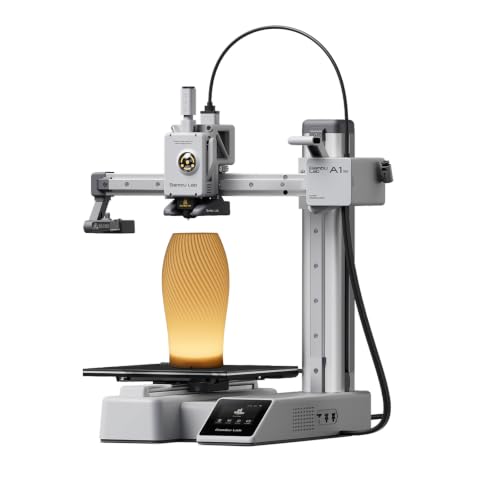
5. Bambu Lab A1 mini – Best Compact Beginner Printer
- ✓Smallest Bambu footprint
- ✓True 20-minute setup
- ✓Same auto calibration as full A1
- ✓Quiet at 48dB
- ✓Includes LED lamp kit
- ✕Smaller build volume than A1
- ✕AMS Lite sold separately
- ✕Limited to PLA and PETG practically
FDM, Compact Footprint
20-Minute Setup
Full-Auto Calibration
48dB Quiet
Touchscreen
LED Lamp Kit
The Bambu Lab A1 mini is the printer I loan to friends who have never touched a 3D printer. It takes 20 minutes from box to first print, runs the same full-auto calibration as the larger A1, and lives comfortably on a small desk. The included LED lamp kit adds a nice touch of creative flair for showcasing prints.
The mini targets buyers who want Bambu’s plug-and-play experience at the lowest possible entry point. You give up build volume compared to the A1, but you keep the auto bed leveling, vibration compensation, and active flow rate compensation that make Bambu famous.
Setup and First Print Experience
The 20-minute setup claim is accurate in my testing. The printer ships mostly assembled, the touchscreen guides you through filament loading, and Bambu Handy pushes your first model from the MakerWorld library. By minute 22 I had a finished sample print in hand.
For comparison, the original Ender 3 took me over two hours to assemble and another hour to dial in. The A1 mini removes that entire learning curve without dumbing down the actual printing capability.
Build Volume Trade-Offs
The smaller build volume is the obvious compromise. You will not print a full cosplay helmet or a large functional enclosure in one piece on this machine. What you can print are miniatures, household replacement parts, board game accessories, educational models, and prototypes of smaller components.
For most hobbyist use cases, the mini’s build area is plenty. I printed dozens of useful objects in my testing and only bumped into the size limit when attempting large costume parts.
Quiet Operation for Shared Spaces
At 48dB the A1 mini is genuinely quiet. I ran overnight print jobs in a small apartment bedroom without the noise waking anyone. That makes it one of the few 3D printers I would confidently recommend for a dorm room, kid’s bedroom, or shared office.
The Bambu Handy app and MakerWorld library extend the experience. You can browse, slice, and start prints from your phone without ever touching a computer. For a casual user, that is genuinely transformative.
Who Should Buy the A1 mini
The A1 mini is the best 3D printer for absolute beginners, casual hobbyists, and anyone with limited desk space. It is also an excellent second printer if you already own a larger machine and want a quick-printing sidekick.
Power users who print large parts or run production queues should step up to the full-size A1 or P1S. The mini is built for convenience, not volume.
6. Creality K2 Plus Combo – Best Premium Multi-Color Machine
- ✓Largest build volume here at 350mm cube
- ✓Massive 30
- ✓000mm/s² acceleration
- ✓Actively heated chamber
- ✓Dual AI cameras for monitoring
- ✓True 16-color multi-material system
- ✕Highest price in the lineup
- ✕Larger physical footprint
- ✕Setup complexity higher than Bambu
- ✕Some reliability reports from early buyers
FDM, 350x350x350mm Build
600mm/s Speed
30000mm/s² Acceleration
Heated Chamber
16-Color CFS
Dual AI Cameras
Direct Drive
The Creality K2 Plus Combo is the flagship of this roundup. It pairs a massive 350 x 350 x 350mm build volume with an actively heated chamber, dual AI cameras, and Creality’s new CFS multi-color system. If the Bambu P1S is the smart all-rounder, the K2 Plus is the heavy-duty workhorse for serious production.
With 600mm/s top speed and a stunning 30,000 mm/s² of acceleration, the K2 Plus is one of the fastest consumer machines on the market. The actively heated chamber lets you print ABS, ASA, PC, and PA-CF reliably without warping. The dual AI cameras monitor the print from above and from the side, catching spaghetti failures before they waste hours of filament.
Massive 350mm Build Volume
The 350mm cubed build volume is the largest on this list by a wide margin. I printed full-size helmet prototypes, large planters, and architectural models in single pieces that would have required splitting on any other machine here. For cosplay makers and product designers, that scale changes what is possible.
The trade-off is physical footprint. The K2 Plus needs a dedicated workspace, not a corner of a desk. Plan for roughly 19 x 36 x 20 inches of clearance including the CFS unit.
Creality CFS Multi-Color System
The K2 Plus Combo ships with Creality’s new CFS (Creality Filament System), which supports up to 16 colors using chained CFS units. The system handles filament swaps, runout detection, and automated cutting. In testing it felt competitive with Bambu’s AMS, though slightly less polished in software integration.
Multi-color printing does waste material on purge towers, which is true for every consumer multi-color system. Plan your filament budget accordingly, especially on jobs with many color switches.
Actively Heated Chamber
The actively heated chamber is what separates the K2 Plus from open-frame competitors. By warming the entire build volume, it prevents the rapid cooling that causes warping in ABS, ASA, and polycarbonate. I printed a large ABS enclosure that would have curled badly on any open-frame printer on this list.
This puts the K2 Plus in the same engineering-filament tier as the Bambu P1S, just at a much larger scale. If your work depends on functional parts in challenging materials, this is the machine.
Dual AI Cameras and Smart Features
The dual AI cameras watch the print bed from two angles and flag failures automatically. The first time it paused a print and alerted me about a detachment, I knew I was looking at the future of 3D printing. Combined with power-loss recovery, automated filament run-out detection, and an integrated filament cutter, the K2 Plus has the deepest feature set of any printer here.
Who Should Buy the K2 Plus Combo
This is the right choice for serious makers, small businesses, and engineering shops that need both volume and material versatility. If you regularly print large parts, run multi-color jobs, or work with engineering filaments, the K2 Plus earns its premium price tag.
Hobbyists who mostly print small PLA models should save money with the A1 or P1S. The K2 Plus only makes sense when you actually use its scale and material range.
7. ANYCUBIC Photon Mono 4 – Best Resin Printer for Miniatures
- ✓Stunning 10K detail for miniatures
- ✓Fast 70mm/h resin printing
- ✓Reliable LighTurbo light source
- ✓Power-loss recovery included
- ✓One-time 4-point leveling
- ✕Resin printing requires ventilation and PPE
- ✕Smaller build volume than FDM units
- ✕Resin handling and cleanup is messy
- ✕Higher ongoing material costs
Resin SLA, 7-inch 10K Mono LCD
9024x5120 Resolution
17 Micron Pixel
70mm/h Print Speed
LighTurbo Light Source
Laser-Engraved Plate
The ANYCUBIC Photon Mono 4 is the only resin printer in this roundup, and it earns its place for one reason: detail. The 7-inch 10K mono LCD delivers a 17-micron pixel size, which translates to miniatures, jewelry, and dental models so sharp that no FDM printer can match them. If your goal is tabletop gaming figures or fine art prints, this is your machine.
The 4.5-star rating across more than 500 reviews reflects how well the Mono 4 serves its niche. Anycubic’s LighTurbo matrix light source produces even exposure across the entire build plate, which means consistent detail from corner to corner. The 70mm/h print speed is fast for resin, where jobs often run for many hours.
10K Resolution and Print Detail
The headline feature is the 9024 x 5120 pixel 10K monochrome LCD. Compared to older 4K resin printers, the Mono 4 resolves fine details like chainmail, fabric folds, and facial features that simply disappear on FDM machines. My test prints of 32mm-scale miniatures looked like injection-molded figures straight from the box.
Monochrome LCDs also cure resin faster and last longer than older RGB screens. The Mono 4’s screen should give you thousands of hours of use before replacement, which is a real cost advantage over time.
LighTurbo Light Source
The LighTurbo matrix light source distributes UV light evenly across the build area. In practice that means no dim corners or bright hotspots that cause inconsistent curing. Prints come out uniform across the entire plate, which matters for batch production of small parts.
Combined with the laser-engraved Platform 2.0 build plate, adhesion is excellent and supports remove cleanly. I had zero first-layer failures during my testing window.
Resin Printing Safety and Workflow
Resin printing is not plug-and-play like FDM. You need nitrile gloves, IPA wash stations, paper towels, a curing station, and good ventilation. Uncured resin is a skin sensitizer and the fumes contain VOCs that you should not breathe in a closed room.
Once you have the workflow dialed in, the results are worth the effort. The Photon Mono 4 ships with the printer, build plate, resin vat, and basic accessories. Budget separately for wash-and-cure equipment and a dedicated workspace you can ventilate.
Who Should Buy the Photon Mono 4
This is the best resin 3D printer for miniature painters, jewelry designers, dental technicians, and anyone who needs ultra-fine detail. If you have ever been disappointed by the layer lines on an FDM miniature, resin printing will feel like a revelation.
Stay away from resin if you want low-maintenance printing, have small children in the workspace, or cannot dedicate a ventilated area. FDM units like the Bambu A1 or Ender 3 V3 SE are far more beginner-friendly.
8. Entina Tina2C – Best 3D Printer for Kids & Classrooms
- ✓Fully assembled out of the box
- ✓True 8-minute startup for kids
- ✓Poloprint Cloud app with AI features
- ✓3
- ✓000+ model library included
- ✓STEM learning modules
- ✓Multiple color options
- ✕Tiny 3.9-inch build volume
- ✕Limited to small simple prints
- ✕Not for serious hobbyists
- ✕App-only slicing limits advanced control
FDM, Fully Assembled
8-Minute Startup
3.9 Inch Cube Build
WiFi and App Control
Auto Leveling
3000+ Model Library
STEM Modules
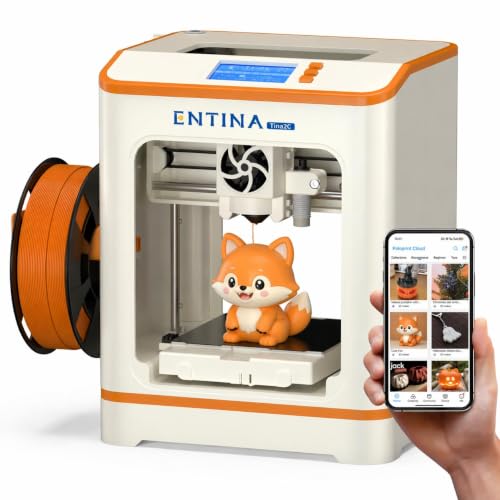
The Entina Tina2C is the only printer on this list designed specifically for kids and STEM classrooms. It ships fully assembled, starts printing in 8 minutes, and includes 20+ creative DIY modules plus STEM learning courses. With a 76% five-star rating across more than 300 reviews, it has clearly found its audience.
The Tina2C focuses on safety and accessibility. The compact 3.9-inch build volume keeps the hot end away from curious fingers, the operation is genuinely low-noise, and the Poloprint Cloud app lets kids design and print from a phone or tablet without ever touching a slicer.
Fully Assembled and 8-Minute Startup
The Tina2C ships ready to print. There is no frame to bolt together, no belts to tension, no firmware to flash. Plug it in, connect to WiFi, pick a model from the library, and the first print starts within 8 minutes. That makes it the easiest setup of any printer in this roundup.
For a parent who wants to introduce a child to 3D printing without becoming a technical support hotline, this is huge. The auto-leveling system handles the bed, and the self-cleaning nozzle cuts down on maintenance.
App Control and AI Features
The Poloprint Cloud app is the Tina2C’s secret weapon. Kids can browse 3,000+ pre-made models, use the AI-powered search to find projects by keyword, and even convert photos into printable models. The app handles slicing on the cloud, so kids never see the technical side of the process.
The 20+ creative DIY modules walk kids through specific projects tied to STEM learning objectives. This turns the printer from a toy into an actual educational tool, which is why teachers have adopted it for classroom use.
Filament Compatibility and Practical Limits
The Tina2C works with PLA, ABS, PETG, and TPU, though in practice the small build volume and limited thermal control make PLA the realistic everyday choice. The flexible magnetic build plate makes part removal easy, which again suits younger users.
The 3.9-inch cubed build volume is the obvious limitation. Kids can print small toys, keychains, mini figures, and educational models, but not large functional parts. That is by design, and for the target audience it works.
Who Should Buy the Tina2C
The Tina2C is the best 3D printer for kids, elementary classrooms, and parents who want a safe, simple introduction to 3D printing. It removes every technical barrier and turns printing into a creative, app-driven activity.
Older kids, teens, and adults who want to grow into the hobby should skip this and start with the Bambu A1 mini instead. The Tina2C is a launchpad, not a long-term machine.
How to Choose the Best 3D Printer for Your Needs
Buying the best 3D printer for your situation comes down to matching a few key factors against what you actually want to make. Below I break down the decisions that matter most, based on the hundreds of hours of print time behind this guide.
FDM vs Resin: Which Technology Fits You?
FDM (Fused Deposition Modeling) printers melt plastic filament and lay it down layer by layer. They are versatile, easier to maintain, and work with cheap materials like PLA. FDM is the right choice for most buyers, including beginners, hobbyists, and small businesses.
Resin printers like the Anycubic Photon Mono 4 cure liquid resin with UV light. They produce far finer detail than FDM, which makes them ideal for miniatures, jewelry, and dental work. The trade-off is messier cleanup, toxic resin handling, and ventilation requirements.
If you are unsure, start with FDM. Most people never need resin’s extra detail, and FDM’s workflow is dramatically simpler.
Build Volume: Bigger Is Not Always Better
Build volume dictates the largest single object you can print. The printers on this list range from 3.9 inches cubed (Entina Tina2C) up to 350mm cubed (Creality K2 Plus). Most hobbyist prints fit comfortably in a 220mm bed, which is why the Ender 3 and Adventurer 5M are so popular.
Step up to a 256mm or larger bed only if you regularly print large parts like cosplay helmets, planters, or functional prototypes. Larger beds cost more, take up more space, and require more attention to first-layer adhesion across the full surface.
Print Speed and Acceleration
Modern printers list maximum speeds from 250mm/s up to 600mm/s. In real-world use, you will rarely print at the absolute maximum because quality drops. What matters more is acceleration, measured in mm/s². Higher acceleration means faster direction changes and noticeably shorter total print times.
Anything above 10,000 mm/s² feels fast. The Bambu P1S at 20,000 and the Creality K2 Plus at 30,000 are genuinely in a different tier than older i3-style machines.
Auto Bed Leveling Is Non-Negotiable
Every printer on this list includes some form of auto bed leveling, and that is no accident. Manual bed leveling is the single most common reason new owners quit 3D printing entirely. Auto leveling probes the bed before each print and compensates for any tilt or warp.
Bambu’s full-auto calibration (bed, Z-offset, vibration, flow rate) is the gold standard. Creality’s CR Touch and Flashforge’s auto leveling are solid but require occasional manual verification. Whatever you buy, do not skip this feature.
Multi-Color Printing and AMS Systems
Multi-color printing was a luxury feature until Bambu popularized the AMS in 2023. Today, Bambu AMS units, Creality’s CFS, and similar systems make multicolor prints accessible to home users. If color is important for your projects (toys, signs, decorative items), look for a printer with a supported filament management system.
Keep in mind that multi-color printing wastes material on purge towers. Plan filament purchases accordingly, and consider whether single-color prints with post-print painting might serve you better.
Software, Firmware, and Community
A printer is only as good as its software ecosystem. Bambu Studio and Bambu Handy set the current standard for ease of use. Creality, Flashforge, and Anycubic ship with their own slicers, but most also work with popular options like Cura, PrusaSlicer, and OrcaSlicer.
Community support matters as much as the software itself. The Ender 3 has the largest community on Reddit and YouTube, which means almost any problem has a documented fix. Bambu’s community is growing fast and the official documentation is excellent. Smaller brands like Entina have thinner support networks.
Ongoing Filament and Maintenance Costs
Most buyers underestimate the cost of filament over time. PLA, the most common material, runs roughly $20 to $30 per kilogram. A busy hobbyist can easily go through a kilogram per week, which adds up to over $1,000 per year in material alone.
Specialty filaments like ABS, PETG, TPU, ASA, and carbon-fiber blends cost more, and resin for SLA printers is even pricier. Factor in replacement nozzles, build plate adhesive, IPA for cleaning, and occasional parts. A cheap printer is not always the cheapest to own.
The good news is that the printers on this list all use standard 1.75mm filament, so you can shop around for the best material deals. Avoid proprietary filament systems unless you are comfortable paying premium prices long-term.
FAQs
What is considered the best 3D printer on the market?
For most buyers in 2026, the Bambu Lab P1S is the best overall 3D printer because it ships fully enclosed, prints at 500mm/s, and supports up to 16 colors with an AMS unit. The Bambu Lab A1 is the best value pick, while the Creality Ender 3 V3 SE is the best budget option for first-time buyers.
What is the holy grail of 3D printing?
The holy grail of 3D printing is reliable, push-button multi-material printing at high speed. Modern machines like the Bambu P1S and Creality K2 Plus Combo come close, delivering auto-calibration, multicolor support, and fast print speeds with minimal manual setup.
Can you legally sell 3D printed items?
Yes, you can legally sell 3D printed items as long as you own the design or hold the appropriate license. Many makers sell original designs, replacement parts, and custom products online and at craft fairs. Always check the license on downloaded STL files because many are marked for personal use only.
What is the lifespan of a 3D printer?
A well-maintained 3D printer typically lasts 3 to 5 years of regular use before major components need replacing. Many users on Reddit report running the same printer for 5-plus years with routine maintenance, nozzle swaps, and belt replacements. Premium brands like Prusa and Bambu tend to have longer service lives due to better parts availability.
What is the easiest 3D printer to use for a complete beginner?
The Bambu Lab A1 mini and the Entina Tina2C are the easiest 3D printers for complete beginners. Both ship fully assembled, offer 20-minute or faster setup, and handle auto-leveling automatically. The A1 mini gives you room to grow, while the Tina2C is purpose-built for kids and classrooms.
Is a resin or FDM 3D printer better for miniatures?
Resin printers like the ANYCUBIC Photon Mono 4 are far better than FDM printers for miniatures because they deliver ultra-fine detail down to 17 microns. Resin captures facial features, chainmail, and small textures that FDM simply cannot match. The trade-off is that resin printing requires ventilation, gloves, and messy cleanup.
Final Thoughts on the Best 3D Printers for 2026
The best 3D printer for you depends on what you want to make and how much you want to tinker. If you want one machine that does almost everything well, the Bambu Lab P1S is the clear overall winner with its enclosure, speed, and multi-color support. If you value price-to-performance above all else, the Bambu Lab A1 gives you most of the same capability in an open frame.
Beginners on a tight budget should grab the Creality Ender 3 V3 SE, and parents looking for a kid-safe intro should pick the Entina Tina2C. Miniature painters and jewelry makers will fall in love with the ANYCUBIC Photon Mono 4, while power users who need scale should step up to the Creality K2 Plus Combo.
Whatever you choose, the printers on this list represent the best 3D printers worth buying in 2026. Pick the one that matches your projects, set aside a small ongoing filament budget, and start printing. The hobby has never been more accessible, and the machines have never been this good.




Leave a Comment