
Learning how to position desktop speakers correctly transformed my audio experience more than any equipment upgrade ever has. I spent years wondering why my music sounded thin and my games lacked immersion, only to discover that my speakers were fighting against my desk instead of working with it. In 2026, with more people working from home and investing in their desktop audio setups than ever before, understanding proper speaker placement has become essential knowledge for anyone who cares about sound quality.
Our team has tested dozens of desktop configurations over the past three years, and I can tell you that even budget-friendly options like the Mackie CR3-X can deliver stunning results when positioned correctly. This guide will walk you through everything you need to know to transform your desktop audio from mediocre to magnificent. You will learn the fundamental rules of speaker placement, why they matter, and how to apply them to your specific setup regardless of room size or desk constraints.
Quick Summary: The 5 Rules of Desktop Speaker Placement
If you are short on time, here are the five essential rules for positioning desktop speakers. These principles form the foundation of proper speaker placement and address the most common questions people ask about desktop audio setup.
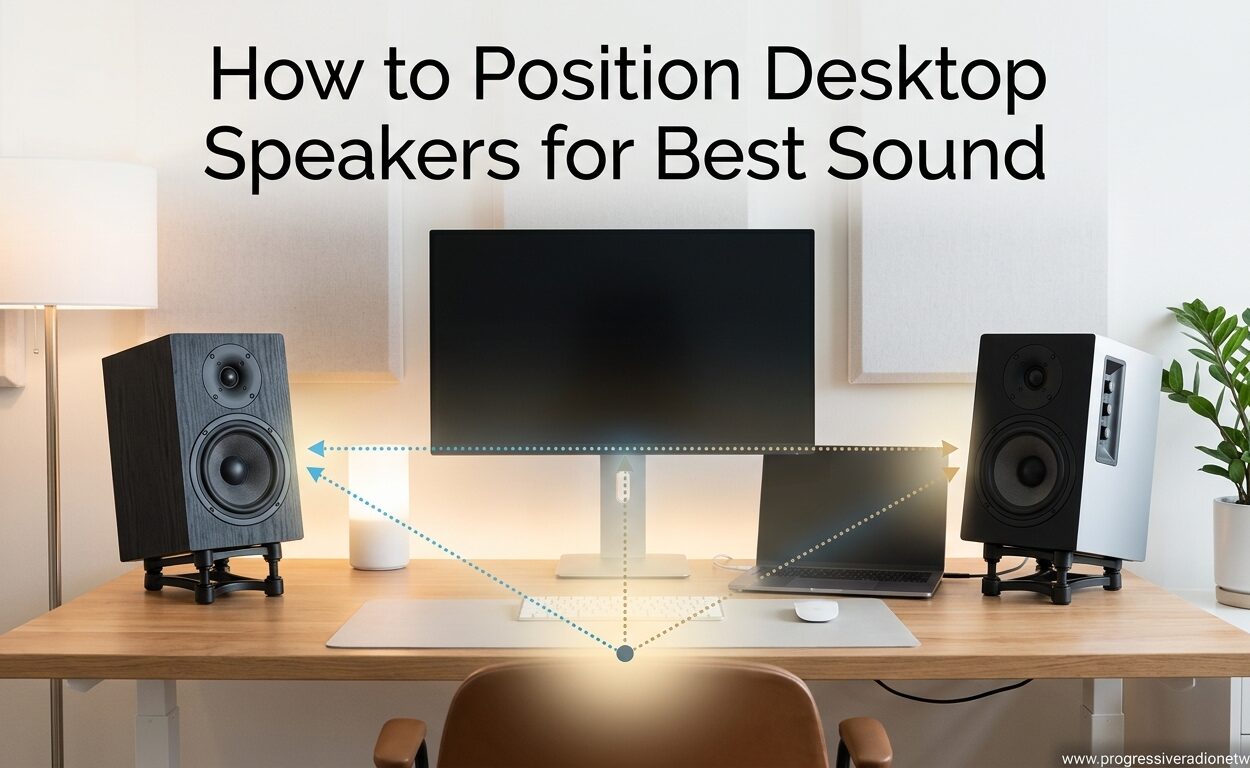
- Form an equilateral triangle between you and your speakers, with each speaker positioned at a 60-degree angle from your listening position.
- Position tweeters at ear level because high frequencies are highly directional and you will miss critical detail if they are aimed over or under your head.
- Angle speakers inward (toe-in) so they point toward a spot just behind your head, creating a focused stereo image.
- Keep speakers 2-3 feet from walls to minimize boundary interference and bass buildup, especially important for rear-ported speakers.
- Isolate speakers from your desk using foam pads, stands, or isolation platforms to prevent vibration from muddying the sound.
These rules come from both acoustic science and the collective wisdom of audio enthusiasts who have spent decades perfecting their setups. Forum discussions across Reddit and HiFiGuides consistently confirm that symmetrical placement matters more than achieving exact measurements down to the inch.
The Equilateral Triangle Rule: Your Foundation for Great Sound
The equilateral triangle rule is the cornerstone of stereo speaker positioning. This rule states that you and your two speakers should form a triangle where all three sides are equal in length and each speaker sits at a 60-degree angle from your listening position.
I remember the first time I applied this principle to my own desk setup. I grabbed a protractor from my desk drawer and positioned each speaker so it sat at a 60-degree angle from where I typically sit. The improvement was immediate and striking. Instruments suddenly had defined locations in space, vocals centered perfectly between the speakers, and the entire soundstage opened up in ways I had never experienced before.
How to Measure Your Speaker Triangle
Start by measuring the distance between your two speakers. This distance should equal the distance from each speaker to your ears when you are in your normal listening position. For most desktop setups, this means placing speakers between 3 and 5 feet apart depending on your desk size.
Use a simple protractor to set the angle, or use the string method: cut two pieces of string equal in length, attach one end of each string to each speaker, and hold the other ends together at your listening position. When the strings meet at a 60-degree angle, you have achieved proper positioning. Many audio enthusiasts report that getting this triangle right creates what they describe as a night and day difference in their listening experience.
If your desk is too small to achieve the ideal triangle, do not despair. Many forum users with compact setups have found that maintaining symmetry matters more than hitting exact measurements. Even an imperfect triangle will sound better than speakers randomly placed on your desk.
Tweeter Height at Ear Level: Why High Frequencies Demand Precision
Positioning tweeters at ear level is non-negotiable for accurate sound reproduction. High frequencies are highly directional, meaning they travel in a focused beam rather than dispersing widely like bass frequencies. When your tweeters are not aimed directly at your ears, you lose detail, airiness, and the sense of space that makes music engaging.
I learned this lesson the hard way when I first placed my professional studio monitors directly on my desk without stands. The tweeters sat about 12 inches below my ear level, and everything sounded dull and lifeless. After raising them to ear level using isolation stands, the high frequencies returned with startling clarity. Cymbals shimmered properly, vocal sibilance became natural rather than harsh, and the overall presentation gained a three-dimensional quality that was completely missing before.
Solutions for Achieving Proper Height
If your speakers sit too low on your desk, you have several options to raise them to the correct height. Desktop speaker stands specifically designed for nearfield monitoring provide the best results, offering adjustable height and angle capabilities along with isolation from desk vibrations.
Foam isolation pads offer a budget-friendly alternative that many forum users recommend. These angled foam wedges tilt speakers upward toward your ears while also decoupling them from the desk surface. I have tested multiple foam pad options and found they provide about 80% of the benefit of expensive stands at a fraction of the cost.
For a DIY approach, sturdy books or wooden blocks can work in a pinch, though they will not provide the vibration isolation that dedicated stands or foam pads offer. The key is getting those tweeters pointed directly at your ears, whatever method you choose.
Toe-In Angle: Fine-Tuning Your Stereo Imaging
Toe-in refers to the practice of angling your speakers inward toward your listening position rather than having them fire straight forward. This simple adjustment has a profound impact on stereo imaging, soundstage width, and overall listening enjoyment.
The ideal toe-in angle points your speakers toward a spot slightly behind your head. Start with speakers facing straight forward, then gradually rotate them inward while playing familiar music. You will reach a point where the center image locks in firmly, vocals center perfectly between the speakers, and instruments occupy distinct positions across the soundstage. That is your optimal toe-in angle.
Some speakers benefit from more toe-in than others. Speakers with wide dispersion characteristics may need less angling, while those with narrower high-frequency dispersion often require more aggressive toe-in. The only way to find what works for your specific speakers is to experiment while listening critically.
Forum discussions consistently emphasize that toe-in is one of the most impactful adjustments you can make. Users report that getting toe-in right can make the difference between a flat, two-dimensional presentation and a holographic soundstage where you can point to exactly where each instrument sits.
Wall Distance and Room Boundaries: Avoiding Bass Buildup
How close your speakers sit to walls dramatically affects bass response. When speakers are placed near walls or in corners, low frequencies reflect off boundaries and reinforce each other, creating boomy, uncontrolled bass that masks detail throughout the frequency spectrum.
The general rule is to keep speakers at least 2-3 feet from any wall, including the wall behind them. This distance allows bass frequencies to disperse naturally without excessive boundary reinforcement. If you have rear-ported speakers with bass ports on the back panel, this distance becomes even more critical as the ports need room to breathe.
Understanding the 38% Rule
The 38% rule offers a more advanced approach to room positioning. This guideline suggests placing your listening position at 38% of the room’s length from the front wall. This position typically avoids the strongest standing waves and room modes, resulting in more accurate bass response across the entire frequency range.
For a 10-foot deep room, this would place your listening position about 3.8 feet from the front wall. While this rule was originally developed for large listening rooms, desktop users in small offices can still apply the principle by avoiding placement at exactly the room’s midpoint, where standing waves are strongest.
If your desk must sit against a wall due to space constraints, consider front-ported speakers that have their bass ports on the front panel rather than the rear. Compact desktop monitors like the iLoud Micro are specifically designed with front ports to accommodate close-wall placement without excessive bass buildup.
Desktop-Specific Challenges: Monitors, Space, and Vibration
Desktop speaker positioning presents unique challenges that floor-standing or bookshelf speaker setups do not face. Computer monitors, limited desk space, and desk vibration all conspire to compromise sound quality if not properly addressed.
Solving Monitor Obstruction
One of the most common problems forum users report is the computer monitor blocking one speaker. When your monitor sits between your speakers, it creates an acoustic shadow that disrupts the stereo image and causes frequency response issues.
The solution is to raise your speakers above monitor height using tall stands or wall mounts. Alternatively, position your monitor slightly off-center and angle both speakers around it, maintaining the equilateral triangle as best as possible. Some users with ultrawide monitors have found success placing speakers on either side at ear level, even if this means a wider than ideal separation.
Addressing Desk Vibration
Your desk is a resonant surface that can color your speakers’ sound through vibration transmission. When speaker drivers move, they transfer energy into whatever surface the speaker sits on. A hollow desk will resonate at certain frequencies, adding unwanted coloration to your audio.
Isolation is the answer. Speakers with headphone jacks and other desktop models benefit enormously from decoupling from their surface. Foam isolation pads, dense rubber feet, or dedicated iso-stands all prevent vibration transmission and let you hear what your speakers actually produce rather than what your desk adds to the sound.
Budget alternatives to expensive iso-stands include dense foam yoga blocks, hockey pucks, or even folded towels in a pinch. While not as elegant as dedicated products, these DIY solutions provide meaningful isolation improvement over speakers sitting directly on a desk.
Why Speaker Positioning Matters: The Science Behind the Sound
Understanding why these positioning rules work helps you apply them more effectively and troubleshoot problems when they arise. The science of speaker placement involves psychoacoustics, room acoustics, and the physical behavior of sound waves.
Stereo Imaging and the Sweet Spot
Stereo imaging creates the illusion of a three-dimensional soundstage between and beyond your two speakers. When properly positioned, two speakers can create a sonic image that extends far wider than the physical speaker placement, with instruments and voices seeming to originate from specific points in space.
The sweet spot is the listening position where this stereo imaging works best. When you sit in the sweet spot, you experience proper channel balance, precise imaging, and the full intended soundstage. Move outside the sweet spot, and the center image shifts toward the closer speaker while stereo separation collapses. Proper equilateral triangle positioning places you directly in the sweet spot.
Reflections and Time Smearing
Sound travels at about 1130 feet per second, which means reflections from nearby walls arrive at your ears slightly after the direct sound from your speakers. When these reflected sounds arrive within about 30 milliseconds of the direct sound, your brain cannot separate them, resulting in time smearing that blurs transients and reduces clarity.
Desktop setups face particular reflection challenges from the monitor, desk surface, and nearby walls. Keeping speakers away from walls reduces boundary reflections, while angling them properly directs more direct sound toward you and less toward reflective surfaces. This is why proper positioning often sounds clearer even at lower volumes.
Boundary Interference and Room Modes
When speakers operate near boundaries like walls, floors, and ceilings, the reflected sound waves interact with direct sound waves creating interference patterns. In some locations, these waves reinforce each other creating peaks, while in others they cancel each other creating nulls.
Room modes are standing waves that occur when the wavelength of a sound matches a room dimension. These create resonant frequencies that ring longer than others and create uneven bass response. The 38% rule helps avoid the strongest room modes by positioning you away from pressure peaks and nulls.
Understanding these principles explains why small position changes sometimes yield dramatic improvements. Moving a speaker just a few inches can shift interference patterns enough to smooth out response peaks or bring a bass null back to life.
Frequently Asked Questions
What is the 38% rule for speaker placement?
The 38% rule suggests placing your listening position at 38% of the room’s length from the front wall. This position typically avoids the strongest standing waves and room modes, resulting in more accurate bass response. It works as a starting point that produces good results in many rectangular rooms.
What is the 83% rule for speakers?
The 83% rule is a room positioning guideline suggesting you place speakers at 83% of the room width from either side wall. This asymmetric placement can help minimize boundary interference and reduce the impact of standing waves on bass response.
How should speakers be positioned for best sound?
For the best sound, position speakers in an equilateral triangle with your listening position, angle them inward (toe-in) toward your ears, place tweeters at ear level, keep speakers 2-3 feet from walls, and isolate them from their surface using stands or foam pads.
Where should speakers be placed on a desktop?
On a desktop, place speakers at arm’s length on either side of your monitor, angled inward toward your listening position, with tweeters at ear level. Keep them at least 2-3 feet from walls if possible, and use isolation pads or stands to reduce desk vibration.
Should speakers be at ear level?
Yes, tweeters should be at ear level because high frequencies are highly directional. When tweeters are above or below ear level, you lose detail and airiness in the sound. Use stands, foam wedges, or adjustable mounts to achieve proper height.
Conclusion
Learning how to position desktop speakers correctly is one of the most rewarding investments you can make in your audio setup. The principles outlined in this guide, from the equilateral triangle rule to tweeter height and toe-in adjustment, work together to create a listening experience that reveals what your speakers are truly capable of producing.
Remember that positioning is not a one-time setup task but an ongoing process of refinement. Your room, your ears, and your preferences are unique, so use these guidelines as starting points and adjust based on what sounds best to you. Start with the basics, spend time listening to familiar music, and make small adjustments until you find your personal sweet spot.
In 2026, with the abundance of quality desktop audio options available, proper positioning separates good systems from great ones. Take the time to apply these principles, and you will discover that the best sound was waiting for you all along, just waiting for your speakers to be pointed in the right direction.




Leave a Comment