
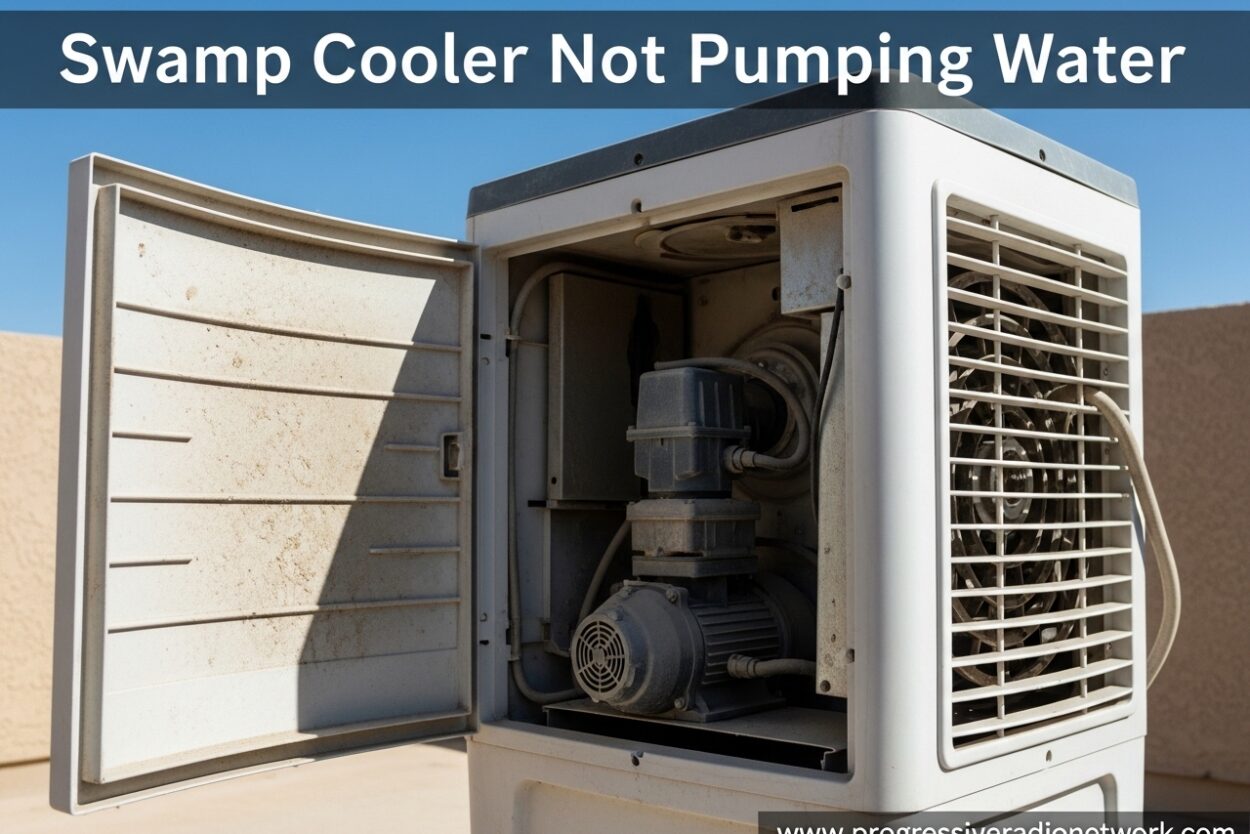
Walking into a hot house expecting relief from your swamp cooler, only to find it blowing warm air, is incredibly frustrating. The most common culprit? Your swamp cooler not pumping water. Without proper water circulation, those cooling pads stay dry and your expensive evaporative cooler becomes nothing more than a noisy fan.
I’ve spent years troubleshooting evaporative coolers, and I’ve found that pump issues account for nearly 70% of all swamp cooler failures. The good news is that most pump problems are diagnosable and fixable without calling a professional. In this guide, I’ll walk you through exactly how to identify why your swamp cooler isn’t pumping water and what you can do to fix it.
Understanding Swamp Cooler Pump Basics
Before diving into troubleshooting, it helps to understand how your swamp cooler pump actually works. The pump sits in the bottom reservoir (sump) of your cooler and its job is simple but critical: pull water from the reservoir and push it up to the distribution tubes that wet the cooling pads.
The key components are the pump motor, the impeller (a small fan-like blade that moves water), the intake screen or strainer, and the water distribution tubing. When any of these parts fail or get blocked, you end up with a swamp cooler not pumping water situation. Without water saturating those pads, the evaporative cooling process can’t happen and you’re just circulating hot air.
Quick Diagnosis Checklist
When you discover your swamp cooler not pumping water, run through this 30-second checklist before diving into detailed troubleshooting:
1. Is the pump switch turned on?
2. Is there water in the reservoir?
3. Is the pump making any sound (humming, clicking, silence)?
4. Did this happen suddenly or gradually?
Sudden failures usually point to electrical issues or a broken pump motor. Gradual decline in water flow typically indicates a clog or mineral buildup. Based on what you find, you’ll know which troubleshooting steps to tackle first.
Swamp Cooler Not Pumping Water: Step-by-Step Troubleshooting
Step 1: Check Power Supply
Start with the basics. I know it sounds obvious, but verify the pump switch is actually turned on. Many swamp coolers have separate switches for the fan and the pump, and it’s easy to accidentally bump one off.
Next, test the electrical outlet. Plug in a small device like a phone charger to confirm the outlet is live. If it’s not working, check your circuit breaker box for a tripped breaker. I’ve seen many homeowners waste hours troubleshooting a pump that simply had no power reaching it.
If you’re using an extension cord (not recommended for permanent installations), make sure it’s the proper gauge. Pumps require adequate amperage and thin extension cords can cause voltage drop that prevents the pump from running properly.
Step 2: Inspect Water Level
Your pump can’t pump water if there isn’t any water to pump. Check the reservoir level and ensure it’s filled to the appropriate line. If the water level is low, the pump may be sucking air instead of water, which prevents proper circulation.
The float valve is responsible for maintaining the proper water level. If it’s stuck or malfunctioning, the reservoir won’t refill properly. Test the float valve by manually lifting it and listening for water to flow in. If nothing happens, you may have a closed supply valve or a faulty float mechanism.
Also verify your home’s water supply valve to the cooler is fully open. I’ve seen this accidentally get turned off during maintenance or repairs.
Step 3: Clean Pump Screen and Strainer
This is the most common cause of a swamp cooler not pumping water. The pump intake screen prevents debris from entering the pump, but over time it can become clogged with mineral deposits, algae, pad material, and other debris.
Locate the pump at the bottom of the reservoir. You’ll typically see a small screen or filter covering the intake. Carefully remove this screen and inspect it. If it’s covered in buildup, clean it thoroughly with a brush and water.
For stubborn mineral deposits, soak the screen in a solution of vinegar and water for about 30 minutes. The acid helps dissolve hard water scale. Rinse completely before reinstalling.
I recommend checking this screen monthly during peak cooling season. Old aspen pads are notorious for shedding fibers that clog pump screens, so replacing worn pads can also prevent this issue.
Step 4: Check for Airlock
An airlock occurs when air gets trapped in the pump or water line, preventing water from flowing through. This commonly happens after draining the cooler for maintenance or when the water level gets too low.
Symptoms of an airlock include the pump motor running but no water moving, or a gurgling sound from the pump. To fix it, you need to bleed the air out of the system.
The easiest method is to manually fill the pump housing with water before restarting. You can also try gently shaking the pump while it’s submerged to dislodge trapped air bubbles. Another technique is to briefly reverse the water flow (if your setup allows) to push the air out.
Preventing airlocks is mostly about maintaining proper water level and avoiding situations where the pump runs dry. Never operate your cooler without adequate water in the reservoir.
Step 5: Test Pump Impeller
The impeller is the spinning component that actually moves the water. Sometimes it can become mechanically stuck due to mineral buildup or debris, especially after the cooler has sat unused for an extended period.
With the pump disconnected from power, reach into the reservoir and locate the impeller (usually visible on the bottom or side of the pump). Try to spin it with your finger. A healthy impeller should spin freely.
If it’s stuck, try gently working it back and forth to break it loose. Mineral deposits can cause it to seize up. Once it starts moving, continue spinning it manually to help break up any remaining buildup.
I’ve seen many pumps that appeared dead come back to life after freeing a stuck impeller. This simple fix can save you from buying a replacement pump. However, if the impeller is damaged, broken, or won’t spin freely after cleaning, the pump will need replacement.
Step 6: Inspect Water Distribution Tubes
Even if your pump is working correctly, blocked distribution tubes can prevent water from reaching the pads. These tubes run along the top of the pad frames and have small holes that distribute water evenly across the pads.
Check for clogs in the distribution tube holes. Mineral buildup is the usual suspect here. Use a small brush or toothpick to clear any blocked holes. You can also run water through the tubes manually to test flow.
The water troughs that feed the distribution tubes should also be inspected and cleaned. Sludge and debris can accumulate here, restricting water flow to the tubes.
Uneven pad saturation is a telltale sign of distribution problems. If you see dry spots on the pads while other areas are soaked, you likely have a clog in the distribution system.
Step 7: Electrical Troubleshooting
If you’ve ruled out mechanical issues, the problem might be electrical. Start by testing the pump motor itself. If you’re comfortable with electrical work, use a multimeter to check for continuity through the motor windings. No continuity means the motor has failed.
Check the pump switch for proper operation. A faulty switch won’t send power to the pump even when turned on. Test for voltage at the pump connections when the switch is activated.
Some pumps have a capacitor that helps start the motor. A failed capacitor can cause the motor to hum but not spin. Test the capacitor or simply replace it if you suspect it’s faulty.
Inspect all wiring connections for corrosion, loose wires, or burnt connections. The humid environment inside a swamp cooler can cause electrical connections to degrade over time.
Swamp Cooler Pump Replacement Guide
Sometimes, despite your best troubleshooting efforts, the pump simply needs replacement. Here’s how to know it’s time and how to do it correctly.
Signs You Need a New Pump:
• Pump motor is completely dead (no sound, no vibration)
• Burning smell coming from the pump
• Visible damage to the pump housing or impeller
• Pump is over 5-7 years old and has failed repeatedly
• Repair cost exceeds 50% of replacement cost
When selecting a replacement pump, match the specifications of your original pump. Pay attention to flow rate (GPM), lift height, and voltage. Portable swamp coolers use different pumps than whole-house units, so verify compatibility.
Installation is straightforward: turn off power, disconnect the old pump, remove it from the reservoir, install the new pump in the same position, reconnect wiring, and test. Most replacement pumps come with detailed instructions specific to that model.
A common mistake is improper water level adjustment after installing a new pump. Make sure the float valve is set correctly to maintain adequate water level without overflowing.
Preventative Maintenance Tips
The best way to avoid a swamp cooler not pumping water situation is regular maintenance. Here’s a schedule I recommend following:
Monthly During Cooling Season:
• Clean pump intake screen
• Check water level and float operation
• Inspect distribution tubes for clogs
• Look for mineral buildup on pump components
End of Season (Fall):
• Drain and clean the entire reservoir
• Remove and clean the pump thoroughly
• Flush distribution tubes with clean water
• Dry all components before storage
Start of Season (Spring):
• Inspect pump for any damage from winter storage
• Test pump operation before hot weather arrives
• Clean or replace pump screen if needed
• Check all electrical connections
Water quality plays a big role in pump longevity. If you have hard water, consider using a water treatment product designed for swamp coolers. This helps reduce mineral buildup that can clog pumps and distribution systems.
Never run your swamp cooler without adequate water in the reservoir. Running the pump dry causes overheating and can burn out the motor quickly. Always maintain proper water level.
FAQ
Why is my evaporative cooler not pumping water?
The most common reasons include a clogged pump intake screen, low water level in the reservoir, a faulty pump motor, or an airlock in the water line. Start by checking the pump screen for debris, verify the reservoir has water, and listen for whether the pump motor is running when switched on.
How do I unclog a swamp cooler pump?
Turn off power to the cooler, locate the pump at the bottom of the reservoir, and remove the intake screen or strainer. Clean the screen thoroughly with a brush and water. For stubborn mineral deposits, soak the screen in vinegar for 30 minutes. If the impeller is stuck, try gently spinning it by hand to break it free.
Why is my pump running but not pulling water?
This typically indicates an airlock in the pump or water line. The motor is working but air is preventing water flow. Try manually filling the pump housing with water to bleed out trapped air. Also check that the water level in the reservoir is high enough for the pump intake to be fully submerged.
Why aren’t my swamp cooler pads getting wet?
Dry pads usually mean water isn’t reaching them through the distribution system. Check for clogged distribution tube holes, a blocked water trough, or a disconnected distribution line. Also verify the pump is actually delivering water to the top of the pads by testing water flow at the distribution point.
How do I know if my swamp cooler pump is bad?
Signs of a failed pump include no sound or vibration when switched on, a burning smell, visible damage to the pump housing, or an impeller that won’t spin freely. You can also test the pump motor with a multimeter to check for continuity. No continuity means the motor windings have failed.
What causes a swamp cooler pump to stop working?
Common causes include mineral buildup clogging the intake screen, debris from old pads blocking the impeller, running the pump dry which burns out the motor, electrical failures like a bad switch or capacitor, and simple old age. Most pump failures are preventable with regular cleaning and maintenance.
How long do swamp cooler pumps typically last?
With proper maintenance, a quality swamp cooler pump should last 5-7 years. Factors that shorten lifespan include hard water causing mineral buildup, running the pump dry, lack of regular cleaning, and exposure to freezing temperatures during winter storage. Annual maintenance can significantly extend pump life.
Can I run my swamp cooler without the pump?
You can run the fan without the pump, but it won’t provide any cooling. Without water circulating to wet the pads, the evaporative cooling process can’t occur. The cooler will simply blow warm air around. Running the fan without the pump might be useful for air circulation on mild days, but don’t expect any temperature reduction.
Conclusion
Dealing with a swamp cooler not pumping water is never convenient, especially during hot weather. The good news is that most pump problems are diagnosable and often fixable with basic troubleshooting. Start with the simple checks like power supply and water level, then work through cleaning the pump screen, checking for airlocks, and testing the impeller.
Regular preventative maintenance is your best defense against pump failure. Monthly screen cleaning and proper seasonal shutdown can add years to your pump’s life. When replacement becomes necessary, choose a quality pump that matches your cooler’s specifications and install it properly.
If you’ve worked through all these steps and your swamp cooler still isn’t pumping water, it may be time to call a professional HVAC technician who specializes in evaporative cooling systems. Sometimes electrical issues or complex mechanical problems are best left to the experts.

Leave a Comment