
Setting up a home theater or stereo system can feel overwhelming when you encounter technical terms like “crossover frequency.” I remember the first time I stared at the back of a subwoofer, wondering what that mysterious knob labeled “crossover” actually controlled. After years of testing audio equipment and consulting with acoustic engineers, I have learned that understanding your subwoofer crossover frequency is the single most important step to achieving deep, clean bass that blends perfectly with your main speakers.
A subwoofer crossover frequency is the specific Hz point where your main speakers stop producing deep bass and your subwoofer takes over the low-frequency duties. Think of it as an audio handoff: frequencies below the crossover point go to the subwoofer, while frequencies above go to your main speakers. Get this setting right, and your system produces seamless, room-filling bass that sounds like it is coming from everywhere. Get it wrong, and you will hear boomy, localized bass or notice gaps in the frequency response where neither speaker is producing sound.
In this guide, I will explain everything you need to know about subwoofer crossover frequency in 2026. We will cover the science behind the THX 80 Hz standard, explore specific recommendations for different speaker types, and walk through the exact steps to dial in the perfect crossover for your room.
What Is a Subwoofer Crossover Frequency?
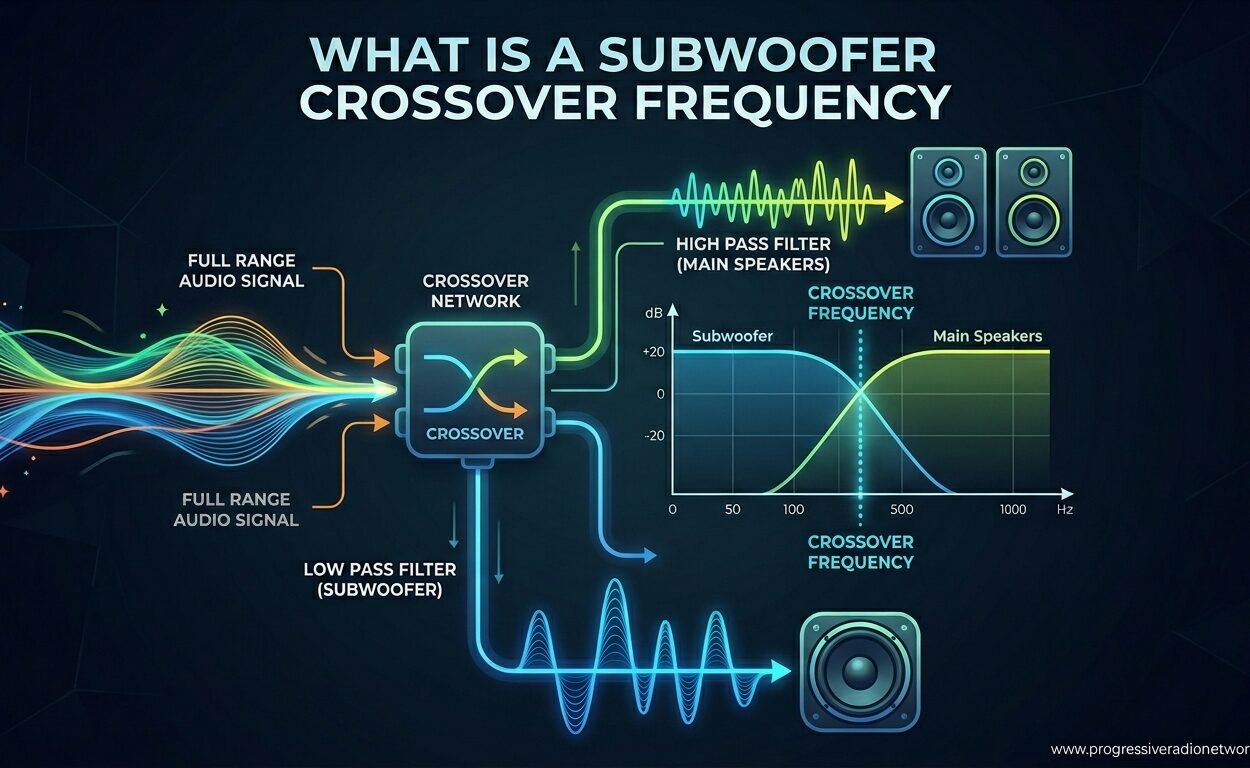
Your subwoofer crossover frequency acts as an electronic filter that divides the audio spectrum between your main speakers and your subwoofer. When you set a crossover at 80 Hz, any sound below 80 Hz gets redirected to your subwoofer, while everything above 80 Hz stays with your main speakers. This division of labor lets each speaker focus on the frequencies it reproduces best.
The concept relies on two types of filters working together: a low pass filter for the subwoofer and a high pass filter for the main speakers. The low pass filter allows frequencies below the crossover point to pass through to the subwoofer while attenuating higher frequencies. Conversely, the high pass filter sends only higher frequencies to your main speakers while rolling off the deep bass. This understanding speaker frequency response helps explain why proper filtering matters for clean audio reproduction.
Crossover frequencies are measured in Hertz (Hz), which represents cycles per second. The human hearing range spans roughly 20 Hz to 20,000 Hz, with subwoofers typically handling the bottom octave from 20 Hz up to around 80-120 Hz. Your main speakers, depending on their size and design, might comfortably reproduce sound down to 40 Hz (large tower speakers) or struggle below 100 Hz (small satellite speakers).
LFE and Bass Management Explained
In home theater systems, you will often encounter the term LFE, which stands for Low Frequency Effects. The LFE channel (sometimes called the .1 in 5.1 or 7.1 surround sound) is a dedicated track containing only deep bass information, typically from 20 Hz to 120 Hz. Movie sound engineers use this channel for explosive effects, rumbling engines, and earth-shaking impacts that add physical sensation to the viewing experience.
Bass management is your AV receiver or processor’s system for deciding which frequencies go where. When configured properly, bass management takes the low-frequency content from all channels plus the dedicated LFE track and routes it appropriately to your subwoofer. This ensures no bass gets lost while preventing your main speakers from trying to reproduce frequencies they cannot handle cleanly.
Why 80 Hz Is the THX Standard
Walk into any home theater discussion forum, and you will see 80 Hz recommended constantly as the starting point for subwoofer crossover. This is not arbitrary. The 80 Hz standard comes from THX certification requirements established decades ago based on psychoacoustic research about human hearing and sound localization.
Here is the critical insight that most guides miss: humans can localize sound above approximately 80 Hz, meaning we can tell where the sound is coming from. Below 80 Hz, sound becomes increasingly non-directional. When your crossover is set correctly at 80 Hz or lower, the bass from your subwoofer seems to emanate from your main speakers rather than from a separate box in the corner. This “invisible subwoofer” effect creates a more immersive, cohesive listening experience.
The science behind this involves how our ears and brain process different frequencies. High frequencies have short wavelengths that interact with the physical shape of our outer ears, giving us directional cues. Low frequencies have wavelengths so long (over 14 feet at 80 Hz) that these directional cues disappear. Your brain perceives the bass as coming from wherever the higher frequencies originate, which is why proper crossover integration matters so much.
Setting your crossover significantly above 80 Hz, such as 120 Hz or higher, introduces localization issues where you can audibly tell the bass is coming from the subwoofer location. This breaks the illusion of a unified soundstage and draws attention to the subwoofer as a separate source. Forum users consistently report this as one of their biggest pain points when setting up new systems.
Recommended Crossover Frequencies by Speaker Type
While 80 Hz works beautifully as a general starting point, your ideal crossover frequency depends heavily on the speakers you are pairing with your subwoofer. Smaller speakers physically cannot move enough air to produce deep bass, requiring higher crossovers to avoid distortion and damage. Larger speakers with bigger woofers can reach lower frequencies confidently, allowing you to set lower crossovers for better integration.
The key principle is this: your crossover should be set about one half to one full octave above your main speakers’ lowest usable frequency. An octave represents a doubling of frequency, so if your bookshelf speakers can reach down to 60 Hz, setting the crossover between 80-120 Hz provides a safe buffer while maintaining blend quality.
Satellite and Small Speakers: 150-200 Hz
Tiny satellite speakers, compact PC speakers, and many soundbar satellite channels typically have 2-inch to 3-inch drivers that struggle below 150 Hz. These speakers rely entirely on the subwoofer for any meaningful bass reproduction. When pairing with satellites, set your crossover between 150-200 Hz depending on the specific model.
At these higher crossover points, you must pay extra attention to subwoofer placement. Since frequencies up to 200 Hz are somewhat localizable, position your subwoofer near the front of the room, ideally between or slightly beside your main speakers. This minimizes the chance of listeners detecting the subwoofer as a separate sound source.
Bookshelf Speakers: 100-120 Hz
Most bookshelf speakers feature 4-inch to 6.5-inch woofers that can comfortably reproduce bass down to 50-70 Hz, though output drops significantly at the lowest frequencies. For compact bookshelf speakers for subwoofer pairing, a crossover of 100-120 Hz works well, giving the speakers breathing room while letting the subwoofer handle the heavy lifting below 100 Hz.
Many bookshelf owners make the mistake of setting crossovers too low, like 60 or 80 Hz, thinking this creates “fuller” sound. In reality, this forces small woofers to work too hard, introducing distortion and compression at higher volumes. Your bookshelf speakers will actually sound cleaner and more dynamic with a higher crossover that unburdens their woofers.
Tower and Floorstanding Speakers: 60-80 Hz
Large tower speakers with multiple woofers or dedicated bass drivers can often reach down to 30-40 Hz with authority. When paired with capable floorstanders, you can experiment with crossovers between 60-80 Hz. Some audiophiles even run large towers as “large” or “full range” in their receiver settings, sending no bass to the subwoofer at all.
However, even with towers, using a subwoofer often improves overall sound quality. Speaker frequency response specifications reveal that while towers may reach low frequencies, they rarely do so with the same authority and low distortion as a dedicated subwoofer. Setting an 80 Hz crossover lets your towers focus on midrange clarity while the subwoofer handles the deepest bass.
Car Audio Applications: 80-150 Hz
Car audio systems present unique challenges that home audio guides rarely address. Vehicle cabins are small, highly reflective spaces with significant road noise masking low frequencies. Additionally, subwoofer placement options are limited, often restricting them to trunks or under seats far from the listener.
For car audio, crossover frequencies typically run higher than home systems. Small door speakers might need crossovers at 120-150 Hz, while larger component systems can work with 80-100 Hz. The higher crossover helps overcome road noise and cabin gain (the natural bass boost that occurs in small enclosed spaces). If your car subwoofer seems too boomy or localized, try lowering the crossover toward 80 Hz for better blending with the front speakers.
How to Set Your Subwoofer Crossover Frequency
Now that you understand the theory, let us walk through the practical process of setting your crossover. You have two main approaches: using your AV receiver’s bass management (recommended for home theater) or using the controls on the subwoofer itself (common for stereo systems and studio monitors with subwoofer integration).
Method 1: AV Receiver Bass Management
Modern AV receivers offer sophisticated bass management systems that handle crossover routing automatically. Access your receiver’s speaker setup menu and look for options like “Speaker Configuration,” “Bass Management,” or “Crossover Frequency.” Most receivers let you set different crossovers for different speaker pairs, which is useful if you have mixed speaker types.
Set your front speakers to “Small” regardless of their physical size. This tells the receiver to route low frequencies to the subwoofer. Then set the crossover frequency based on your speaker type using the guidelines above. Many receivers default to 80 or 100 Hz, which works well for most systems. Run your receiver’s auto-calibration system (like Audyssey, YPAO, or MCACC) if available, though you should verify the results manually.
Method 2: Subwoofer Control Knob
If you are using a stereo integrated amplifier without bass management, you will rely on the crossover knob on your subwoofer’s rear panel. Turn this knob to set the crossover frequency where the subwoofer begins accepting bass. Start with the knob at the 80-100 Hz range as a baseline.
When using the subwoofer’s crossover, you may also need to engage a high pass filter on your main speakers if your subwoofer offers speaker-level outputs with filtering. Otherwise, both your main speakers and subwoofer will reproduce the same overlapping frequencies, which can cause cancellation or excessive bass. Some subwoofers include a ” crossover bypass” or “LFE” mode specifically for use with AV receivers that handle bass management.
Fine-Tuning by Ear
Numbers and charts provide starting points, but your room and ears have the final say. Play music or movie content with prominent bass content and listen for smooth transitions between speakers. The bass should sound like it is coming from everywhere, not distinctly from the subwoofer location. If you hear a “hole” where bass seems weak, your crossover might be set too high, creating a gap between where the main speakers roll off and the subwoofer picks up.
Try the phase switch on your subwoofer if one is available. This flips the subwoofer’s polarity and can dramatically improve bass response at the crossover point. Toggle between 0 and 180 degrees while playing bass-heavy content, choosing whichever setting produces fuller, louder bass. As one forum user noted, “whichever position results in the loudest and fullest bass is the correct setting.”
Understanding Crossover Slopes and Filters
Most consumer guides completely ignore crossover slope rates, yet they significantly impact how smoothly your speakers blend. The slope refers to how quickly frequencies are attenuated beyond the crossover point, measured in decibels per octave (dB/octave).
Common slopes include 12 dB/octave (gradual) and 24 dB/octave (steep). A 12 dB/octave slope reduces output by 12 dB for each octave away from the crossover point. At 80 Hz with a 12 dB/octave slope, the subwoofer still produces audible output at 160 Hz, just 12 dB quieter. A 24 dB/octave slope cuts much faster, reducing overlap between speakers but potentially creating audible gaps if not set correctly.
Active vs Passive Crossovers
Most home audio and home theater systems use active crossovers built into receivers, processors, or subwoofer amplifiers. Active crossovers process the line-level signal before amplification, offering precise control and minimal signal degradation. They allow you to adjust crossover points easily via menus or knobs.
Passive crossovers, found inside some older or specialized speakers, divide amplified signals after the power amplifier. These use capacitors, inductors, and resistors to filter frequencies and cannot be adjusted by the user. While passive crossovers work well in dedicated speaker designs, they lack the flexibility of active systems for subwoofer integration.
Common Crossover Mistakes to Avoid
After reviewing hundreds of forum posts and troubleshooting sessions, I have identified several recurring mistakes that sabotage subwoofer performance. Avoiding these pitfalls will save you hours of frustration and help you achieve better sound faster.
Setting the crossover too high causes localization issues where you can audibly locate the subwoofer in the room. If your bass sounds like it is coming from the corner where the subwoofer sits rather than from the center of your soundstage, try lowering the crossover toward 80 Hz. This is especially problematic with movie dialogue that extends into the 100-150 Hz range, making voices sound chesty or boomy.
Setting the crossover too low creates frequency gaps and strains small speakers. If you hear thin, weak bass that lacks punch, your crossover might be set below your main speakers’ usable range. Try raising it 10-20 Hz and listen for improved fullness. Small satellite speakers particularly suffer from this mistake.
Trusting auto-EQ blindly without verification frustrates many users. While room calibration systems work well in many rooms, they sometimes choose inappropriate crossovers based on microphone placement or room anomalies. Always verify auto-EQ results by ear and adjust manually if the bass sounds off. Room acoustics play a massive role in how bass behaves, and no algorithm perfectly accounts for every situation.
Frequently Asked Questions
What is the best crossover frequency for a subwoofer?
The best crossover frequency depends on your main speakers. For most home theater systems, 80 Hz works excellently as the THX standard. Small satellite speakers need 150-200 Hz, bookshelf speakers work best at 100-120 Hz, and large tower speakers can use 60-80 Hz. Start with 80 Hz and adjust based on your specific speakers and room acoustics.
Is 80 or 120 subwoofer crossover better?
80 Hz is generally better for most systems because it prevents bass localization above 80 Hz, keeping your subwoofer invisible in the soundstage. However, 120 Hz may work better with very small satellite speakers that cannot reproduce bass below 100 Hz. If using 120 Hz, place your subwoofer near the front speakers to minimize localization issues.
Should subwoofer crossover be 60 or 80Hz?
For large tower speakers that can reach 40 Hz or lower, 60 Hz provides deeper subwoofer integration. For bookshelf speakers or smaller systems, 80 Hz is the safer, more reliable choice. The 80 Hz THX standard works beautifully for the vast majority of home audio setups and prevents the localization issues that can occur at higher frequencies.
How to make a subwoofer hit harder?
To maximize subwoofer impact: 1) Ensure proper phase alignment by testing 0 and 180 degree settings, 2) Set crossover no higher than 80 Hz to prevent localization, 3) Position the subwoofer in a corner for room gain (or use the subwoofer crawl technique to find the best spot), 4) Check that your AV receiver has the subwoofer channel set to a suitable level (usually 0 dB to +3 dB), and 5) Verify your source material has strong LFE content.
What does crossover frequency mean on a subwoofer?
Crossover frequency on a subwoofer is the specific Hz point where your main speakers stop producing bass and the subwoofer takes over. Frequencies below this point go to the subwoofer, while frequencies above stay with the main speakers. This creates a seamless blend between speakers and ensures each component handles only the frequencies it reproduces best.
Can you set subwoofer crossover above 120Hz?
While technically possible, setting crossover above 120 Hz is generally not recommended for home audio. Frequencies above 120 Hz are easily localizable, meaning listeners can tell the bass is coming from the subwoofer rather than the main speakers. This breaks the cohesive soundstage. Only very small satellite speakers with limited bass response might need crossovers in the 150-200 Hz range, and subwoofer placement becomes critical in these setups.
Conclusion
Understanding your subwoofer crossover frequency transforms how you experience music and movies. The 80 Hz THX standard exists for good reason: it keeps bass non-directional and creates that immersive, “subwoofer as invisible support” experience that makes great audio systems shine. Start with 80 Hz, adjust based on your speaker type and room, and trust your ears over the numbers.
Remember that subwoofer crossover frequency is not a “set it and forget it” parameter. As you upgrade speakers, rearrange your room, or switch between music and movies, revisit your crossover settings. Small adjustments can yield significant improvements in bass clarity and integration. Keep exploring audio equipment guides on our site to deepen your understanding of building the perfect sound system for your space.
With the knowledge from this guide, you now have the foundation to dial in subwoofer crossover frequency like an audio professional. Your system will thank you with deeper, cleaner, more seamless bass that brings your content to life.




Leave a Comment