
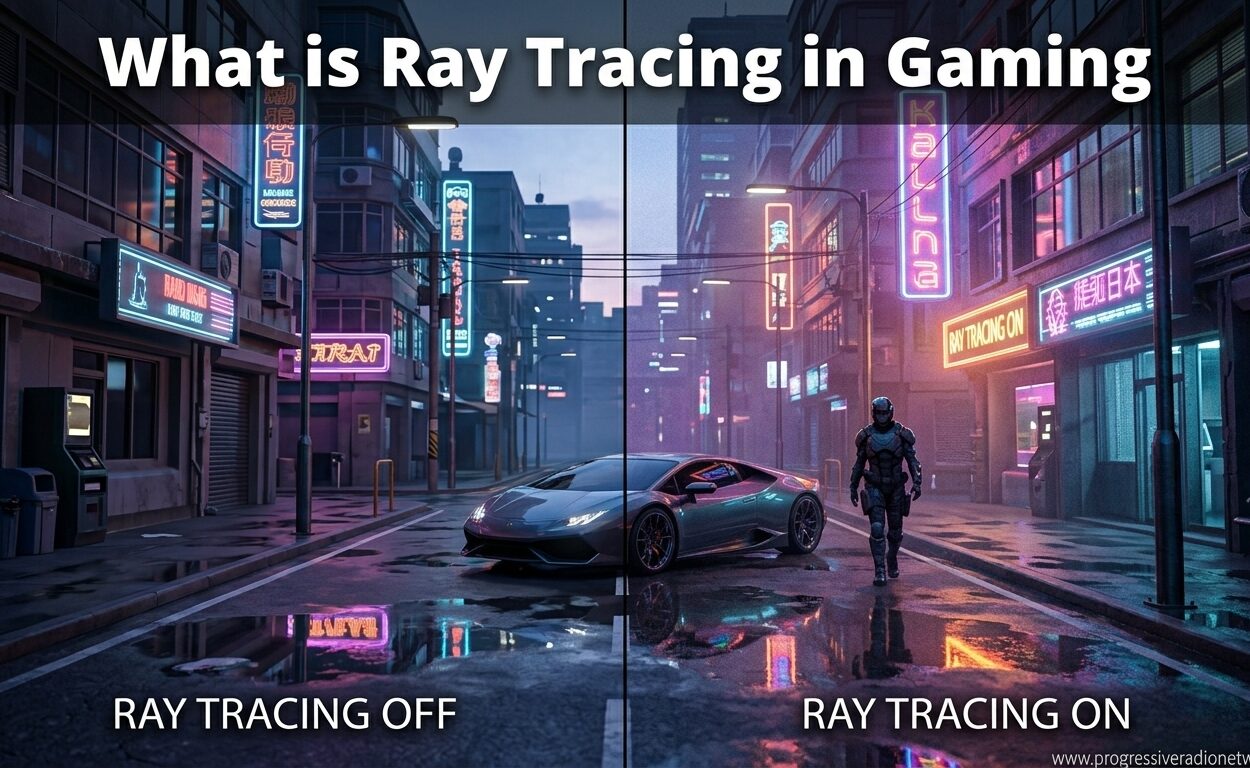
Have you ever paused a game just to stare at a puddle reflecting neon lights, or watched sunlight stream through a window and cast shadows that look almost real? That is ray tracing at work, and it represents one of the biggest visual leaps in gaming history. What is ray tracing in gaming? It is a rendering technique that simulates how light behaves in the real world, creating reflections, shadows, and lighting effects that make game worlds look genuinely believable. Our team has spent months testing ray tracing across dozens of titles, and in 2026, this technology has moved from a niche feature to something worth understanding for every serious gamer.
Traditional games have relied on clever tricks to fake lighting effects. Screen-space reflections approximate mirror-like surfaces by copying what is already on screen. Baked lighting pre-calculates how light should look and stores it as static textures. These methods work, but they break when the camera moves or when objects leave the frame. Ray tracing changes the game by calculating light behavior in real time, which means reflections show what is actually there, not just what the camera can already see.
The catch? All this visual beauty comes with a performance cost. Modern GPUs have dedicated hardware to handle ray tracing calculations, but even then, frame rates can drop significantly compared to traditional rendering. Understanding how ray tracing works, what hardware you need, and when it is worth enabling will help you get the most from your gaming experience without sacrificing playability.
What is Ray Tracing? A Simple Explanation
Ray tracing is a rendering technique that models how light travels through a scene by tracing the path of individual light rays as they interact with surfaces. Instead of approximating how light should look, it calculates the actual behavior of photons bouncing off objects, passing through transparent materials, and creating shadows. The result is lighting that behaves like it does in the real world.
This approach differs fundamentally from rasterization, the traditional method games have used for decades. Rasterization converts 3D geometry into 2D pixels on your screen by drawing triangles and applying textures and lighting approximations. It is fast and efficient, but it relies on shortcuts that break down when scenes get complex. Ray tracing removes those shortcuts and lets light behave naturally.
The concept is not new. Hollywood has used ray tracing for years to create visual effects in films, where each frame can take hours or days to render. What changed in recent years is the arrival of dedicated hardware in consumer GPUs that makes real-time ray tracing possible in games. NVIDIA introduced RT cores with their RTX 20-series in 2018, AMD followed with ray tracing support in RDNA 2, and Intel joined with Arc GPUs in 2026.
For gamers, ray tracing means puddles that reflect the actual buildings around them, not just the sky. It means shadows with soft edges that grow blurrier as the object casting them moves farther from the surface. It means light bouncing off red walls and tinting nearby white surfaces with a subtle pink glow. These effects add up to scenes that look more immersive and grounded in reality.
How Does Ray Tracing Work?
The technical process behind ray tracing starts with the camera, which represents your viewpoint in the game world. The GPU casts rays from the camera through each pixel on your screen, then traces where those rays travel as they bounce through the scene. When a ray hits an object, the GPU calculates what happens next based on the material properties of that surface.
Shiny surfaces like mirrors or polished metal send rays bouncing to other parts of the scene. Transparent materials like glass or water bend the rays through refraction. Matte surfaces absorb most light but scatter some back. Each bounce adds computational complexity, so most real-time ray tracing limits itself to a few bounces per ray to maintain playable frame rates.
Handling all these calculations efficiently requires specialized acceleration structures. GPUs use something called a Bounding Volume Hierarchy (BVH) to organize scene geometry into nested boxes. Instead of testing every ray against every triangle in a scene, the GPU first checks if a ray hits a large bounding box. If it misses, all the geometry inside gets skipped. If it hits, the GPU drills down into smaller boxes until it finds the exact triangle the ray intersects. This hierarchical approach turns an impossible computational problem into something modern hardware can handle in milliseconds.
NVIDIA RTX GPUs use dedicated RT cores specifically designed for BVH traversal and ray-triangle intersection tests. These cores work alongside traditional shader cores, freeing up processing power for other tasks. AMD implements ray tracing through compute shaders on their RDNA architecture, while Intel uses specialized units they call Ray Tracing Units (RTUs). All three approaches achieve similar visual results, though performance varies depending on implementation and game optimization.
One challenge ray tracing faces is noise. Casting just one ray per pixel produces grainy results because single rays capture limited information about a scene. To solve this, games use denoising algorithms that combine information from multiple frames and apply intelligent smoothing. NVIDIA leverages their Tensor cores, originally designed for AI calculations, to run sophisticated denoising filters that clean up the image without losing detail. The final result looks crisp and stable even though the underlying calculations work with limited ray samples.
What Visual Effects Does Ray Tracing Enable?
Ray tracing unlocks three main categories of visual improvements: reflections, shadows, and global illumination. Each effect addresses a specific limitation of traditional rendering and delivers noticeably more realistic results.
Realistic Reflections
Traditional screen-space reflections can only show what the camera currently sees on screen. Move the camera and the reflection breaks. Step in front of a mirror and your own reflection disappears because the game cannot see you from behind. Ray traced reflections solve this by actually calculating where light bounces, meaning reflective surfaces show the true surroundings regardless of camera angle.
Cyberpunk 2077 demonstrates this brilliantly with its neon-soaked streets. Every glass building, chrome car bumper, and rain-soaked sidewalk reflects the actual city around it. In Minecraft RTX, even simple water pools mirror caves and structures accurately. These reflections add depth and spatial awareness that screen-space techniques simply cannot match.
Accurate Shadows
Traditional games draw shadows using shadow maps, which are essentially depth images rendered from the light source’s perspective. These work for basic shadows but struggle with soft edges, transparency, and complex geometry. Ray traced shadows calculate exactly where light gets blocked, producing shadows that grow softer as the distance between the object and shadow surface increases.
In Alan Wake 2, ray traced shadows create atmospheric depth in forest scenes. Tree branches cast intricate shadow patterns that shift realistically as you move. Indoor scenes benefit too, with complex objects like chandeliers or fans casting accurate shadows without the blocky artifacts common in traditional shadow maps.
Global Illumination
Global illumination refers to how light bounces between surfaces, carrying color and brightness with it. A red carpet should tint nearby white walls slightly pink. Sunlight streaming through a window should illuminate the whole room, not just the spot it directly hits. Traditional games fake this with pre-calculated light maps or ambient occlusion approximations.
Ray traced global illumination calculates these bounces in real time. The effect is subtle but transformative. Scenes look more cohesive because lighting behaves as a unified system rather than a collection of independent effects. Control and Metro Exodus both showcase how indirect lighting adds mood and realism to their environments.
Performance Impact and Hardware Requirements
Does ray tracing lower FPS? Yes, significantly. Depending on the game, resolution, and which ray tracing effects are enabled, frame rates can drop by 30% to 50% compared to traditional rendering. A GPU that pushes 100 FPS in rasterization might manage only 50 to 60 FPS with full ray tracing enabled. This performance cost is the primary reason ray tracing has not become the default rendering method for all games.
The hardware requirements for ray tracing start with a compatible GPU. NVIDIA RTX cards from the 20-series onward all support ray tracing, with newer generations offering better performance. The RTX 40-series and 2026‘s RTX 50-series bring improved RT cores and better efficiency. AMD offers ray tracing on RX 6000-series cards and newer, with the RX 7000-series providing substantial improvements over their first-generation implementation. Intel Arc GPUs also support ray tracing, though performance varies by title.
For those seeking budget-friendly GPUs with ray tracing support, the RTX 4060 and RX 7600 offer entry-level performance at 1080p resolution. These cards can handle ray tracing in less demanding titles or with settings dialed back, but expect compromises. For a better experience, mid-range cards like the RTX 4070 or RX 7800 XT handle ray tracing more comfortably at 1440p.
Enthusiasts wanting the best ray tracing experience should look at modern graphics cards that support ray tracing at the high end. The RTX 4080, 4090, and 2026‘s 5080 series deliver playable frame rates even with full ray tracing at 4K resolution, especially when paired with upscaling technologies.
Speaking of upscaling, AI-powered solutions have become essential companions to ray tracing. NVIDIA DLSS and AMD FSR render games at lower internal resolutions then use machine learning or advanced algorithms to upscale the image back to your monitor’s native resolution. This process recovers lost performance, often making ray tracing playable on hardware that would otherwise struggle. DLSS 3.5 even includes ray reconstruction, which uses AI to improve ray tracing image quality while maintaining performance.
Console gamers are not left out. The PlayStation 5 and Xbox Series X both support ray tracing through their AMD RDNA 2-based GPUs. Games like Spider-Man: Miles Morales and Forza Horizon 5 demonstrate console ray tracing, though typically at lower resolutions or with more limited effects compared to high-end PC implementations. The results still impress and prove that ray tracing has moved beyond PC exclusivity.
For portable gaming, laptop GPUs capable of ray tracing now include mobile versions of the RTX 40-series and newer. These bring desktop-class ray tracing to gaming laptops, though thermal and power constraints mean sustained performance varies by laptop design.
Ray Tracing vs Rasterization: What’s the Difference?
Understanding the difference between ray tracing and rasterization helps explain why both technologies continue to coexist in modern gaming. Each approach has distinct strengths and trade-offs that make them suitable for different situations.
Rasterization has dominated real-time graphics for decades because it maps efficiently to GPU hardware designed for parallel processing. Drawing millions of triangles quickly suits the massively parallel nature of modern graphics cards. Rasterization also allows artists to pre-bake beautiful lighting into textures and light maps, creating stunning scenes that run smoothly on modest hardware. The limitation is that dynamic lighting changes require complex workarounds, and certain effects like accurate reflections remain difficult.
Ray tracing excels at simulating how light actually behaves, producing effects that rasterization struggles to approximate. Reflections show true surroundings. Shadows have natural softness. Global illumination responds dynamically to scene changes. The trade-off is computational cost. Even with dedicated hardware, fully ray traced games remain challenging to run at high frame rates.
Most modern games use a hybrid approach. Rasterization handles the bulk of rendering quickly, while ray tracing adds specific effects like reflections or shadows where they matter most. This strategy delivers visual improvements where players notice them while maintaining playable performance. Cyberpunk 2077 and Alan Wake 2 both use hybrid rendering, applying ray tracing selectively to maximize visual impact without tanking frame rates completely.
The industry is gradually shifting toward more ray tracing as hardware improves. Unreal Engine 5’s Lumen technology uses ray tracing techniques for global illumination, making advanced lighting accessible to more developers. As GPUs become more powerful and efficient, the balance will continue tipping toward ray tracing as the default approach for realistic lighting.
Games That Showcase Ray Tracing
Certain games have become synonymous with ray tracing excellence, demonstrating what the technology can achieve when implemented well. These titles serve as benchmarks for visual quality and help gamers understand whether their hardware can handle the demands.
Cyberpunk 2077 stands as the current gold standard for ray tracing implementation. With Overdrive mode enabled, the game uses full path tracing (an advanced form of ray tracing) to deliver photorealistic lighting in Night City. Neon signs reflect accurately off wet streets. Interior spaces glow with realistic global illumination. The performance cost is substantial, requiring top-tier GPUs for playable frame rates, but the visual result justifies the hardware investment for enthusiasts.
Minecraft RTX proves that ray tracing can transform even simple geometry into stunning scenes. The basic blocky world becomes almost unrecognizable with realistic lighting, reflections in water, and colored light filtering through stained glass. It is perhaps the clearest demonstration of how much lighting affects visual perception, since the underlying geometry remains unchanged.
Alan Wake 2 took a bold approach by making ray tracing mandatory on PC. The developers built their lighting around the technology rather than treating it as an optional extra. Forest environments benefit particularly from accurate shadows and global illumination, creating atmospheric horror that traditional rendering would struggle to match.
Other notable implementations include Control, which uses ray tracing for reflections and transparent surfaces in its brutalist office environments. Metro Exodus Enhanced Edition applies ray traced global illumination throughout its post-apocalyptic world. Spider-Man: Miles Morales on PlayStation 5 demonstrates console ray tracing with reflections on skyscraper windows as you swing through the city.
For competitive multiplayer games, ray tracing adoption remains limited. The performance cost conflicts with the high frame rates competitive players prioritize. However, single-player cinematic experiences continue pushing the technology forward, treating visual fidelity as a core part of the experience.
Should You Use Ray Tracing? Pros and Cons
Is it better to have ray tracing on or off? The answer depends on what you value and what you play. For gamers who prioritize visual fidelity and immersion in single-player experiences, ray tracing is usually worth enabling. For competitive players or those with older hardware, traditional rendering often makes more sense.
The pros of ray tracing include dramatically improved visual realism. Reflections become accurate. Shadows look natural. Lighting feels cohesive and grounded. These improvements matter most in games where you stop to admire environments, solve puzzles, or follow narrative experiences. Walking through a detailed world with ray tracing enabled feels more immersive because lighting behaves the way your brain expects.
The cons center on performance. Ray tracing can cut frame rates in half, turning a smooth 100 FPS experience into a choppy 50 FPS one. Even with upscaling technologies like DLSS or FSR, you typically sacrifice some image quality or introduce latency to recover performance. Hardware costs also factor in, as capable ray tracing GPUs command premium prices.
Our recommendation: Enable ray tracing for cinematic single-player games where you can tolerate 60 FPS or lower. Disable it for competitive multiplayer titles where high frame rates and low input lag matter more than visual polish. If your GPU struggles, try enabling just reflections while keeping shadows traditional, or use medium ray tracing settings rather than maximum. The visual improvement from off to medium is usually more noticeable than from medium to ultra.
For those with entry-level ray tracing hardware, be realistic about expectations. An RTX 4060 can handle ray tracing at 1080p in optimized titles but will struggle in demanding games like Cyberpunk 2077 with full settings. Use DLSS or FSR aggressively, and consider ray tracing a bonus feature rather than an expected default.
Frequently Asked Questions
What is ray tracing in simple terms?
Ray tracing is a graphics technology that simulates how light behaves in the real world. Instead of using tricks to fake reflections and shadows, it calculates the actual path of light rays as they bounce off surfaces. This creates more realistic lighting, accurate reflections, and natural shadows in video games.
Does ray tracing lower FPS?
Yes, ray tracing significantly reduces frame rates compared to traditional rendering. Depending on the game and settings, FPS can drop by 30% to 50%. A GPU running at 100 FPS with traditional rendering might only achieve 50 to 60 FPS with full ray tracing enabled. This is why upscaling technologies like DLSS and FSR are often used alongside ray tracing to recover lost performance.
Is it better to have ray tracing on or off?
It depends on your priorities. Turn ray tracing on for cinematic single-player games where visual immersion matters more than maximum frame rates. Turn it off for competitive multiplayer games where high FPS and low input lag provide competitive advantages. If your GPU struggles with performance, keep ray tracing off or use reduced settings.
What is better, RTX or GTX?
RTX is better for ray tracing. NVIDIA GTX cards lack dedicated RT cores and cannot hardware accelerate ray tracing. While some GTX cards can attempt ray tracing through software, performance is generally too poor to be usable. RTX cards from the 20-series onward include dedicated hardware for ray tracing, making them the clear choice if you want to use this technology.
What GPU do I need for ray tracing?
For entry-level ray tracing at 1080p, an NVIDIA RTX 4060 or AMD RX 7600 suffices. For 1440p with good quality, consider an RTX 4070 or RX 7800 XT. For 4K ray tracing with high settings, you need an RTX 4080, 4090, or 2026‘s RTX 50-series equivalents. Console gamers can use PlayStation 5 or Xbox Series X, which both support ray tracing.
Can AMD GPUs do ray tracing?
Yes, AMD supports ray tracing on RX 6000-series cards and newer. RDNA 2 introduced hardware ray tracing, and RDNA 3 improved performance significantly. While AMD’s ray tracing implementation traditionally trails NVIDIA in efficiency, the gap has narrowed with recent generations, making AMD a viable option for ray tracing gaming.
Conclusion
What is ray tracing in gaming? It is the most significant visual advancement in real-time graphics since the move to 3D, bringing physically accurate lighting to interactive experiences. By simulating how light actually behaves, ray tracing creates reflections that show true surroundings, shadows with natural softness, and global illumination that responds dynamically to scene changes.
The technology has matured significantly in 2026. Dedicated RT cores in modern GPUs, AI upscaling solutions like DLSS and FSR, and smarter hybrid rendering approaches have made ray tracing accessible to more gamers than ever. Whether you are exploring Night City in Cyberpunk 2077, admiring the blocky beauty of Minecraft RTX, or experiencing atmospheric horror in Alan Wake 2, ray tracing adds a layer of visual authenticity that traditional rendering cannot match.
The performance cost remains real, and ray tracing is not for everyone. Competitive players should prioritize frame rates over visual effects. Budget hardware owners should set realistic expectations. But for gamers with capable GPUs who want the most immersive visual experiences possible, ray tracing has become an essential feature rather than a novelty. As hardware continues improving and developers gain experience implementing the technology, ray tracing will likely become the standard way games handle lighting, bringing us ever closer to photorealistic interactive worlds.





Leave a Comment